
SurfFind is a fast grep-like text search tool for Windows
The Windows Search engine is much better than it used to be, but still has plenty of room for improvement, which is why there’s an enormous number of alternative tools around.
SurfFind is a tiny open source package -- a mere 216KB download -- that searches your specified text files for keywords, quickly displaying the results. It’s a familiar idea, but the program does have some interesting extra touches which help it stand out from the crowd.

MEmu is an Android 4.2.2 emulator for Windows
MEmu is a free package which allows you to run a virtual Android 4.2.2 tablet on your Windows desktop.
Setup is far more awkward than it should be, not least because the developers forgot to finish its localization from the original Chinese, but if you persevere you’ll find what looks like a good product.

Organize, edit and share your photos with digiKam
After an initial release way back in 2006, digiKam has grown into a powerful, professional photo manager, crammed with high-end features and free for everyone to use.
The program started life on Linux, and so doesn’t get much attention elsewhere. There are builds available for Windows and Mac, though, so we installed a copy on a Windows 8.1 system to see what it had to offer.

Colasoft Capsa Free is a comprehensive network analyzer
Colasoft Capsa 8 Free is a powerful tool for monitoring and analyzing network traffic, the free version of an enterprise package normally costing from $695.
The program has a vast and lengthy list of features, yet it’s also accessible to regular users. Just choosing an adapter and clicking "Start" gets you an attractive dashboard, with graphs showing network utilization, traffic, and top traffic by protocol and domain (keep in mind that Wi-Fi devices can’t be monitored in the free edition).

bstrings searches files for URLs, email addresses, more
Bstrings is an open source console-based tool for Windows Vista and later which makes it easy to search files for important strings: URLs, email, IP or MAC addresses, UNC paths, GUIDs, credit card numbers, US phone numbers, zip codes and more.
Basic operations are much like many similar tools. Point the program at a file -- bstrings -f file.exe -- and it’ll list any ASCII and Unicode strings for you.

gImageReader extracts text from images, PDFs, more
Extracting text from a PDF can be very easy. Just select a section and copy it to the clipboard, or maybe -- in Adobe Reader -- click File > Save As Other > Text to save the entire document.
This all works just fine, too, until you come across a PDF which is all images. And that’s when you need something a little more powerful.

Create mobile-friendly websites with Mobirise
Mobirise is a free cross-platform WYSIWYG web designer which makes it easy to build mobile-friendly, Bootstrap 3-based websites.
The interface is stripped back, more like an app than a regular desktop program. There’s no complex menu system, no hidden right-click options, just a few buttons to click and panels to explore.
ImmersED: not just another Notepad replacement
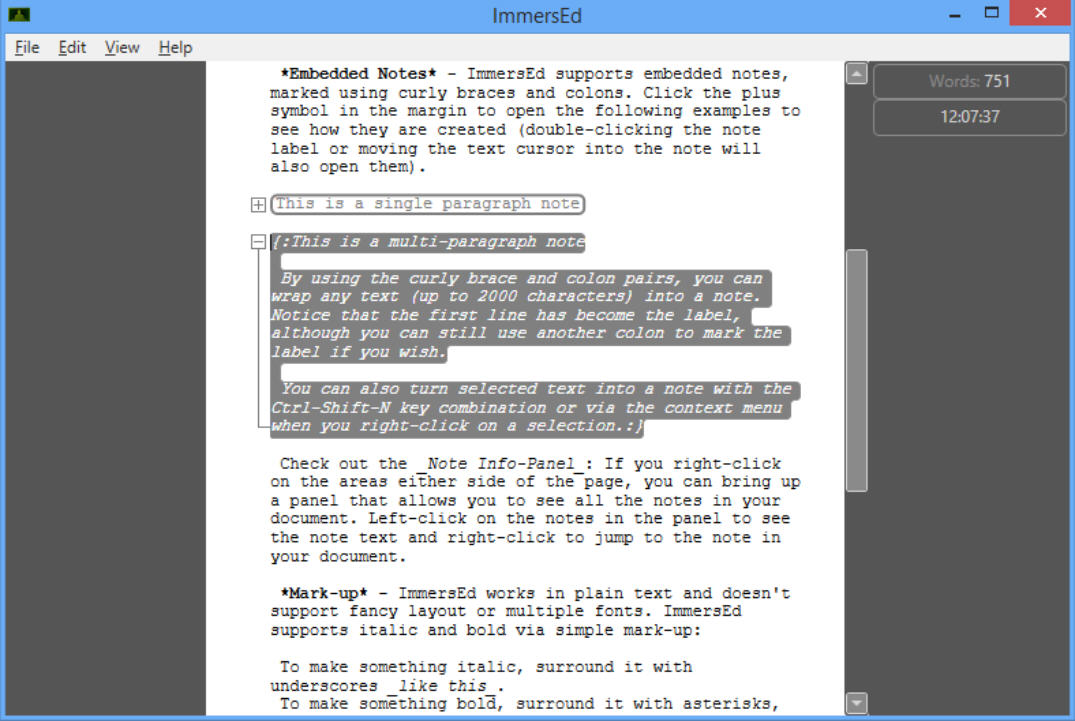
ImmersED is an interesting plain text editor for Windows XP+. It’s not another feature-heavy developer-oriented Notepad replacement -- in fact, its core editor is very basic -- but the program has nice extra touches which could appeal to a wide range of users.
It’s designed to run full-screen, for instance, giving you a minimal chrome, distraction-free interface. But you can also run it in a window, and either environment can be customized by adding a word count, session target, a clock, and more.

Scan your website for SEO issues with BeamUsUp
BeamUsUp is a free Java-based crawler which quickly scans a website and reports on common SEO issues: status error codes, description/ title too long or missing, missing headings, duplicate content and more.
Free? We were skeptical, but it’s true. It’s free for all uses, no adware, no flashing "Donate" button, and no annoying restrictions to persuade you to upgrade (can’t scan more than xxx links, can’t produce reports, can’t use it on Tuesdays -- you know the kind of thing).

NirSoft releases TaskSchedulerView 1.0
One-man freeware machine Nir Sofer has announced the release of TaskSchedulerView, a tiny portable tool for viewing, enabling or disabling scheduled tasks on Windows Vista through to 10.
Run the program and it displays a table listing each task and various details about it: Name, Description, Status, Hidden (Yes/No), Last Run/Next Run Times, Task Folder, EXE filename or COM handler of the task, number of missed runs, and more.

FFmpeg is a one-stop audio and video converter
If you need to convert a few audio or video files then you could try out a few freeware transcoders, do your best to avoid the adware, hope they support the formats and options you need.
Or you could just grab a copy of FFmpeg, the open-source media-processing powerhouse which is the engine behind most freeware converters, anyway.
How to find out who unfriended you on Facebook
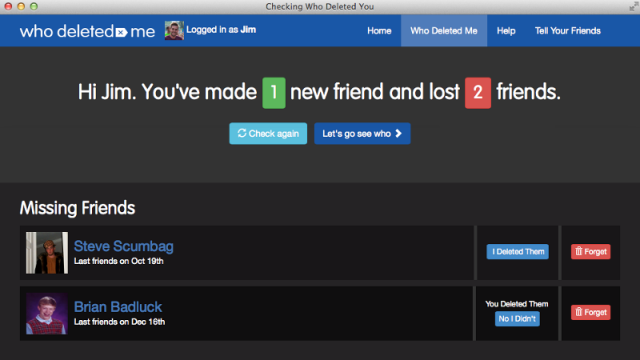
Ever wanted to know when one of your Facebook friends deletes you? Well now there’s an app that’ll tell you that and more.
Unsurprisingly named "Who Deleted Me on Facebook", the app shows you which accounts have unfriended you, which have become deactivated and who is online.

Context Menu Manager for Windows
Double or right-click a file in Explorer and it’s not always obvious what's going to happen. You might find context menu entries for all kinds of long-forgotten applications, and Windows provides no obvious way to clean up.
Context Menu Manager is a free (well, ad-sponsored) portable program to help you browse your current file associations, view their context menus, clean up broken entries, and maybe add a few new right-click options to get your system working better.

Capture, edit and share webpage screenshots with qSnap
Taking a screenshot of what you can see on a computer is easy. Capturing something larger than the screen -- in particular, a lengthy web page -- is much more of a challenge, and even specialist screen capture tools won't necessarily do it.
QSnap is a free service and set of browser add-ons which helps you capture web pages, no matter what size they are, and can edit and share them, too.

Scan pages as searchable PDFs with NAPS2
Earlier this year we wrote about NAPS2 (Not Another PDF Scanner 2), a tiny open source tool which could scan documents to PDF, TIFF and other file formats. We liked the program’s simplicity and ease of use, and in the past few months it’s been further extended with some major new features.
Integrated OCR means you can now make your PDFs searchable. There’s no complex interface to navigate, no manual setting of OCR regions or anything else: just click the OCR button, choose the document language and NAPS2 handles everything else.