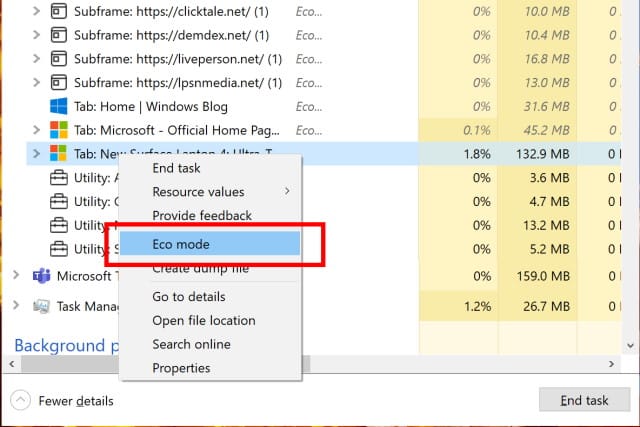
Microsoft is making it easy to speed up Windows 10 using 'Eco mode' resource throttling
In the latest build of Windows 10, Microsoft has introduced various changes and additions, but one of the most useful comes in a somewhat surprising place. It is perhaps not one of the most exciting Windows 10 utilities, but Task Manager is about to get much more useful, particularly for anyone looking to boost the performance of their system.
Microsoft has introduced a new "Eco mode" option that makes it possible to throttle process resources. This makes it easier for power users to ensure the most important apps and processes have access to CPU and memory when needed.
Windows 10's Microsoft Store app is getting a Sun Valley redesign and relaxed polices for developers
Across its Mac, iPhone and iPad range, Apple's App Store is users' first port of call for downloading new app; on Android, the Play Store is Google's equivalent. But when it comes to Windows 10 large numbers of people eschew the Microsoft Store app in favor of simply downloading apps from developers' websites.
But Microsoft would like this to change, and the company is planning a major revamp of its own store app, according to reports. As well as a visual refresh, the Microsoft Store is set to become friendlier for developers, thanks to relaxed policies -- including permitting the submission of raw, unpackaged .exe and .msi apps.
Microsoft announces fully 64-bit Visual Studio 2022
Developers waiting for news about the next installment of Visual Studio need wait no longer. Microsoft has announced that Visual Studio 2022 will be released later this summer as a public preview.
The company has also revealed that the software is going 64-bit, overcoming the limitations of the 32-bit edition. Microsoft says that the user experience will feel cleaner, more intelligent and action oriented, and that there is an increased cloud focus thanks to improved GitHub integration.
Microsoft releases KB5001391 for Windows 10 20H2 and 21H1
Anyone testing out the very latest versions of Windows 10 has a new bug-fixing patch to install. With the release of the KB5001391 update, fixes and changes introduced to the Dev channel now make their way to the Beta and Release Preview channels.
This latest patch sees Microsoft taking Windows 10 20H2 up to build 19042.962 and Windows 10 21H1 up to build 19043.962. It includes a large number of bug fixes, and addresses problems with a profile-related Group Policy, and fixes an issue that caused soaring memory usage by the lsass.exe process, as well as high CPU usage that led to system lockups.

FLoC off! WordPress proposes treating Google's new targeted ad tech as a security concern
Google's Federated Learning of Cohorts (FLoC) technology has raised the hackles of many, and the latest to express concern at the new user tracking and ad targeting technique is WordPress.
The blogging platform joins the likes of DuckDuckGo in standing up to Google, suggesting it could block Google's new technology on the sites it powers. With WordPress catering for around two-fifths of the web, the proposal could have a huge impact on what Google has planned. Fighting FLoC, WordPress says it "can help combat racism, sexism, anti-LGBTQ+ discrimination and discrimination against those with mental illness with four lines of code".
Microsoft fixes Windows 10's drive corrupting NTFS denial of service vulnerability
In the middle of January, we reported about a vulnerability in Windows 10 that could be used to corrupt the contents of an NTFS formatted drive. A specially crafted folder name was all that was needed to cause a volume to be marked as dirty, and then require a fix with the Chkdsk utility.
But Chkdsk did not always do the trick, leaving victims with unbootable systems. A couple of months ago, Microsoft started testing a fix with Windows Insiders and now the patch is being made available to everyone. It addresses the problems which was being tracked as CVE-2021-28312 (Windows NTFS Denial of Service Vulnerability).
Windows 10's KB5001330 update is causing problems with shared folders and DNS resolution
It is only a few days since Microsoft released the KB5001330 and KB5001337 updates for Windows 10 which kills off the legacy version of Edge. Having wondered aloud what problems might be caused by the latest batch of updates, we didn't have to wait long for the first issues to rear their heads.
But problems with gaming performance, boot loops and screen flicker are not, it would seem, the end of the story. Users are also reporting problems with DNS resolution and issues with shared folder following the installation of the KB5001330 update.
Microsoft releases experimental PowerToys v0.36.0 with eagerly awaited new utility
While there have been new PowerToys builds released over the last few months, it has been a while since a new tool was added. Now, with the launch of PowerToys Experimental v0.36.0, this changes.
The latest release of the much-loved Windows 10 utility collection now features the Video Conference Mute tool, giving users the ability to quickly mute their microphone and turn off their camera with a keyboard shortcut.
KB5001330 update for Windows 10 is causing performance problems and other issues
Earlier this week we asked -- slightly tongue-in-cheek -- what problems would be caused by this month's Patch Tuesday updates. As the weekend crests the horizon, we have our answer, and this time around it is the Edge-killing KB5001330 update that is proving problematic.
And the problems appear to be not only plentiful, but also fairly significant. Among the reported issues are a drop in the performance of games, error messages, screen flicker and more.
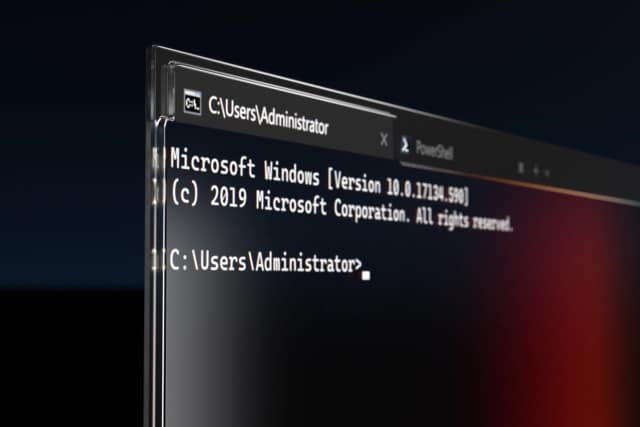
Microsoft pushes improved Windows Terminal 1.7 to the stable channel
After a period of testing, Microsoft has now launched the stable version of Windows Terminal 1.7. There are various notable changes in this release, particularly the arrival of a proper UI for editing settings.
The idea behind the introduction of a settings user interface in Windows Terminal v1.7.1033.0 is that it makes life a great deal easier for anyone who is not familiar or comfortable with JSON file tinkering. Significant as this is, it is not the only change to be found in this new stable release.
Microsoft is making Windows 10's Timeline feature far less useful
With the release of the latest insider preview of Windows 10, Microsoft has made a key change to the way the Timeline feature works. The idea behind Timeline was to not only provide a web browser-style history option for general computing activities, but to synchronize this history across devices via the cloud.
Now Microsoft has decided that the cross-device synchronization side of things is not needed, and the company is getting rid of what was arguably the most useful feature of Timeline. While currently only deprecated in the Windows 10 Build 21359 preview, this is a change that will ultimately roll out to all Windows 10 users.
Microsoft issues KB5001330 and KB5001337 updates for Windows 10, killing off legacy Edge
The writing has been on the wall for legacy Edge in Windows 10 for quite some time. Now, with the release of this month's updates for the operating system, Microsoft has finally pulled the trigger.
With the release of the KB5001330 and KB5001337 update for Windows 10, Microsoft has forcibly removed the old version of Edge and replaced it with the newer Chromium-based version of the browser.
Microsoft fixes a mass of serious flaws with the latest Windows 10 updates -- but what has it broken this time?
Another Patch Tuesday has rolled around, and this month sees Microsoft releasing a bumper crop of update for Windows 10. In all, April's updates address a total of 108 flaws, 19 of which are considered Critical.
Four of the critical flaws are Exchange vulnerabilities discovered by the NSA, and there are also fixes for no fewer than five zero days. The patches also include fixes for an incredible 89 Important issues.

Microsoft adds new Windows Tools to Windows 10 for tweakers and administrators
For power users looking to customize, personalize, optimize and control Windows 10, there are lots of tools available in the operating system. The problem is that they are spread out across multiple locations which can mean a lot of traveling back and forth.
Microsoft is changing this with the introduction of a new Windows Tools folder which brings together elements of the Control Panel, Administrative Tools and more.
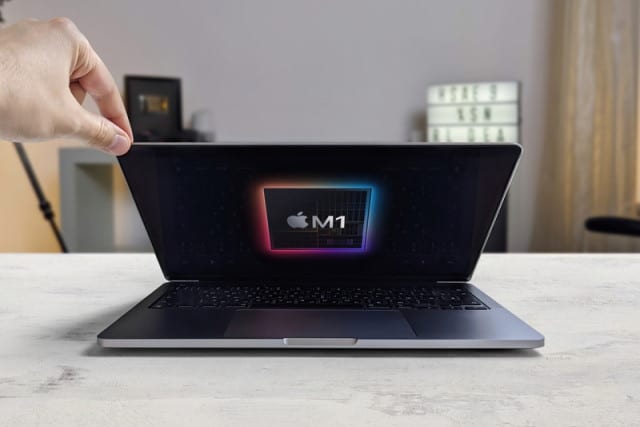
Linux could run on Apple M1 chips in just a few months
Apple's latest M1-based range of laptops and desktops has impressed many with the impressive speed boost over Intel chips. While many macOS fans have been eagerly waiting for their favorite apps to be ported across, others have been waiting to the arrival of Linux.
And with the launch of version 5.13 of the Linux kernel, this should become a reality. The hard work of developers means Linux support could be coming to M1 Apple devices as soon as June this year.