
Opera updates Opera One with color-coded Tab Islands and rebuilt browser AI

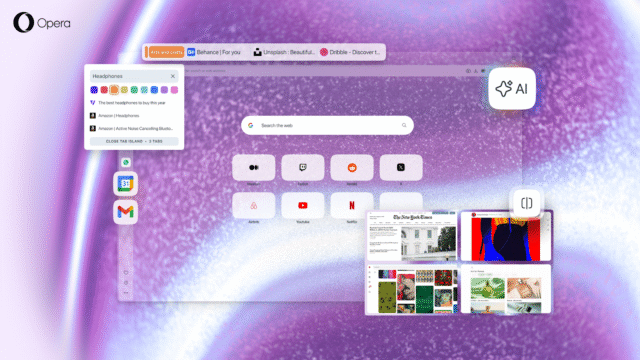
Opera has released Opera One R3, a new version of its flagship browser that focuses on customization, improved tab organization, and deeper AI context awareness. The update targets users who manage large numbers of tabs and rely on browser-based tools for work, study, and everyday browsing, while aiming to make long sessions feel more manageable.
The release focuses on tweaking Tab Islands, improving the built-in AI, and adding new layout and sidebar options. Opera said the changes are meant to help users keep different tasks separated while reducing problems when switching between them.
SEE ALSO: Opera Neon, Opera's experimental agentic AI browser, is now available to all
Tab Islands are an alternative to traditional tab groups. The browser automatically clusters tabs based on browsing context, such as shopping, research, or communication, without user interaction. In Opera One R3, users can now name these groups and assign colors to them, making it easier to identify their contents at a glance.
The update also allows the browser’s AI to operate within the context of a single tab or an entire Tab Island. Questions and prompts are tied to the active group, rather than pulling information from unrelated pages. This context awareness can be disabled in the AI chat settings.
Opera One AI
Opera has rebuilt its browser AI on a new engine architecture derived from its experimental AI browser, Neon. This change improves response speed and (so Opera says) reduces confusion between tasks that are open at the same time. The AI can also answer questions about online videos, helping users locate specific moments or understand the subject matter without having to sit through an entire clip.
Opera One R3 introduces changes on how users access early features. Instead of installing a separate beta browser, they can now enable an early bird mode directly within the browser. This will allow those on the cutting edge to access experimental tools as they are being tested.
One of the first features tied to the early bird mode is an expanded split screen system. Opera previously allowed two tabs to be viewed side by side and the new version supports up to four tabs at once, with multiple layout options including grid and horizontal views.
The browser’s sidebar has also been improved. In addition to existing integrations such as messaging apps and music players, you can now access Gmail and Google Calendar directly from the sidebar. These tools open alongside webpages, reducing the need to switch between tabs or windows.
The new browser build also gains three new dynamic themes called Radiance, Orbit, and Sonic. Radiance is available in dark mode, while Orbit is designed for light mode. Both include animated visuals and matching soundscapes that respond to user interaction.
Developed in collaboration with Spotify, the Sonic theme, released last November, reacts in real time to music playing through the browser’s built-in player. The background visuals move based on the audio, you play.
Opera One R3 is available now and can be download from here.
What do you think about Opera One's new approach to tabs, AI, and browser customization? Let us know in the comments.



