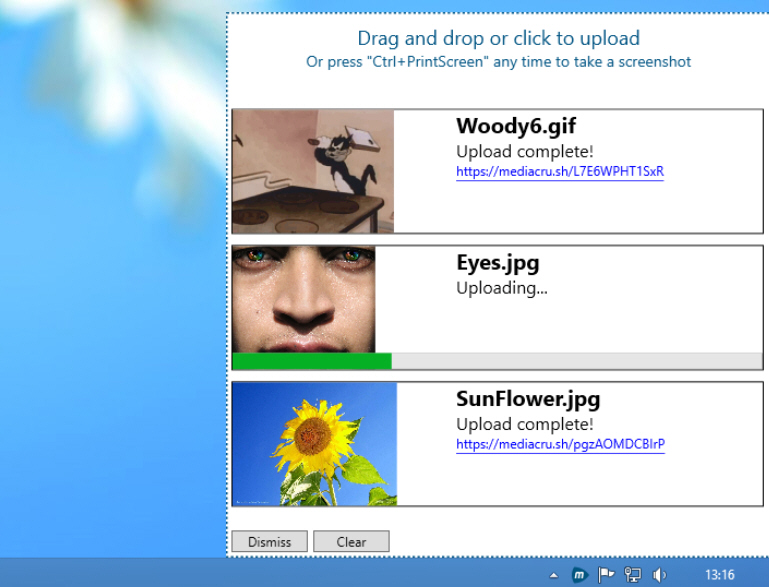
MediaCrush: an ad-free open source photo, music and video host
There are plenty of web services around to host your photos, music and video files, but most have a range of problems. In particular, they’ll surround your content with intrusive ads, slowing page load time and -- depending on their use of tracking -- perhaps compromising your privacy.
MediaCrush works a little differently. There are no ads. There’s no use of tracking, no records kept of how you use the service. You can even check this yourself, as MediaCrush is entirely open source.

Take control of your Mac backups with TimeMachineEditor 3
Any computer user with even a smidgen of sense has some kind of backup plan in place, and for many Mac owners that backup plan will be Time Machine, Apple’s built-in tool for saving your data from harm. It’s incredibly easy to set up -- choose a backup drive, flick a switch and you’re good to go -- so what’s not to like?
That backup schedule for one. By default, Time Machine updates your backup every hour. That’s fine when you’ve just started out using it, but when low disk space warnings start popping up with regularity, what then? The solution lies with TimeMachineEditor 3.

Fluffyapp adds new drop display, no longer supports Windows XP
It took three years for version 2 to make its final appearance, but just one month later developer Richard Wang has released FluffyApp 3.0. FluffyApp is a freeware client that allows Windows users to share files (known as "drops") using the Mac-only CloudApp file-sharing service.
Version 3.0 includes a new drop display feature, live drop history updates and features a major rewrite of its core code. It also now requires .NET Framework 4.5 to function, which means it’s no longer compatible with Windows XP.

Keep your PC awake with Caffeine
If your PC screensaver keeps activating at awkward times, or maybe your system goes to sleep when it shouldn’t, then it may be a good time to adjust your power options (press Win+R and launch powercfg.cpl).
If you only have this problem occasionally, though -- when giving a presentation, perhaps -- then Caffeine provides a quick and easy way to temporarily keep your system awake.

NirSoft unveils SimpleProgramDebugger
Nir Sofer has announced the release of SimpleProgramDebugger, a tiny portable debugger which runs on anything from Windows XP to 8.
The program can attach to a running process, or start a new process in debugging mode. There are no options to control or interrogate that process, but SimpleProgramDebugger will display its main debugging events: Load DLL, Unload DLL, Create Thread, Create Process, Exit Thread, Exit Process, Exception and Debug String.

ImDisk Toolkit adds dynamic RAM disks
Setting up a RAM disk can be a quick and easy way to speed up some programs, but it also has a very obvious down side. Any RAM you allocate to a virtual drive is no longer available to Windows and the rest of your system, which may reduce performance in other situations.
While this kind of trade-off sounds inevitable, the latest ImDisk Toolkit shows it doesn’t have to be that way. New dynamic memory management support means that RAM disks will only consume the memory they actually need. If you’ve a 512MB RAM disk with 10MB of files, say, then memory consumption will be only a fraction above 10MB: the remaining 500MB will be available for other applications.

PngOptimizer compresses PNG files without affecting image quality
Save an image as a PNG file and you can be sure it’ll be compressed to a significant degree -- but there could be scope for reducing the file size even further. You don’t have to resize the image, cut the number of colors or do anything to affect image quality, either. It’s just a matter of using PngOptimizer to rewrite your files in a more efficient way.
The program arrives as a single 246KB executable, and its interface is as basic as that size suggests. There’s just a window, with no toolbar or menus: you drag and drop your target onto PngOptimizer, and they’re automatically analyzed, optimized and saved.

Automatically add clipart-style masks to on-screen faces with Funny Mask
If you want to have a little fun with a picture of someone, then you could open it in a graphics editor, draw on glasses, add a clipart wig, maybe a hat. But if that sounds like too much work, you could just use Funny Mask to do much the same thing, at a click.
The program is small, portable and easy to use. Just launch it, and click "Draw On Screen". Funny Mask uses OpenCV (the Open Source Computer Vision Library) to look for faces, and adds one of twelve silly customizations to anything it finds (wigs, glasses, hats, a mustache, and more).

WinPatrol 2014 debuts tweaked user interface, better performance
BillP Studios has unveiled the 30th major version of its snapshot-based security tool with the release of WinPatrol 30.0.2014. Although this release isn’t a beta, it’s been billed as a "Preview", with many additional enhancements -- including support for international date formats -- promised to follow.
What is already present in the new release is an interface redesign, improved performance, enhanced reporting, new cookie support, better handling of Windows Update and a tweaked Delayed Start function.

GifCam records screen activity as an animated GIF
Screen recorders are a great way to show others what’s happening on your desktop, as we saw with oCam earlier this month. But they usually save their results as videos, which can be a problem if you want to be sure they can be viewed by anyone, on any device (you’re embedding them in a website, for example).
GifCam can help by recording your desktop activity as an animated GIF. This means you won’t be able to include audio, of course, and file sizes will be larger. But they’ll be accessible to everyone, everywhere -- and the program is far better at tuning the results than you might think.

CCleaner update supports new apps, adds Pro-only scheduler tool
Piriform has updated its popular Windows cleaning tool with the release of CCleaner 4.10. Also available in portable form, version 4.10 continues the recent trend of concentrating development on the new paid-for Professional build.
Pro users now gain a new cleaning scheduler tool, allowing them to automatically run cleaning operations at set intervals. All other changes apply equally to both free and paid-for versions, however.
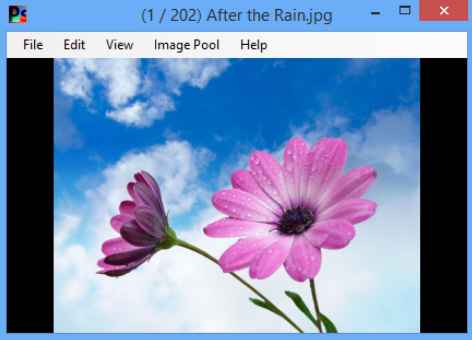
Quickly organize unsorted images with PhotoSift
Creating digital images is easy. Organizing them into appropriate folders takes rather more effort, though, which is probably why many people just let them pile up in the Pictures folder. But there could be a better way.
PhotoSift is small and simple tool which uses a keyboard-based workflow to sort your images. It’s basic, but can be effective, and in the right situation it’s extremely fast.

Avast 2014 update offers stability improvements and bug fixes
Security firm Avast Software, celebrating 25 years in the business this year, has released a second update to its avast! 2014 range of products. Avast Free Antivirus 2014, Internet Security 2014 and Premier 2014 all get updated to build number 9.0.2013.
The new build, although a minor one, contains a number of important stability and bug fixes, making it a must-have update for all existing Avast users.

Free Audio Video Pack handles all your audio/video conversion needs
Pazera Software has announced the release of Free Audio Video Pack 2.0, a renamed update of its Pazera Video Converters Suite.
As you’ll guess from the name, the package provides tools to handle audio and video and conversions between all the main formats (AVI, MPG, MP4, MP3, WAV, FLAC, AAC, MOV, WebM, WMV, WMA, OGG, WebM, FLV, OGV, 3GP). As a bonus, there’s also a program to extract audio tracks from CD images based on the CUE sheets.

Adobe Digital Editions promises better DRM security, improved layout support
Adobe has released Adobe Digital Editions 3.0 on Windows and Mac, a major new version of its eBook manager. The tool, which helps users browse, organize and read both free and purchased eBooks in EPUB, PDF, and PDF/A formats, offers more secure DRM, improved PDF search tools and enhanced display of certain book types.
The headline new feature is the new DRM Scheme, which Adobe says has been "hardened and made more secure" to prevent unauthorized viewing of files protected by Digital Rights Management.