
Unchecky offers a brand new way to avoid adware
It’s happened to us all. You’ve found what looks like some great freeware, downloaded and installed it, only to discover that your browser has a new toolbar, home page, search engine and more. Many setup programs now include these "offers", unfortunately, and they’ll employ all kinds of tricks to fool you into installing them.
If you’re tired of this situation, though, there’s a new way to fight back. The free Unchecky monitors setup programs, checks for any attempts to install adware, toolbars and other unrelated extras, and uses a couple of strategies to ensure they don’t end up on your hard drive accidentally.

SiSoft Sandra 2014 adds Windows 8.1 support, new Scientific Analysis benchmarks
UK-based SiSoftware has released SiSoftware Sandra Lite 2014, a major new release of its system information, diagnostics and benchmark tool for Windows PCs.
The 2014 version adds official support for Windows 8.1 and Windows Server 2012 R2, but also includes a number of new benchmarks as well as updating commercial-only features such as device performance certification validation for benchmark results.

Protect your PC from unwanted changes with ToolWiz Time Freeze 2014
ToolWiz has released Time Freeze 2014, a major new update to its system protection tool for Windows. The new build -- version 2.2 -- promises better stability with a brand new kernel and engine, plus adds a few minor features.
New additions include a desktop floating toolbar allowing users to easily see whether the tool is switched on or off, plus the ability to select folders and files for exclusion from the protection feature.

Restore Point Creator provides an easier way of managing Windows System Restore
Windows System Restore is a very useful PC safety net which regularly backs up your key system settings and files, then helps you restore them later if disaster strikes. So it’s a shame that its interface is so poor, difficult to find and requiring the maximum number of clicks to do anything at all.
Restore Point Creator is a free and portable tool which aims to change all that, and you only need launch it to see major improvements. Everything you need is available in the same dialog: the list of restore points, a "create new" option, a "restore to selected" button, and more.
Nero BackItUp 2014 offers 5GB free online storage
A capable local and online backup tool, Nero BackItUp normally comes bundled with the boxed version of Nero 2014. There is also a stand-alone version offering 5GB of online storage for free, though -- so is it worth your time? We took a closer look.
The PC client installs quickly, and has a very familiar interface. As usual, you first select files and folders by checking boxes in an Explorer-type view. And then you choose a local drive or your online account as the destination (although not both as a part of the same job, unfortunately).

Plex Home Theater officially launches, brings Plex Media Server-hosted content to the big screen
Plex hits the big screen with the first official release of its media browsing and playback tool. Plex Home Theater 1.0 is the client-side version of Plex’s media suite for Windows and Mac users, and has been 11 months in the making, during which time 15 separate builds were released exclusively to PlexPass subscribers.
Plex Home Theater replaces Plex Media Center, and gives users access to media stored on a computer running Plex Media Server, both over their local network and -- via the MyPlex web service -- wider internet.

CHM to PDF converts your CHM files to something more portable
Commonly used for everything from program help to e-books, Microsoft’s Compiled HTML Help (CHM) format works very well on the PC. CHM files aren’t always as easy to browse on other platforms, though, so if you need to access their content elsewhere then you might be interested in CHM to PDF.
This free program is extremely easy to use. Just choose your source CHM file, click Convert, and a PDF of the same name (but with a PDF extension) will be produced in the same folder.

Hear almost any text file read aloud with Balabolka
When you need to read a long document then you could just sit at your PC, scrolling for an age, until you’re finally done. But having the computer read to you could make much more sense. There’s no eye strain, no document navigation issues, and you might even be able to do something else as you listen.
Windows provides a simple text-to-speech solution in Narrator (Control Panel > Ease of Access Center), and this can easily read the current document in many applications. For real TTS power, though, the free Balabolka is hard to beat.

Free Any Burn is a portable, easy-to-use burning tool
Finding the right disc burning tool for you can sometimes be a problem. The big commercial suites are expensive, but smaller freebies are often buggy, unreliable, sometimes weighed down with adware. So it’s good to find a small but capable alternative in Free Any Burn.
The program arrives as a compact download, only around 1MB. You can just unzip and run it right away, no installation required, no adware hassles. And it’s extremely portable: the authors claim it can run on anything from Window 98 upwards, so this really is a program you can run just about anywhere.

Generate spectacular 3D fractals with Mandelbulber
Most fractal programs are entertaining for a while, and capable of producing some amazing abstract pictures. But the constant focus on 2D Mandelbrot imagery means that boredom will inevitably set in, and sooner rather than later. What you really need is something more interesting – and we have the ideal candidate.
Mandelbulber is a fractal program with a difference. Forget the usual 2D pictures, this brings you amazing ray-traced 3D images, with complex shading, full lighting and camera control, even the ability to create custom animations where the camera flies around and into your chosen view.

Troubleshoot tricky PC problems with SpyStudio
In an ideal world, diagnosing software problems would be easy. If a program couldn’t find a vital DLL or Registry key then it would display a detailed error message, describing both the problem and solution, so you could get everything working again with the minimum of hassle.
The real world, of course, is very different: failing programs will generally crash, lock up, or display an error message which means almost nothing at all. Checking with the developer, or searching for your symptoms online may offer some clues. But if you’re getting nowhere, then SpyStudio 32-bit and 64-bit might be able to help you understand what’s going on.

Pazera Free Audio Extractor 2.0 now available
Pazera Free Audio Extractor is an excellent tool for saving video soundtracks as audio files which was just upgraded to version 2.0 with a host of welcome additions and improvements.
The previous edition supported all the main video and audio formats, but 2.0 adds even more. The new formats are M4B, WebM, OGV, OGA, DTS, DTS-HD, EAC3, AIFF, GSM, MP1, QCP (qcelp), RA, TrueHD, VQF, MP4V, MKA, M2TS, MTS, WTV, F4V, F4P, F4A, F4B, VIDEO, M4R and AVS files, while your audio tracks can be saved as MP3, AAC, WMA, OGG, AC3, FLAC, WAV, and -- new this time -- M4A.

Securely delete confidential files with BitKiller
If you ever work with personal or confidential documents then you’ve probably considered using a shredder, a tool which overwrites your files so they can’t be recovered by others. And there are plenty around: searching for "secure delete" returns lots of capable programs in just the first few hits.
Which file shredder is best for you, though? Most recommendations focus largely on the length of their feature list, but if you’re just looking for something simple, a convenient way to get the job done with the minimum of hassle, then BitKiller could be more interesting.
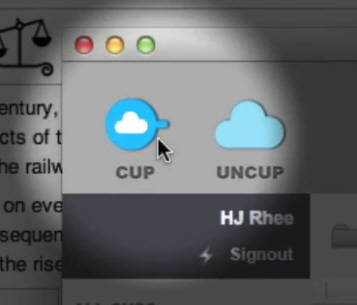
Cupcloud lets you save your work, then restore it later on any PC or Mac
You’re at work, tied up with some major project: browser tabs are open, maybe a Word document, while you’re adding polish to some graphics in Photoshop. And deadlines are looming, so you’d like to carry on at home. What do you do?
If you’ve set up a syncing service like Dropbox then your key documents will probably be accessible already; if not, you can always just copy them to a USB key. But for real convenience, you might prefer Cupcloud. Click "Cup" and your application states are saved; click "Uncup" later, on this computer, or another PC and Mac, and the programs reopen, just as they were. Easy.

Sound Valley brings the relaxing sounds of nature to your PC
Working on your PC isn’t generally a great way to wind down, but if you’re stressed out after a hard day then Sound Valley might be able to help. It’s a small and simple tool which plays the sounds of nature -- birdsong, wind in the trees, rain, streams and more -- gently in the background, while you just relax.
The program looks like a simple but stylish media player. Click "Play" and Sound Valley plays its first scene, "Forest -- Day". You’ll hear a stream gurgling nearby, various birds singing, perhaps the rustle of the undergrowth in the background. It’s nicely done, and very restful.