
Easily delete locked files with Reboot Delete File Ex
Deleting files on a PC is normally very easy. If they’re locked, though -- being accessed by another program -- then Windows won’t allow you to touch them. Tools like Unlocker try to help out by unlocking the files themselves, but this is a dangerous approach which risks crashing your PC. Reboot Delete File Ex offers a marginally alternative: point the program at the offending file and it’ll have Windows to delete it when your system next restarts.
There’s nothing complicated to this process at all, but the program still requires installation, most probably because it wants to equip your PC with a toolbar. If you’re not interested then watch carefully during setup, and click "Decline" as appropriate.

BleachBit now digitally signed, adds Explorer integration
It’s taken almost five years to get there, but disk cleanup and shredding tool BleachBit has finally reached version 1.0 with some welcome new features.
The Windows installer and executable are now digitally signed, so users shouldn’t be hassled with "unknown publisher" alerts any more.
Easily retrieve 200+ product keys with Windows License Key Dump
Reinstalling Windows and your applications is a hassle for many reasons, but the greatest is probably the time it takes to find your various license keys. Are they on a CD box, a sleeve, in an email, online, somewhere else? You’ll have hours of fun finding out.
Windows License Key Dump can help by finding the product key for Windows, along with many other applications (Acrobat, Creative Suite, Photoshop, Norton Internet Security, TuneUp Utilities, VMWare Workstation and so on), and displaying them all in a single report.

Adobe Brackets is a powerful source code editor for the web
If you’ve tried more than your share of source code editors, then Brackets probably won’t make much of a first impression. It may have been launched by Adobe in 2012, but this open-source tool still looks a little basic, not something you’d want to use for serious work.
Actually try the program, though, and you’ll soon feel very differently. It’s very much a work-in-progress (the project is still only at version 0.34), but already Brackets is proving to be a capable editor with some very interesting features.

IObit Advanced SystemCare Ultimate 7 Beta 1 showcases real-time protection
Hot on the heels of the recently released Uninstaller 3, IObit has launched the first public pre-release version of its forthcoming commercial system and security suite, IObit Advanced SystemCare Ultimate 7 Beta 1. The new build adds official support for Windows 8, 8.1 and Internet Explorer 11, but also bundles a new anti-virus engine with real-time protection.
The update also debuts a revamped user interface similar to found in IObit Uninstaller (and in Advanced SystemCare 7 Free), and throws in some potentially useful new tools along with performance improvements.

Remotely control a PC from your smartphone with ROCCAT Power-Grid
It’s been in development for a long time, but PC remote control app ROCCAT Power-Grid is finally available for iOS and Android devices. And so you’re now able to view your PC’s status, launch and control programs, monitor emails/ Twitter/ Facebook, play music and more, all from the comfort of your own smartphone.
This is just the start, though. You’re also able to create your own "grids", collections of tools which help you to control particular programs or perform various tasks. It’s possible to download and install grids created by others, too, and just browsing these will give you an idea of what Power-Grid can do.
7+ Taskbar Tweaker adds even more desktop tricks
RaMMichaeL’s excellent 7+ Taskbar Tweaker has been updated to version 4.4 with the inclusion of even more tweaks and customizations. A new "Hide the Start button" option does exactly what you’d expect, for instance, saving useful taskbar space. And yes, it works in Windows 7 and Windows 8.1.
If you need another way to launch the Start menu or Start screen, then good news: install 7+ Taskbar Tweaker 4.4 and double or middle-clicking empty taskbar space will do just that.

DVDStyler extends slideshow support
Alex Thuring has released DVDStyler 2.6, the latest revision of his open-source video DVD authoring tool for Windows, Mac and Linux.
Previous editions have been able to create video slideshows from your chosen images. DVDStyler improves on this by adding support for a few transitions -- fade in/ out, and four wipes -- as well as allowing you to loop your slideshow audio.
AndreaMosaic transforms your photos into hi-res works of art
If you’d like to do something different with your digital photos then most image editors provide at least some artistic effects you can try. They’re not always that interesting, though, and after you’ve tried ten "Oil Painting" filters which don’t produce anything vaguely painting-like, it’s tempting to just give up. But wait: there is another option.
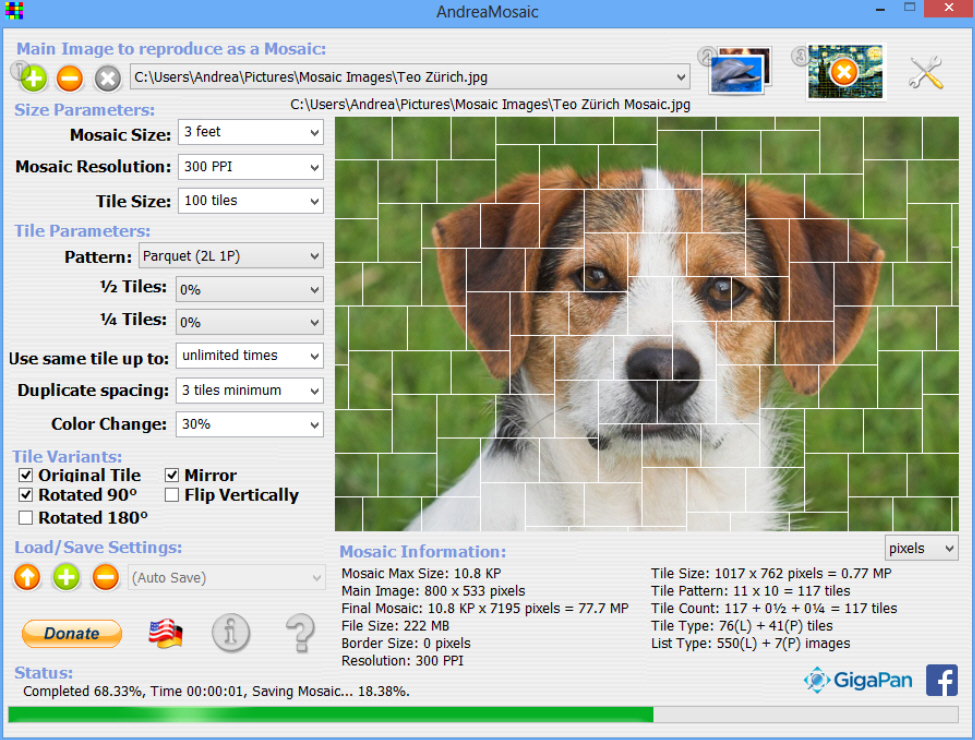
AndreaMosaic is a free tool for creating photo mosaics, pictures which are themselves built up of other images (check the program samples page if you’ve not seen these before). The technique only takes a few minutes to master, but delivers pictures with an appealing, abstracted look, which look great on anything from a Facebook thumbnail to an A3 page (or even larger printed formats).

IObit Uninstaller 3 adds browser plug-in removal and file shredding tools
IObit has released IObit Uninstaller 3.0, a major, redesigned update of its application uninstall utility. Application uninstallers have never had much of a reputation for thoroughly cleaning up after the programs they’re supposed to remove, which is where the likes of IObit Uninstaller come into their own, hunting down leftover files and Registry entries to offer a more complete removal.
Version 3.0 debuts a redesigned and simplified user interface, adds full support for Windows 8/8.1 and now incorporates browser plug-in removal functionality too alongside a number of more minor tweaks.
System Mechanic license giveaway -- get yours now!
While Windows, at least arguably so, has become more efficient with each new version, it's still far from fault-free. System problems still rear ugly heads -- check the action center and you will likely find something awaiting you. There is no end to the amount utilities that purport to help you fix these errors, but some are useless and a few are just malware, so it's frequently best to go with a reputable piece of software, even if it costs a few dollars.
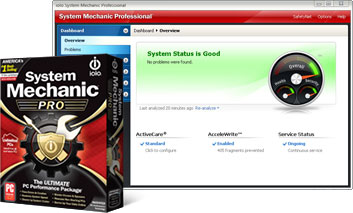
System Mechanic describes itself as "an all-in-one PC tune-up utility software suite that analyzes, fixes, optimizes, and maintains Windows computers. It incorporates multiple patented and patent-pending technologies, such as ActiveCare, a technology that allows the program to run automatic maintenance scans and repairs on a Windows PC while a computer is on but not in use".

ImBatch 2 adds even more image processing automation
High Motion Software has announced the release of ImBatch 2.0, its comprehensive image batch processing tool.
As before, you can use the program to resize or rotate photos, tweak colors and contrast, apply effects, set tags and more. But now you’re also able to apply new "AutoEnhance" tasks, which do their best to automatically optimize your target images.

Chrome 32 beta highlights noisy tabs
It’s a regular web annoyance: you’re busy online, a line of browser tabs open, when suddenly one of them starts playing a Flash video ad. Which one? Normally you’d have to check each tab in turn, but that’s all about to change with Google Chrome 32 beta.
The next time your concentration is disturbed by some unexpected sound, just glance at the tabs, and a speaker icon will appear next to any which are playing audio. Further icons highlight tabs currently using your webcam, or Chromecast, and we expect others will appear in future.

UniPDF converts PDFs to Word, HTML, images and text
PDF is a great format for sharing content, not least because it’s viewable just about everywhere. It’s not quite so convenient if you need to reuse that content elsewhere, of course, but there could be an easy solution: just use UniPDF to convert your source documents to Word (DOC, RTF), images (BMP, JPG, PCX, PNG, TGA, TIF), HTML or plain text.
The program is easy to use. Drag and drop your PDF files onto the program, choose an Output format, click "Convert", and watch as UniPDF goes to work.

grepWin is a powerful regex-based search and replace tool
Search and replace is a key part of most text editors, and it’s generally very simple to use: type a keyword, press [Enter] to look for it, then step through however many matches there might be. This is so straightforward and familiar that it’s easy to forget there’s any other way.
Regular expressions do offer a far more powerful alternative, though, at least if you take the time to learn how they work. As an example, take a look at \b[A-Z0-9._%+-]+@[A-Z0-9.-]+\.[A-Z]{2,4}\b : despite looking like binary garbage, this is actually a very useful search term which will locate any email address. Not something you could easily do in any other way.