
Get WinOptimizer 2026 for free and save $30 on this brand new Windows cleanup and tuning tool

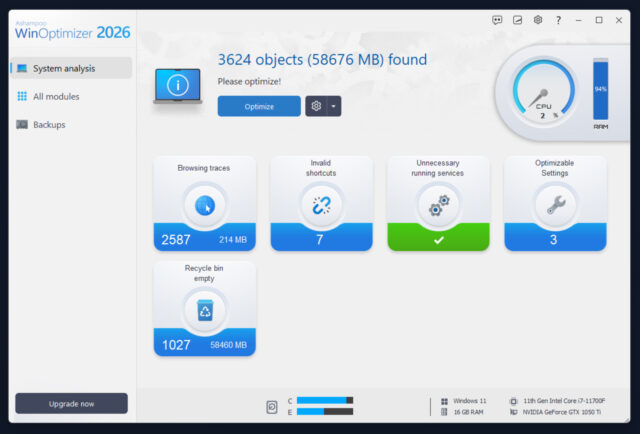
Ashampoo has released WinOptimizer 2026 for managing Windows performance, privacy, and system maintenance. It promises to help boost slow performance, remove leftover junk, and provide easy access to advanced settings.
WinOptimizer 2026 lets users clean, tune, and customize Windows 10/11 without the need for deep technical know-how.
SEE ALSO: Ashampoo Burning Studio 2026 usually costs €30, but you can get it free
All tools in this suite share the updated WinOptimizer 28 core, which improves memory handling on 64-bit systems and improves overall responsiveness during scans and cleanup tasks.
The start page has been redesigned to show live hardware details, including a CPU speedometer and current system information. It also includes interactive analysis screens that point out common problems and offer suggestions for fixing them.
The Internet Cleaner completes scans quicker than before, makes the cleanup process easier to understand, and shows exactly what was removed in a new stats overview.
System Information has been rebuilt from the ground up and now shows more accurate hardware data across additional categories, making it easier to read detailed system information at a glance.
The Privacy Manager includes a number of new tweaks that target Windows data collection and background communication. You can use these to control what information Windows collects or transmits (either individually or all at once).
WinOptimizer 2026 modules
The new suite has 19 different modules that cover system maintenance, analysis, file management, and customization. You can manage restore points, adjust system policies, back up changes, and access your Windows license key from within the software.
There are file tools for secure deletion, recovery, encryption, and disk cleanup. Features such as File Wiper, Undeleter, DiskSpace Explorer, and Link Checker help remove junk and protect or recover important data.
System analysis tools include drive health checks, service monitoring, disk benchmarks, and font management. There’s also a handy built-in system benchmarker so you can see how your system compares with others online.
Customization and performance tuning tools will let you manage startup behavior, uninstall unwanted software, tune internet connections, and disable background services that aren’t needed.
All changes can be saved and restored through the built-in backup system.
The interface has been given a new coat of paint in this release too, with clearer layouts and easier navigation.
WinOptimizer 2026 usually costs $30, but is available free to BetaNews readers. You can download the new release here. You will need to request a free activation code to unlock the full version.
What do you think about WinOptimizer 2026? Let us know in the comments.



