
Dropbox 2.8 offers smarter installer, drive space warnings
Cloud backup provider Dropbox has announced the final release of Dropbox 2.8, its latest major update for Windows, Linux and Mac.
The new release adds Windows and OS X auto sign-in support for easier installation. As long as you're logged into Dropbox already, the installer won’t ask for your credentials again. (This doesn’t work if you’re using two-step verification, or a Dropbox for Business account that uses single sign-on.)

Migrate data to your new PC with EaseUS Todo PCTrans Free
Migrating to a new PC can be a tedious, time-consuming business. There will be applications to reinstall, serial numbers to find, data to move, and that’s before you start reconfiguring everything to try and restore your old settings.
Alternatively, you could just use EaseUS Todo PCTrans to handle at least some of the work for you.

ShareX 9.0 adds screen recording with audio
Powerful open source screenshot tool ShareX has been updated to version 9.0 with some significant changes and additions.
Top of the list is new support for screen recording with audio. This makes use of FFmpeg to do the hard work, with ShareX downloading the program if you don’t have it already.
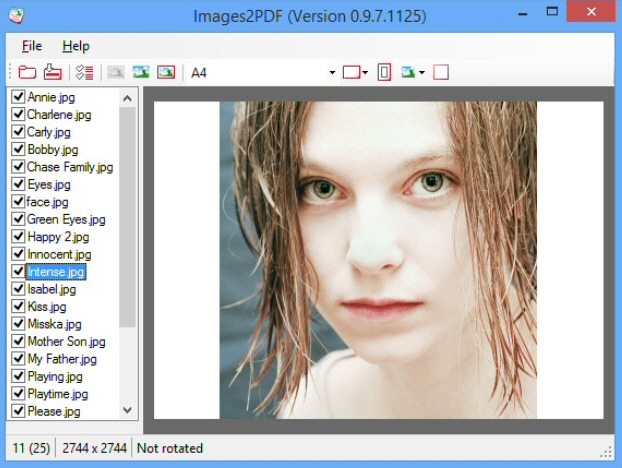
Images2PDF converts your digital images to PDF files
Images2PDF is a simple tool for saving your chosen digital images to a PDF file. Yes, you’re right, there are plenty of ways to do this already, but the program has one or two touches which help it stand out from the crowd.
Images2PDF is a lightweight 1.66MB download, for instance, and there really isn’t anything more (this isn’t one of those tools which comes bundled with Ghostscript). It’s adware-free, too, always a plus with this type of application.

How to list the contents of a folder in Windows
If you’re troubleshooting a PC problem, maybe trying to help someone else, then it can sometimes be useful to list the files in a folder. Explorer still can’t do this. But, no problem -- you’ve plenty of other options.
File Lister is perhaps as basic a solution as you’ll see. Specify a folder, check "Preserve file structure", click "List Files", and the program displays your folders and files in an indented list.

Cloudmark DesktopOne is an accurate, free and reliable spam filter
Spam rates may be high, at around 70 percent of all email traffic, but protecting yourself is easy -- at least, in theory. Just install an internet security suite and you’ll probably get a spam filter along with everything else.
The problem? While this sounds convenient, bundled antispam engines aren’t generally very accurate. If you really want your inbox to stay junk-free, then you should try a specialist filter like Cloudmark DesktopOne.

Snagit 12 debuts video trimmer, drops XP/ Vista support
TechSmith Corporation has unveiled the latest Snagit for Windows and Mac (that’s version 12 and 3, respectively), and while it’s not as revolutionary an upgrade as version 11, there are still some major changes and additions.
The bad news is the removal of support for XP and Vista. This is no great surprise -- Snagit has become much simpler and more streamlined lately, and it’s a logical step -- but that’s not much consolation if you’re affected.

Music player Winyl adds internet radio, lyrics, aiff/ opus/ speex support
Vinyl Software has announced the release of Winyl 3.0, an extremely major update to its popular music player. A new Radios menu gives easy access to nine internet radio stations, and you can add more as required.
Lyrics now appear automatically whenever you play a recognized song. Well, usually -- they’re not yet visible in all skins (try iTunes if you have problems).

Whirlpool File Checker finds new and changed files on NTFS drives
Every time you use your PC, files are being created, modified or deleted in the background. For the most part you won’t care, but if you’re worried about malware, or wondering what someone else is doing on your system, then it might be interesting to find out exactly what’s being changed.
Enter Whirlpool File Checker, an open source file integrity checker which can scan a set of files and highlight any which are new, or have been changed.

FreeText is an easier way to make ad-hoc notes, to-do lists and more
You’re busy on the PC when you need to make a note, manage a task, maybe save a link. You could open Notepad, enter the details, save the file, and hope you can find it again later. But it might be easier to use FreeText to manage the whole process for you.
At its simplest, the program works like a more convenient version of Notepad. Links you type are recognized and become clickable; its window will by default remain on top of others; it minimizes to the system tray, and FreeText automatically saves your current file at regular intervals.

Mosamic creates gorgeous photo mosaics from Flickr images
You might have taken some great digital photos, but they can always be made better, and one way is to transform them into a photo mosaic: a picture built from the color-matched thumbnails of other images.
This isn’t always easy. As we’ve discussed before, AndreaMosaic is a very powerful mosaic creator, but with a complex interface which means it can be hard to follow. Fortunately there are simpler alternatives -- and Mosamic is one of the very best.

Shield your PC from keyloggers with Zemana AntiLogger Free
Keyloggers are a real malware menace, recording everything you type -- user names, passwords, credit card numbers and more -- for misuse later.
Your antivirus software will intercept most keyloggers before they can be installed, of course. Well, hopefully. But if you’d like another layer of protection, just in case, then you might be interested in Zemana AntiLogger Free.

Extract PDF images, text, fonts and files with Weeny Free PDF Extractor
It’s easy to view the contents of a PDF, but extracting them for reuse elsewhere takes more effort. Even if you install something PDF to JPEG Expert to grab the images from a document, for instance, that won’t help you save the text, fonts, or other resources a PDF might contain.
Weeny Free PDF Extractor claims to offer a simpler solution. It doesn’t just grab the pictures, or the text. Instead the program cycles through 1, 10, 100 or as many PDFs as you like, extracting all their resources -- images, text, fonts and files -- and saving them to disk.

Microsoft's Office Mix turns PowerPoints into 'interactive online lessons'
Microsoft has released the first customer preview of Office Mix, a free PowerPoint 2013/Office 365 add-in which makes it easier to create and share your presentations.
There are new tools to record you giving your presentations, draw on slides as though they were a whiteboard, add audio or video, take screenshots or record what’s happening on the desktop, all available from the Mix tab on the PowerPoint ribbon.
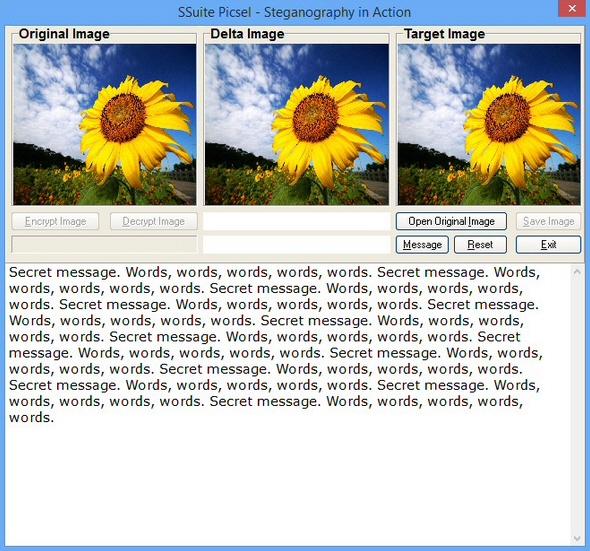
Picsel Security: exchange secret messages with others, no passwords required
Steganography tools can be a quick and easy way to send a secret message to someone, typically embedding your words inside a digital photo. If anyone intercepts the message then they’ll see what looks like a normal image, and never realize that it contains some hidden content.
The catch? You’ll often need to protect that content with a password. And that makes life more complicated, as you must first find a way of exchanging the password with the recipient, and then you’ll both have to remember it.