Microsoft releases PowerToys v0.56.1 with important updates for FancyZones and more
We've already had a few updates for PowerToys this year, and Microsoft has even treated us to a selection of new utilities for 2022. Now the company has released PowerToys v0.56.1, and it's another significant update.
Sadly, there are no new toys to play with in this particular release, but there have been some important changes, fixes and updates to existing utilities. Three especially noteworthy changes include a massive increase in the number of zones that can be created in FancyZones, huge changes to Find My Mouse, and a switch to VS 2022 with the .NET 6 upgrade. There are also big changes for various other PowerToys utilities.
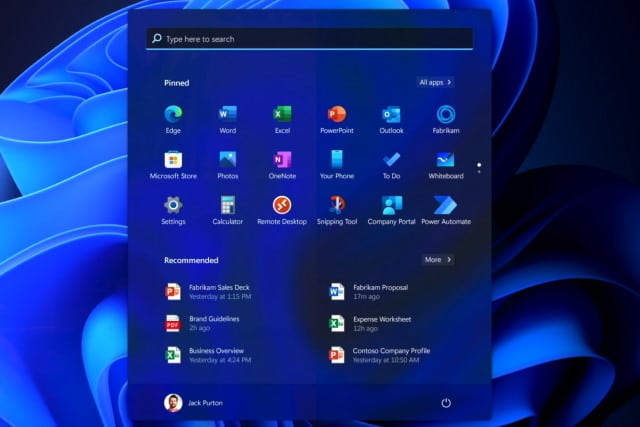
KB5010414 update for Windows 11 is hiding the Start menu
When Microsoft released the KB5010414 update for Windows 11 a couple of week ago, there was great interest in the new features it added. But there was also a sense of heavy anticipation for the almost inevitable problems the update would cause.
We have already had reports of the update not only breaking printing, but also causing some systems to overheat, but this is not all. Users are also complaining that KB5010414 is causing the Start menu to be hidden.

TVAddons concedes defeat and says that massive piracy lawsuit brings closure
Last week Kodi addons repository TVAddons threw in the towel following a long running piracy lawsuit, with founder Adam Lackman agreeing to pay damages of $19.5 million.
In an email sent out to users and subscribers this weekend, TVAddons concedes defeat. It says mournfully that the lawsuits "didn't result in the outcome we'd hoped for" but adds that it brings closure and will "allow us to begin the process of moving on with our lives". It also calls for donations to help pay the colossal bill.

Twitter now lets all users add sensitive content warnings to photos and videos
Twitter is giving everyone the ability to obscure individual photos or videos. The new feature is something that was tested last year and is now rolling out to all users.
In addition to blurring out select multimedia content, the new feature gives Twitter users the opportunity to add warnings to tweets. This can be used to indicate that a particular post includes nudity, violence, sensitive content or is in some way NSFW. There are, however, limitations.
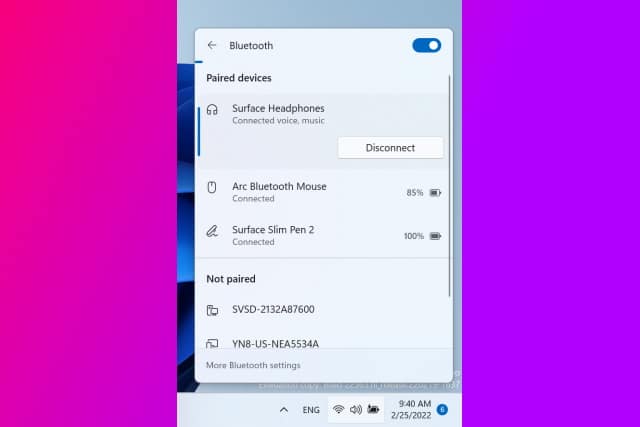
Microsoft is making it easier to manage Bluetooth devices in Windows 11
From mice and keyboards to phones and speakers, there is a virtually endless list of Bluetooth devices that you can connect to your computer. With this in mind, Microsoft is taking steps to make life a little easier for Windows 11 users, introducing a new list of Bluetooth devices in the Quick Settings menu.
The addition comes as part of the latest build of Windows 11, released earlier this week. In Windows 11 build 22563 the Quick Settings menu has been updated to give greater control over attached Bluetooth devices.
Microsoft confirms recent Windows updates cause problems establishing Netlogon secure channel connections
Microsoft has issued a warning to users of various versions of Windows Server that a recent update is causing problems with Netlogon connections.
Affecting Windows Server 2022, 2019, 2012 R2, 2012, 2008 R2 SP1 and 2008 SP2, the problem means that some applications and appliances on domain controllers may be unable to establish a Netlogon secure channel. Microsoft is blaming not only the KB5009555 update, but "updates released January 11, 2022" for the problem.
Electron Bot malware is running rampant in the Microsoft Store, opening backdoors on victims' computers
Fake versions of popular games such as Temple Run and Subway Surfers are being used to distribute dangerous malware through the Microsoft Store to users of Windows 10 and Windows 11.
Security firm Check Point Research found that malicious versions of the titles were riddled with Electron Bot malware and have already infected thousands of computers in countries incuding Sweden, Bulgaria and Russia. The malware gives an attacker a backdoor into a victim's computer allowing for complete system control, as well as control of social media accounts.
Microsoft confirms Windows 11 system reset bug that leaves behind data after wiping
Microsoft has confirmed the existence of a problem in Windows 11 that can result in files being left behind after a user performs a reset that should completely wipe a device.
The issue has been added to the list of known problems with the operating system just days after a Microsoft MVP shared details of his findings after conducting both remote and local data wipes in Windows 10 and Windows 11. The company has provided details of a workaround that can be used until a proper fix is produced.
Microsoft Defender for Cloud now protects Google Cloud Platform
Windows users are familiar with Microsoft Defender running on their computers offering local protection, but there is also a cloud-based version of the security tool. Microsoft Defender for Cloud is the result of the unification of Azure Security Center and Azure Defender.
Having already added support for Amazon Web Services (AWS), Microsoft has now added protection for Google Cloud Platform. The latest addition comes as Microsoft recognizes the fact that 92 percent of organizations now embrace a multi-cloud strategy.
Apple is giving Siri a new less gendered option recorded by an LGBTQ voice actor
In iOS 15.4, Apple is introducing a new voice option for Siri. The latest addition is a voice that is described as being "less gendered" and is being introduced to increase diversity.
This is not the first time Apple has used its digital assistant to promote inclusivity, having previously introduced black-voiced Siri options. The company says it is giving users the ability "to choose a voice that speaks to them".
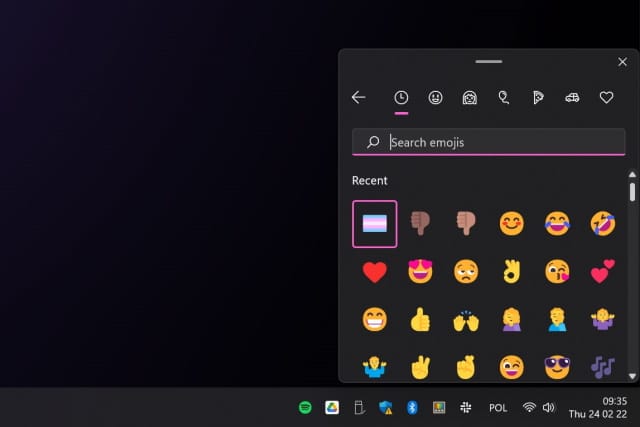
Microsoft is bringing new Emoji Panel, Voice Typing and other shortcuts to Windows 11
The Insider builds of Windows 11 are something of an experimental playground for Microsoft, giving the company a chance to trial new features and options with beta testers before a wider rollout. In the recent Dev Channel build there are signs of new shortcuts coming to the operating system.
Users who installed Windows 11 build 22557 noticed that the language switching panel accessible from the taskbar is now home to buttons to access a range of input options. This includes the Emoji Panel, the Clipboard Panel and more.
How to hide the 'System requirements not met' warning in Windows 11
Whether it stems from wanting to ensure that people have the best experience by using appropriate hardware or not, Microsoft has caused annoyance among Windows 11 users with warning messages about system requirements. If you have installed Windows 11 on a computer that does not technically meet the minimum requirements, you may well have seen these alerts advising you that your system is not up to scratch.
Whether you are irritated by the "System requirements not met" message on the desktop, or the one that appears in the System section of Settings, you will be pleased to hear that you can hide them. There is no need to track down a watermark remover, as all you need to do is apply a registry tweak.

Ubuntu and other Linux distros at risk from Oh Snap! More Lemmings security exploit
Security researchers from Qualys have issued a warning about a Local Privilege Escalation Vulnerability Discovered in the snap-confine function of Canonical's Snap package manager.
Known as Oh Snap! More Lemmings and tracked as CVE-2021-44731, the collection of security flaws can be exploited to gain root privileges.
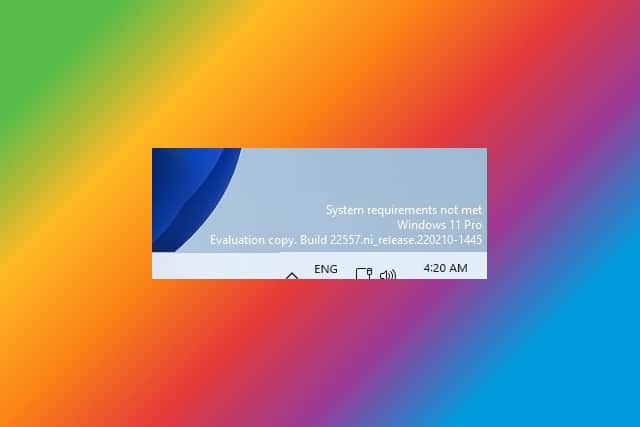
Microsoft is testing an annoying desktop watermark if you install Windows 11 on unsupported hardware
One of the obstacles standing in the way of some people upgrading from Windows 10 to Window 11 is system requirements. Even some relatively new systems are unsupported due to lacking features such as TPM 2.0, but where there's a will there's a way, and there are various workarounds that make it possible to install Windows 11 on pretty much any system.
If you have opted to go down this route, Microsoft is preparing to irritate you. The company is testing a desktop watermark that will serve as a constant reminder that you're using unsupported hardware. The message reads "System requirements not met" and is sure to lead to a surge in watermark removal tools. [UPDATE: it is now possible to hide the message!]

Microsoft has updated the data wiping tool in Windows 10 and Windows 11... and now it leaves behind data
Using Windows' built in option to reset your computer and erase data may not be as secure as you thought. If you are passing on a computer to a friend or family member, or perhaps selling a machine you no longer need, you may well have used the option to reset the PC and wipe out your personal data. While this seems like a sensible move, an update to the data wiping tools in Windows 10 and Windows 11 means that potentially revealing and sensitive data can be left behind.
Tests conducted by Microsoft MVP Rudy Ooms showed that in Windows 10 version 21H2 and Windows 11 version 21H2 the data wiping function left behind user data in the Windows.old folder. Versions of the operating system prior to 21H2 did not suffer from this issue.