
Connection Explorer update adds new ways to see where -- and why -- your PC is sending data

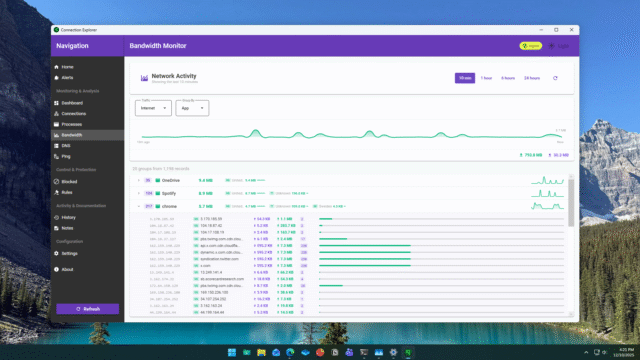
Stardock has released an updated beta of Connection Explorer, the Windows app it first launched a month ago that lets users can see and understand all of the network activity on their PCs. The new update adds additional ways to view bandwidth usage and connection history, giving users a better understanding of where the data is going and -- even more importantly -- why.
Connection Explorer shows every network connection a PC makes in real time and turns background activity into something readable. It allows users to see which apps and processes are communicating online and where those connections terminate.
If you suspect your PC is sending data it shouldn’t, then Connection Explorer helps you see what’s talking to the internet and where it’s going, whether that’s a normal background service or something dodgy that you need to shut down.
The newest release adds a Bandwidth panel that presents a live view of how much data applications are sending and receiving. Connections are grouped by process name, and you can expand each entry to see endpoint locations alongside bandwidth usage.
This structure makes it easier to understand how individual apps behave over time. Instead of seeing a flat list of connections, it lets you associate data volume with specific processes and endpoints.
The Home panel has also been updated with the addition of a an activity timeline that displays device activity across a 48 hour period. This is shown as a horizontal view, making usage spikes easier to spot. By lining up bandwidth changes with specific apps or connections, it will be easier to spot patterns you’d likely otherwise miss.
Connection Explorer map view
Connection Explorer still makes use of a map view (below) to visually show all active connections at a given moment, while the activity timeline now shows exactly how that changes over time.
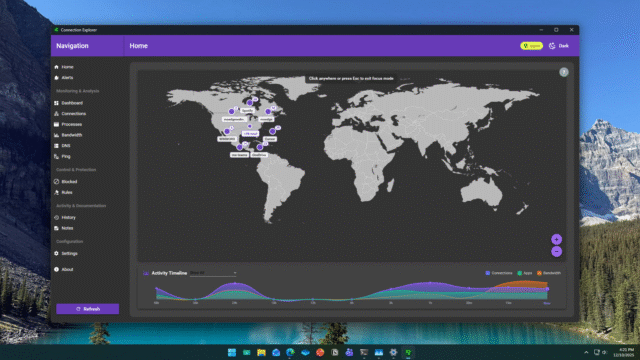
Based on early feedback of the first beta, Stardock has made tweaks to how the map view behaves. The addition of a new right-click option allows closely grouped connection dots to be expanded, making overlapping connections easier to see.
Additional map controls are also now overlaid directly on the interface so zooming and panning is easier.
Dark mode settings are now also remembered and actioned on startup, and changes have been made to how the app launches after a system reboot.
Connection Explorer still includes all of the features from the original beta, such as tracking active and historical connections, labeling DNS entries with notes, and blocking unwanted processes.
Users can also set alerts tied to specific IP addresses, ports, or regions to monitor unusual activity.
Connection Explorer is available for Windows 11 and includes both light and dark modes. It's currently available as a beta release here. You can try it for free or as part of Object Desktop for $40 a year.
What do you think about the latest Connection Explorer update? Let us know in the comments.



