
Troubleshoot TCP/IP issues with 'Why Can’t I Connect?'
Why Can’t I Connect? is an open source tool which can help to identify and solve TCP/IP connection errors.
Typically you'll use the program to try and connect to one of many common server types (Microsoft SQL Server, MySQL Server, FTP, SFTP, IMAP, POP3, SMTP, IRC, LDAP and Usenet are supported, along with generic servers and clients). Why Can’t I Connect? then tries to make the connection for you, reporting on what happens at every stage, and offering possible explanations for whatever errors crop up.
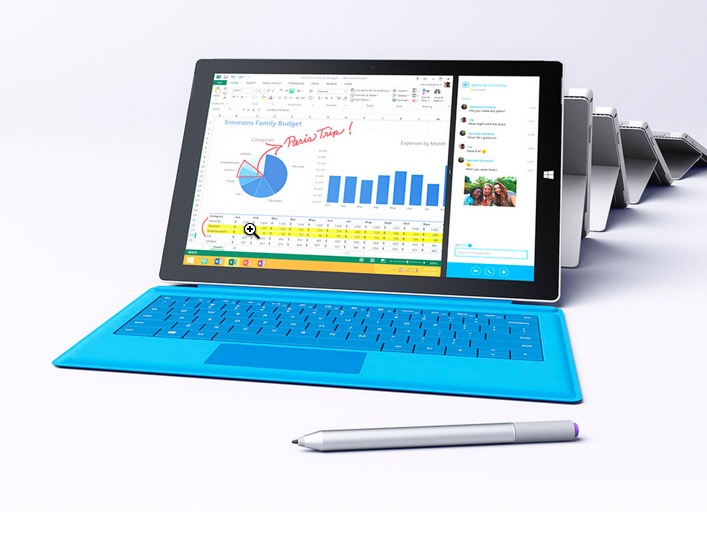
Buying the Surface Pro 3? Here are the apps, games, programs and accessories you need
As someone blessed with the opportunity to try the Surface Pro 3 early, I can say it is truly a game changer. It is very light, has great battery life and a big beautiful display. The tablet/laptop hybrid is far beyond offerings by competitors, including Apple. If you even consider buying a Macbook Air over this, you are arguably making a huge mistake.
With that said, the Surface Pro 3 will begin hitting stores this Friday, June 20th. While the computer is great out of the box, it is not complete until you install useful apps and programs. But wait, aren't apps and programs the same thing? Yes and no. They are both pieces of software, but apps run in the Modern UI, and programs run in the classic UI. While Windows RT variants of Surface cannot install extra programs, the Pro 3 can, since it has an x86_64 Haswell processor. Below is a list of my suggested programs, apps, games and hardware accessories.

B1 Free Archiver is a friendly cross-platform archive manager
Everyone needs a good archive manager, and you've probably chosen one already. We're fans of 7-Zip: the current release may be three years old, but it still performs very well.
There is some competition around, though, and B1 Free Archiver is an interesting example which really does stand out from the crowd.

Encrypt, decrypt and process your PDFs with QPDF
If you need to process your PDFs then there’s no shortage of free options. JPDF Tweak alone can crop or rotate pages, apply text and image watermarks, encrypt, decrypt them, and so on. You’ve probably come across similar toolkits yourself.
Even the best of these programs will have some gaps in its functionality, though: some security options missing, limited batch processing, inflexible split or merge tools, maybe can’t create linearized (web-friendly) PDFs. And so sometimes, just occasionally, you’ll need a heavy-duty solution like the command line QPDF.

New anti-exploit tool aims to prevent your PC from getting infected
Normal antivirus software works by looking at signatures and behaviors to prevent or remove malware infections. However, many infections now stem from exploits in legitimate programs which means that it's possible for nasties to slip onto the system unnoticed.
A new Anti-Exploit tool from Malwarebytes released today is designed to protect against vulnerabilities in mass-market applications such as browsers, Java, document readers, media players and others.

Securely archive your images with WinTrezur
WinTrezur looks at first much like any other image viewer. There’s a folder tree on the left, a set of thumbnails on the right. Double-clicking any image displays it full-screen; pressing Esc returns you to the thumbnail viewer again, and you can view everything as a slideshow.
So far, so very standard. But explore a little further and unusual extras begin to appear.

Move and copy files more easily with MyFolders
MyFolders is a free Windows shell extension which makes it easier to copy or move files to any folder, or to open common folders in a couple of clicks.
The program installs quickly and easily. There’s no obvious interface, so to see how it works, select a file in Explorer, right-click and choose the new MyFolders menu.

Troubleshoot Windows 7 and 8 service triggers with Service Trigger Editor
If you’ve ever spent time troubleshooting low-level PC problems then you’ll know that understanding Windows services can be very helpful. The standard Services applet (Win+R > services.msc) tells you a lot about what’s happening on your system -- but there is one important exception.
Windows 7 and 8 support service "triggers", a mechanism which allows Windows services to start when a particular event occurs (a device is plugged in to the computer, say). The Services applet highlights these by listing their Startup Type as "Manual (Trigger Start)" or "Automatic (Trigger Start)", but double-click a triggered service and it won’t tell you anything more.

Adobe releases Flash Player 14 and AIR 14
Adobe has released a major update to its web media player and runtime platform with the release of Adobe Flash Player 14.0 and Adobe AIR 14.0.
The new releases deliver a number of new features and updates: a PPAPI Flash Player content debugger, support for Atom-based Android devices and -- of most interest to end users -- support for the AIR Gamepad API.
Power up the OS X context menu with FinderPop
It doesn’t matter how many refinements and new features are introduced into each new version of OS X, you always end up wanting more, particularly when it comes to the Finder. Thankfully there are usually a slew of third-party apps -- many free -- that can fill in the gaps.
Take the Finder context menu for instance -- if you feel like it could be a little more helpful at times, then you need to install FinderPop 2.5.5.

PhraseExpress provides universal AutoCorrect and AutoText for Windows, unveils multiple improvements
Bartels Media GmbH has unveiled Phrase Express 10.1, a major update to its versatile tool for extending AutoText and AutoComplete to any Windows app. Version 10.1 contains a number of improvements and adds a new cancellation hotkey.
The tool, which is free for personal use and is also available in portable form, allows users to build a personal library of text snippets and phrases for quickly inserting into documents, forms and other windows.

Paint.NET 4.0 Beta 4 restores Line/Curve tool, improves rendering quality and performance
dotPDN LLC has released the fourth beta of Paint.NET 4.0, the latest pre-release of this eagerly anticipated freeware image-editing tool for Windows.
The fourth beta -- build 5628 -- sees the Line/Curve tool restored, having previously been incorporated into the Shapes tool. It also sees a number of rendering quality and performance improvements alongside a slew of other minor tweaks and bug fixes as Paint.NET edges towards its final release.

Pale Moon overhauls rendering engine, adds animated panorama support
Moonchild Productions has released a relatively major update to its Firefox browser variant for Windows with the release of Pale Moon 24.6 and Pale Moon x64 24.6.
Version 24.6 comes with a major overhaul of the graphics rendering engine to boost stability, plus a number of important fixes, including all latest security fixes. It also adds support for animated personas.

G'MIC: the world’s most flexible image processor?
G’MIC (GREYC’s Magic for Image Computing) is an exceptionally powerful image processing tool for the command line (or via GIMP, if you install it via a plugin). It’s aimed very much at experts, but has features which can be used by just about everyone.
At its simplest, you might use the program to view a series of images (gmic pic1.jpg pic2.jpg pic3.jpg) or convert an image from one format to another (gmic ThisPicture.png Output.png).

WinPatrol tweaks cookie management, adds Pale Moon support
BillP Studios has released WinPatrol 31.0.2014, a minor refresh of its Windows snapshot-based security tool. WinPatrol monitors key system areas for changes, alerting the user to program attempts to make significant alterations.
Despite the jump to version 31, the latest release is a relatively minor one, with the most significant changes made to its browser-monitoring SQLite database.