DriveInfo: not your average desktop gadget
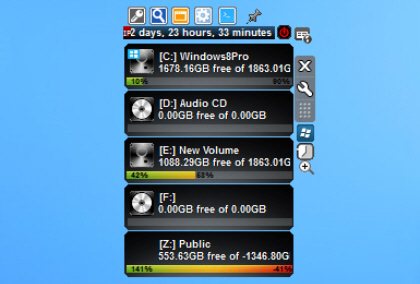
At first glance DriveInfo looks like another very ordinary system monitoring gadget, this time listing every drive on your system, with its free and total space. Not exactly impressive, especially as it didn’t even get all these figures right for us (a 3TB network drive was reported as -1346.80GB).
It seems the developer has realized that users need more from their gadgets, though, and in response he’s equipped DriveInfo with a host of additional features and tools.

Firefox Beta and Aurora channels updated, Australis UI makes first appearance
Hot on the heels of the underwhelming appearance of Firefox 27.0 FINAL, Mozilla has released Firefox 28.0 Beta 1 and Firefox Aurora 29.0a2, both of which come with the promise of significant new features and changes.
First up is the debut of Firefox for Windows 8 touch, which has migrated across to the beta channel for the first time, while Aurora ships with a brand new user interface (Australis) and revamped tool for syncing settings between multiple computers and devices.

Artweaver 4.5 extends ArtweaverTeam.com integration
Boris Eyrich Software has updated its popular paint tool Artweaver to version 4.5.
The new build improves integration with ArtweaverTeam.com, the companion site where several Artweaver users can collaborate on projects. The Uploader plugin is now installed by default, making it easier to get started, while team status messages are more clearly displayed on a separate status bar.

Detect and install missing updates with SecPod Saner
Installing a reliable antivirus package is a key part of maintaining your PC’s security, but there’s more you can do. It’s just as important to ensure you keep up-to-date with the latest software patches, blocking security vulnerabilities before malware can exploit them.
SecPod Saner is a free tool which can help automate this process by scanning applications, highlighting missing security patches, and even downloading and installing them for you.

Save web page pictures automatically with SavePictureAs
If you're browsing the web and find an image you'd like to keep, then the procedure is almost always the same: right-click, select "Save image as", and choose your preferred destination. That's simple enough, too, but if you’re saving lots of pictures in the same session then it can get a little tedious.
SavePictureAs is an open-source tool which speeds up the image saving process (in all the main browsers, and most of the minor ones) by automating most of its steps. All you have to do is move the mouse cursor over a picture, press a customisable hotkey, and watch as the program simulates a right-click, selects "Save image as", points the browser at your favorite folder, and saves the picture with its default file name.

VirusTotal adds AegisLab as a file scanning engine
VirusTotal has announced the addition of AegisLab as a new file scanning engine. The Taiwanese company was already working with VirusTotal on its URL scanner, but this should raise its profile significantly.
The good news continued in AV Test’s latest Android Security report, where AegisLab’s Antivirus Premium 1.1 and AhnLan’s V3 Mobile 2.1 were the only packages to score maximum marks for protection.

VLC Media Player increases stability, fixes bugs and regressions
VideoLAN has released VLC Media Player 2.1.3, the latest minor release of its open-source, cross-platform media player for Windows, Mac and Linux. Version 2.1.3 comes with the promise of fixing multiple bugs and regressions introduced in previous 2.1.x releases.
Important fixes involve improving audio and video output management across most platforms, and also include decoder and dexmuxer improvements too.

Geo-Tag Mapper plots geotagged photos on an interactive globe
Geotagging photographs sounds great, at least in theory. You buy a camera with GPS, and it records exactly where you take every picture, very useful when you’d like to return there later (or just if you’ve just forgotten where you saw that amazing sunset).
This isn’t quite as easy as it should be, because most image viewers and graphics tools don’t recognize or use positional data. There are some exceptions, though, and the latest, Geo-Tag Mapper, provides a very easy way to visualize your photos by their location.

Evernote for Mac adds descriptive search feature, aims to make finding information quicker and easier
Evernote Corporation has released Evernote for Mac 5.5, a minor refresh of the cloud-based note-taking service’s desktop tool. Version 5.5 contains one major new feature of note: support for descriptive search.
The feature, currently only available to English-language users, is accompanied by a number of minor bug fixes and tweaks. It follows on from the recent updates to both Evernote for iOS 7.3 and Evernote for Android 5.7

KeePass introduces new auto-key sending engine, improves entry attachment handling
Dominik Reichl has released KeePass 2.25 for Windows. The open-source password management tool allows users to manage both offline and online passwords via a secure, encrypted container, and is also available in portable form.
Version 2.25 is a minor update, but introduces a new auto-type key sending engine that improves support for sending Unicode characters as well as sending keypresses into virtual machine and emulator windows.

Opera Next delivers a lightweight network installer, enhanced bookmarking
Opera Software has announced Opera 20′s debut in the Next stream. There’s no revolution this time, perhaps fortunately, but the new build does bring some small but welcome improvements.
A tiny 804KB network installer for Windows grabs the latest version from Opera’s servers, retries the download as required, looks for security issues and starts the installation. The regular offline installer will also remain available, though, and that’s what you’ll see if you download Opera 20 right now.

Light is a fast-loading, stripped down Firefox fork
If you’re not happy with the performance of Firefox on your PC then you could try tuning the browser manually. This isn’t difficult, but could take a while, as there are many possibilities to consider.
If you’re in a hurry, then, you might prefer to grab a copy of Light, a Firefox fork where many components (developer tools, less common APIs) have been "slimmed down" or removed entirely to improve its speed.

Registrar Registry Manager: like Regedit, only much, much better.
Most PC users will need to edit the Windows Registry, at least occasionally, and the standard Registry Editor provides the basic functions you need to get the job done. It’s not always a quick or straightforward process, though, and if you regularly work in the Registry then you’ll probably benefit from the far more capable Registrar Registry Manager.
At first glance the program looks a little odd, as it opens with just a toolbar. This includes an address bar, though, so if you want to browse to a particular key -- HKEY_CURRENT_USER\Software\Nero\Nero 15\Nero Vision\Settings\ExpressUI, say -- there’s no need to expand each folder manually. Just paste the full path into the address bar, press Enter, and a window will open at that location.
Firefox 27 extends SocialAPI, now handles multiple providers simultaneously
Mozilla has released the latest version of its open-source, cross-platform web browser with the launch of Firefox 27 FINAL for Windows, Mac and Linux, with Firefox for Android 27.0 due to follow.
There’s only one major new feature of note in this latest release -- the SocialAPI, which allows providers to provide social networking updates directly from within the browser, can now handle multiple providers simultaneously.

Scan Firefox downloads for viruses with Fireclam
Firefox is a great browser in many ways, but malware protection isn’t one of them. The program tries to keep you away from dangerous sites, but isn’t particularly effective, and in our tests both Internet Explorer and Chrome do a much better job of keeping you safe.
This isn’t a major issue, of course, because you should also have an antivirus package to monitor your downloads, but if you’d like to add an extra layer of protection then a free Firefox add-on may be able to help.