
Give your text a spell and grammar check with Grammarly 1.5 for Windows and Mac
Correct spelling and grammar is something of a dying art these days. Rather than embark on a rant, however, let us gently direct you towards a superb online tool for helping to bring your language skills up to scratch with the minimum of fuss.
Grammarly 1.5 takes this online spellchecker and grammar correction tool on to your Windows PC or Mac -- now you can keep on top of all your documents.

Store and synchronize your passwords with the free KeePassXC
Accessing your data is becoming tougher with two-way authentication, multiple password entry options and having to answer 'secret' questions where you can’t always remember the answer.
The most obvious answer is to write down your information, passwords and other login information. Problem is, this is no good if you’re using your laptop on the road or working away from home.

Preview and explore multiple videos at once with HamMultiPlayer
HamMultiPlayer is an interesting media player with some unusual features, including the ability to preview and work with multiple videos simultaneously.
The program doesn’t require any installation, and it doesn’t even arrive in an archive. It’s just a single executable you can download and run right away. The interface is initially confusing with rows of tiny buttons and boxes, and the most important features aren’t clearly highlighted. A "getting started" page explains the next steps, though, and they’re not difficult: choose your video folder, click Scan > Go and wait as the previews are prepared.

Paint.NET is coming to the Windows Store
Recently, the developer of Paint.NET mentioned that the app would be making its way to the Windows Store. He went as far as saying, "it's at the top of my list" of things to do.
Rick Brewster has now followed up on his "innocent little comment," confirming that the free image editor -- it was originally developed as simple replacement for Windows Paint, but has grown into something much bigger -- will indeed appear in the Windows Store as of version 4.0.17.
Speccy 1.31 improves Creators Update compatibility, provides system information for Windows PCs
Piriform has released Speccy 1.31 and Speccy Portable 1.31, an updated version of its system information tool for Windows PCs. Version 1.31 comes with the promised of improved compatibility with the recent Creators Update release of Windows 10, and provides users with the ability to get detailed stats about their computer for diagnostic or sharing purposes.
Speccy 1.31 also improves the 32-build version’s architecture and comes with updated GPU information and sensor tracking along with the usual minor tweaks: improved localization and languages support, minor GUI improvements and minor bug fixes.

BPing: a network Ping tool with added audio
BPing is a tiny console-based ping tool with an unusual extra: sound. Why? It gives you instant feedback on what’s happening without any need to watch the console window.
Double-click the program and by default it pings Google.com, playing a sound every time a reply arrives. That’s useful all on its own as a very obvious "my internet connection is up and the device is responding" message. If your connection goes down or the device doesn’t respond, the pings will stop.

NirSoft unveils NetworkUsageView 1.0
NirSoft has released NetworkUsageView, a handy portable program which displays some of the applications that have been using your network over the past few hours, days or weeks.
Details available include the app name, description, the time of access for that session, user, internet adapter and the bytes sent and received.

Back up drives and partitions with MiniTool ShadowMaker Beta
MiniTool ShadowMaker Beta is a versatile tool for creating and managing backup images of all your storage devices. The program supports full, incremental and differential backups of both local drives and other systems on your network.
Backups can be restored from within the program, via a bootable WinPE CD, DVD or USB key, or by integrating ShadowMaker’s recovery environment with the Windows boot menu.
Save Gmail emails to PDF or ZIP with a click
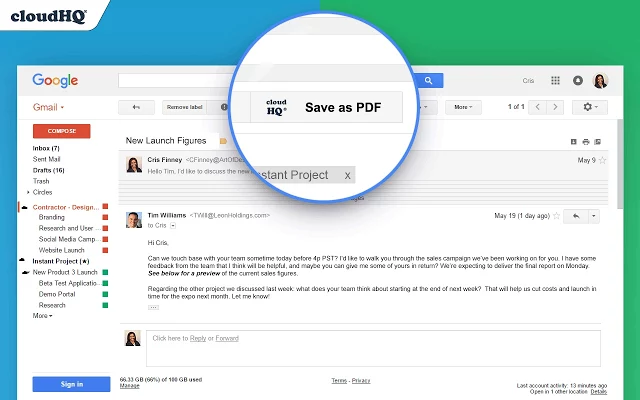
Save emails to PDF is a Chrome extension which enables saving any Gmail email to PDF in a couple of clicks.
Download options include saving individual emails to separate PDFs, merging all selected PDFs into one PDF, or saving conversations to CSV or Excel, apparently (the Excel option just saved to PDF for us).

QuickViewer is a very, very, very fast image viewer
QuickViewer is a portable open-source image viewer which shows and navigates pictures with the maximum possible speed. The developer has built in multiple optimizations, including reading images before they’re required and displaying them with OpenGL.
How effective is this? We used QuickViewer, IrfanView and Windows Photos to work through 385 images as fast as they could manage, displaying each one at full screen.

Spot malware and troubleshoot PCs with QuickDiag
QuickDiag is a portable tool which creates an in-depth and highly technical report on your Windows setup, running processes and installed applications.
It’s not for beginners, but if you’re looking for a quick way to collect key system information -- maybe to troubleshoot problems on a friend’s PC -- the program could be ideal.

Deep-clean your hard drive with atomiccleaner3
Atomiccleaner3 is a powerful and comprehensive tool for cleaning junk files, browser histories and assorted other leftovers from your hard drive.
Reviewing this kind of app is usually very easy. Check to see if it gets even close to CCleaner’s abilities, realize that it doesn’t, throw it away. But atomiccleaner is a little different.

Find and control Windows 10 privacy settings with WPD
WPD is a freeware tool for exploring, understanding and tweaking Windows 10 privacy settings. We’ve seen many of these -- we’ll bet you have, too -- but the program does have some unusual extras which help it stand out from the crowd.
The interface is up-to-date, for instance. The developer hasn’t got it right in every area, but the program does look like it was written for Windows 10.

Securely encrypt single files with AES Protect
AES Protect is a portable tool for encrypting single files using a passphrase and AES. The program is written in x86 assembly language, which means there are no annoying dependencies, and the download is tiny: it’s a 32KB ZIP, but still manages to squeeze in three programs.
AES Protect is the general purpose tool, an easy way to encrypt single files using AS.

Extract icons and create image thumbnails with Thumbico
Thumbico is a combination of an icon extraction and viewing tool, with a thumbnail viewer and creator. The program is tiny, a 28KB download, and unsurprisingly there’s no installation required -- just unzip and run Thumbico.exe.
On launch the program displays a small window. Drag and drop any executable and Thumbico extracts and displays its icon.