Google Docs and Google Drive were all I knew when it came to personal cloud document storage until this summer. I never got on the Dropbox bandwagon, and was so entrenched in the Google ecosystem that SkyDrive didn't interest me at first when it came out. While I have nothing personally against Google Drive, as it has served my company and myself quite well, I had to take a deep dive into SkyDrive territory to prepare for an Office 2013 class I taught this past summer. I was pleasantly surprised with the service, so much so that I began using it side by side next to Google Drive for my personal needs.
Fast forward to when Windows 8.1 went RTM, and I subsequently moved my primary Thinkpad X230 Tablet over to the new OS. One of the least publicized aspects of 8.1 has to be hands-down the tight integration between the OS and SkyDrive, meaning you didn't need a standalone app anymore to save/open files on the service. Some have called it Microsoft going too far, but I completely disagree. The service is 100 percent optional (you can still save locally as you would expect) and if you are using a local account instead of a MS account for your computer login on 8.1, the service is a moot point at best.

Migrating data between two Google accounts is not the easiest of tasks -- there's no simple switch that one can flip. Folks have to use various tools provided by the search giant to move a Google+ profile with circles, backup important emails and Drive content or transfer the Voice number and data. Based on my experience, it takes quite a bit of time too.
This makes it especially problematic for business users who wish to seamlessly migrate data from a standard Google account to Google Apps. Backupify wants to address this issue with the latest update for its Migrator tool, released today, which now introduces support for Google to Google Apps (and vice-versa) migrations.
One way to gain loads of free online storage space is to mix and match storage providers, taking advantage of each to quickly build up tens of gigabytes of cloud-based storage for backup, sync and sharing purposes. The downside of such an approach is the fact you need to manage each provider using its own dedicated app.
Nowhere is this frustration more evident than when using a tablet or phone to access your data, as you have to switch between apps to try and locate where you’ve stored a particular file. But help may be hand in the form of an app for Windows 8, iPad and Android calledRainbowDrive 2.0.0 that attempts to bring multiple providers together under one roof.
While it did not grab a lot of attention, this week Google rolled out version 1.9 of its Drive app for both Windows and Mac users. The cloud storage service adds a number of new features that should improve the experience for its customers -- and that is anyone who has a Google account, because Drive and 5 GB of free storage come along with that account.
The latest version contains added-features in the right-click context menu available from within your file system explorer, including sharing and also the ability to view the file on drive.google.com.
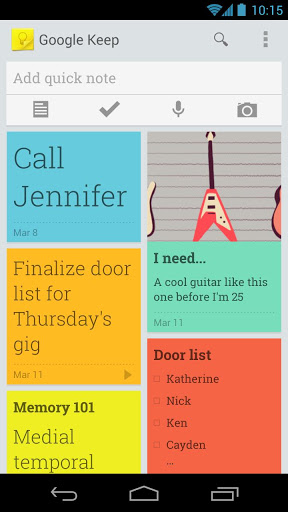
Confession: I've never used Evernote, much to the abash of colleague Alan Buckingham (or so he expressed in group chat a little while ago). But I would use Google Keep, which released today. Russell Holly calls Keep "the not-quite Evernote clone" -- for anyone making bold comparisons.
You tell me. Does this sound familiar, Evernote and OneNote users? "With Keep you can quickly jot ideas down when you think of them and even include checklists and photos to keep track of what’s important to you", Katherine Kuan, Google software engineer, says. "Your notes are safely stored in Google Drive and synced to all your devices so you can always have them at hand". She adds: "If it’s more convenient to speak than to type that’s fine -- Keep transcribes voice memos for you automatically. There’s super-fast search to find what you’re looking for and when you’re finished with a note you can archive or delete it".