
Google brings the Bookmarks bar to Chrome for Android

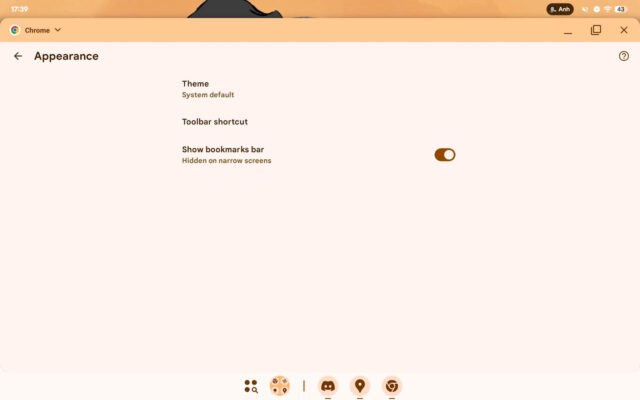
Google is making it much easier for Chrome users to access their bookmarks in the Android version of the app. Borrowing a feature from the desktop version of the browser, there is a new feature that can be used to toggle the display of the bookmarks bar.
It is a simple idea, but it is one that makes a lot of sense. There are, however, some caveats, so try not to get too excited just yet.
First off, Google has not made an announcement about the availability of the Bookmarks bar in the Android version of Chrome – it just seems to be showing up for some people, as Android Authority spotted. The fact that this undeniably handy feature has not been officially announced could point to a couple of things.
It could be that Google is unsure about whether or not it will be well-received and is therefore opting for a soft launch – and this means the feature could be pulled at any time. It may also be the case that Google is simply conducting a slow and gradual rollout to help squash bugs that emerge.
Secondly, it does not seem to be the case that all Android devices will be getting access to the Bookmark bar – assuming it does end up getting a full rollout, that is. So far, the option has only been spotted on devices with wider screens – that is, Android tablets – presumably because Google is concerned about losing screen real estate on the smaller display of a phone.
There is no getting away from the fact that the Bookmark bar is a little space hungry, so it would be understandable – if rather frustrating – to see it limited to larger Android devices. But many people would consider the loss of screen space a price worth paying for the faster access the Bookmark bar provides to favorite sites.
But with the necessary code now out there to enable the Bookmark bar, it is surely only a matter of time before a technique is found to enable it on any device – or there is always the possibility that Google will be convinced to give the option to everyone.
Does this sound like a feature that you would use, regardless of the size of your screen?
Image credit: Android Authority



