
Google is giving Gmail and AI boost with new Gemini-powered features

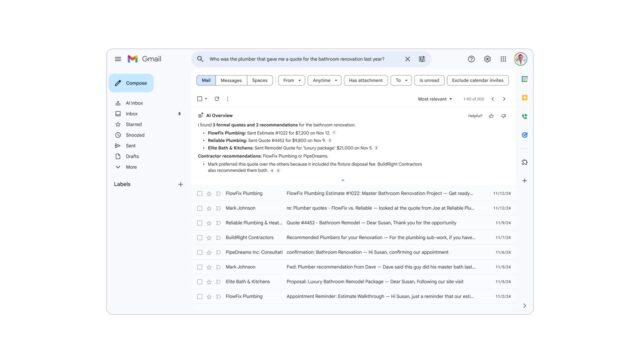
It should surprise no one that Google is filling up just about all of its apps and services with a dose of AI. Now the company says that it is “bringing Gmail into the Gemini era” with new AI-powered features.
The aim is to transform Gmail into “your personal, proactive inbox assistant”, and Google has a smattering of new features that it believes will kickstart this process. Borrowing an idea from Google Search, Gmail’s new AI Overviews is very much what you would expect, but it is also just the start of the story.
Designed with meandering email threads in mind, AI Overviews helps to surface the much important information from a conversation. Some of the capabilities of the feature are available for free, while others are limited to paying subscribers. Google explains that “AI Overviews turn information into answers without the digging”.
It goes on to say:
When you open an email with dozens of replies, Gmail synthesizes the entire conversation into a concise summary of key points.
And when you ask your inbox a question, we use Gemini to generate a simple AI Overview with the answer. Instead of hunting for keywords or digging through a year of emails, just use natural language, like “Who was the plumber that gave me a quote for the bathroom renovation last year?” Gemini’s advanced reasoning pulls the answer, instantly summarizing the exact details you need.
AI Overview conversation summaries are rolling out today for everyone at no cost. The ability to ask your inbox questions with AI Overviews is available to Google AI Pro and Ultra subscribers.
Many of the new features are about getting things done faster, and this is certainly true of Help Me Write, a tool to “polish emails or draft them from scratch”. The existing Smart Replies feature has a new counterpart in the form of contextual Suggested Replies. Google says:
Say you’re coordinating a family gathering and your aunt replies asking if she should bring cake instead of pie. Suggested Replies can instantly draft an initial response in your tone and style, leaving you free to refine it before giving it your approval. You can also use the new Proofread feature for advanced grammar, tone and style checks so everything is polished before you send.
Rounding off the new feature drop is AI Inbox. Google says of this:
Your inbox is filled with updates; some are critical, others are just noise. The new AI Inbox filters out the clutter so you can focus on what’s most important.
AI Inbox is like having a personalized briefing, highlighting to-dos and catching you up on what matters. It helps you prioritize, identifying your VIPs based on signals like people you email frequently, those in your contacts list and relationships it can infer from message content. Crucially, this analysis happens securely with the privacy protections you expect from Google, keeping your data under your control. This lets high-stakes items — like a bill due tomorrow or a dentist reminder — rise to the top. We’re giving trusted testers access to AI Inbox before making it more broadly available in the coming months.
The US is getting first dibs on these new offerings, but Google will be expanding availability throughout the year ahead.
More details are available here.



