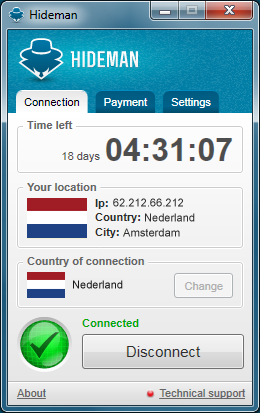
Hideman cloaks your IP address
VPN clients are a generally a very good way to maintain your anonymity online, and Hideman is no exception: just launch the program, click the Connect button and in a second or two you’ll be allocated an IP address in another country.
Which country? Hideman provides servers in Australia, Canada, Czech Republic, France, Germany, Netherlands, Panama, Russia, Singapore, Ukraine, United Kingdom and United States.

Twitter fights for its users
Twitter will appeal the ruling of a New York Criminal Court, which ordered the social network to turn over the tweets of Malcolm Harris. He is an Occupy Wall Street protester charged along with several hundred others for allegedly marching onto the Brooklyn Bridge roadway on Oct. 1, 2011. The ruling came last month, after a series of legal back-and-forth actions.
Today, Twitter legal counsel Ben Lee declares that Twitter will fight back: "We're appealing the Harris decision. It doesn't strike the right balance between the rights of users and the interests of law enforcement". The case, and more significantly, the appeal is a loaded gun, pitting free speech against the state's right to prosecute and searing emotions about Occupy's crusade against the so-called 1 percent, whom some will accuse the ruling benefits. Twitter does the right thing, by protecting its users. But considering the statements Judge Matthew Sciarrino made in his ruling, do they have a chance to win the appeal?

OpenPuff 4.0 keeps files from prying eyes, and maybe even from you
When you need to keep confidential files away from prying eyes then encryption is the most obvious answer. But it’s not always appropriate.
If others share your hardware, in particular, then the presence of password-protected files alone might attract attention. And so in some situations you might be better off using a steganography tool, like OpenPuff 4.0, to move your data entirely out of view.

Disconnect for Chrome lets YOU track advertisers
There are some websites for which it makes sense to use cookies. Online stores use them to keep your basket up to date and many sites use cookies to store usernames and password to help speed up logging in. but there are also plenty of sites that use cookies and other tracking methods to deliver personalized advertisement to you as well as tracking your route across the internet. This is something that Disconnect for Chrome can help with.
This is a simple browser extension for Google Chrome, but the effect that it could have on your browsing experience is quite dramatic. Once you have Disconnect installed, you are placed firmly in control over which web sites you share information with, and you can block any you would rather were not able to track you.

Safari tracking is Google’s penalty day: $22.5 million fine
Word of advice to cloud service providers: Don't get caught with your hand in the cookie jar. The Wall Street Journal reports that Google and the US Federal Trade Commission will soon announce a $22.5 million settlement. Google bypassed privacy settings on Apple’s Safari web browser, a practice later stopped, after being contacted by the Journal nearly six months ago.
Independent researchers found that of the top 100 websites, 22 installed the tracking code on a desktop computer, while on 23 sites code was successfully installed on the iPhone. Safari blocks such cookie tracking by default. At the time, Google claimed that the user tracking did not have any negative side-effects on its users, but that's hard to measure. Surely, advertisers benefited from the practice.

British Airways will Google passengers ahead of flights
British Airways faces criticism after unveiling plans to look up frequent fliers on Google as part of a customer service programme called "Know Me".
Two-thousand iPad wielding airline staff will be given access to the data, which will include travel history and, most interestingly of all, photos pulled from Google Images. BA says the idea of the initiative is to be able to offer a more personal service -- the photos will allow staff to greet recognized passengers with a smile when they arrive at the terminal or plane.

PrivaZer is one of the most powerful free privacy tools we’ve ever seen
If you’ve tried a few PC privacy tools then you’ll know they’re often disappointing, doing little more than you can achieve with your browser and Windows alone (clearing your temporary folders, deleting cookies and so on).
PrivaZer, fortunately, is a genuine exception, an amazingly thorough utility which could be one of the most powerful free privacy tools we’ve ever seen.
ShareMeNot protects your privacy from prying social networks
Most people who have used the Internet for any length of time are only too aware that websites are able to track their online activities by using cookies. This information is incredibly useful to advertisers, but there are steps you can take to help protect yourself. With the ever increasing popularity of social networks there is a new breed of tracking in the form of Like buttons -- and this is something that ShareMeNot can tackle.
There are very few Internet users who do not have a Facebook account, but there are numerous other social networks such as Google+, LinkedIn and many more. Many of these have their own site integration buttons that you have no doubt seen adorning the pages of many sites you visit -- they will give visitors the options of "Liking the current page on Facebook, or sharing it via some other means.

Cisco's Connect Cloud rollout stymied by privacy-bending terms of service
Cisco's new Connect Cloud service is supposed to provide browser-based and remote network management features to users of some of its "Smart Wi-Fi" consumer routers. It's a pretty promising free set of features, and should impress anyone who likes to keep a close eye on their home wireless network with products like Spiceworks or Nmap. It includes such features as parental controls, media prioritization, and device management, and users can access it while at home or remotely via their mobile device.
Unfortunately it's had a pretty rough beginning.
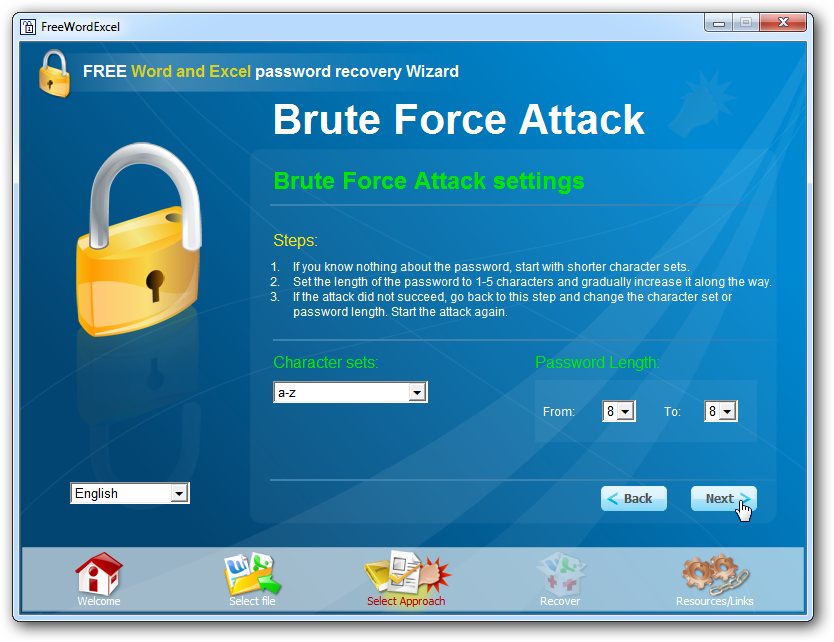
Free Word and Excel Password Recovery Wizard 2.09 lives up to its name, sometimes
Passwords are supposed to protect files from unauthorised access, but the sad fact is that just about any password can eventually be cracked. That’s bad news if you’re looking for bulletproof protection, but should you suddenly forget a password you might be grateful that your file isn’t as secure as you might have thought.
Password-recovery tools are plentiful, but freebies are thin on the ground. Many of these don’t even work, but one that does -- within certain limits of file format and password length -- is Free Word and Excel Password Recovery Wizard 2.09.
Google stands against government spying and censorship
Google's fifth "Transparency Report" shows that the emperors of the world wear no clothes. The search and information giant started releasing the data two years ago, offering a small peek into the bombardment of user information requests that world governments make -- everything from non-copyrighted YouTube video take-downs, to search result link removals, to, most alarmingly, private citizen emails and information.
But what is most alarming about these requests? Many are not even for serious matters of national security. Most are down right requests to silence, censor, track, and or monitor dissident internal political groups and political opponents. In some, it is the outright censorship of non-violent organizations, ideas, or even the requested silence of whistle-blowers pointing out corruption. Google's own policy analyst, Dorothy Chou, sees a disturbing trending rise, particularly from "Western democracies not typically associated with censorship".
LastPass 2.0 is your first line of data defense
LastPass has released a major new update for its secure password manager, LastPass 2.0, and the big addition is the extension of its Secure Notes feature.
As well as safely protecting simple text information, the new release also allows you to add confidential documents, PDF files and images as attachments to your secure notes. As with all other stored data, these will be locally encrypted to keep them safe from snoopers. And of course the attachments will then be synced to any location where you log in to your account, so they’ll be available anywhere.

The 25 worst pins and passwords
At a time when password breaches like the one at LinkedIn are once more making the news, there's plenty of good advice around about how to select a strong password as opposed to the sort of stereotyped easy-to-remember-but-stupendously-easy-to-guess password that turns up again and again in dumped lists of hacked passwords.
So if your favorite, much-used password (or something very like it) is in the following list, it might be a good idea to stop reading this now, go to the link on how to select a strong password and use it as a basis for changing all your passwords to something safer (then come back and think about the PINs you use). The list is abstracted from one compiled by Mark Burnett, representing the most-used passwords in a data set of around 6 million:
Use a 'code book' to protect (and to recall) your online passwords
With the recent announcements of password breaches at LinkedIn, and warnings from Google about state-sponsored attacks on Gmail accounts, it seems like a good idea now to review some password security basics. Then there is report today that someone hacked presidential candidate Mitt Romney's Dropbox and Hotmail.
In this post, we’re going to take a look at a rather low-tech solution to a decidedly high-tech problem: How to guard against password reset attacks, and where to securely store the answers to your password reset questions.
How will the LinkedIn hack affect you?
This morning when I logged into LinkedIn I was greeted with several front page references to the reported hacking of the site, and instructions for changing my password, which I did immediately. This is a good time to change all of your social media passwords, making sure you create a fresh password that is hard to guess and unique to each site. It is not unusual for malicious parties who grab a bunch of passwords from one site to try those same passwords on other sites.
Over 6.5 million account passwords showed up on a Russian forum in SHA-1 (hashed) format to prove that the hackers had indeed succeeded in penetrating LinkedIn. There is a good chance that if the hacker(s) achieved access to LinkedIn passwords then they also know the corresponding LinkedIn usernames, i.e. the matching email address of the account owner.