
Microsoft is bringing some massive visual changes to PowerToys v0.97

We know that PowerToys fans are always looking out for new modules to play with, and Microsoft is quite generous in sprinkling these across releases. But new releases are also about new features, bug fixes, and important tweaks and changes.
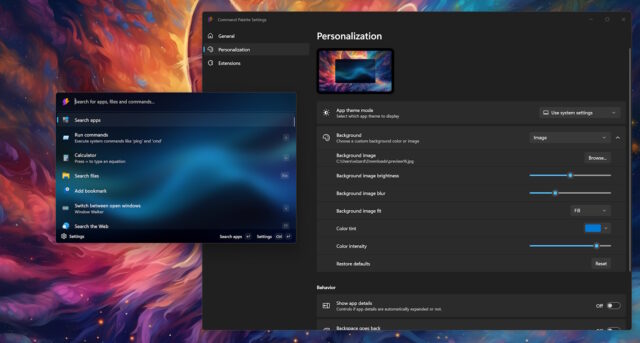
In an upcoming release, Microsoft is planning some significant changes for the suite of utilities. Key among the changes is support for theming and using custom backgrounds. One of the modules in line for these changes is the beloved Command Palette.
Changes are due to be introduced in PowerToys v0.97, although we do not yet have a specific release date for this version. News of some of the changes that the release will include come from none other than Niels Laute from the PowerToys development teams
There has not been an official announcement as such, but news has been shared on X by Microsoft employees. Responding to a query about PowerToys Run, Clint Runkas said that “I know there is a massive visual configuration tweak PR coming in”:
He passed the baton to Laute who went on to share some details about the changes that are on the way, saying “we have some great personalization stuff coming for 0.97:
@thesimmerdan yeah, we have some great personalization stuff coming for 0.97 :). For more info, see: https://t.co/y9BxVsSgRT
We haven't looked at intro/outro animations though - so this is great feedback. Agree on being optional, we have had feedback in the past about animations… pic.twitter.com/9eCo8fEz5T
— Niels Laute (@Niels9001) December 6, 2025
He also points to the PowerToys GitHub repository where there is a Pull Request for Command Palette. PR #43505, CmdPal: Light, dark, pink, and unicorns, reads:
This PR introduces user settings for app mode themes (dark, light, or system) and background customization options, including custom colors, system accent colors, or custom images.
-
- Adds a new page to the Settings window with new appearance settings and moves some existing settings there as well.
-
- Introduces a new core-level service abstraction, IThemeService, that holds the state for the current theme.
-
- Uses the helper class ResourceSwapper to update application-level XAML resources. The way WinUI / XAML handles these is painful, and XAML Hot Reload is pain². Initialization must be lazy, as XAML resources can only be accessed after the window is activated.
-
- ThemeService takes app and system settings and selects one of the registered IThemeProviders to calculate visuals and choose the appropriate XAML resources.
-
- At the moment, there are two:
-
- NormalThemeProvider
-
- Provides the current uncolorized light and dark styles
-
- ms-appx:///Styles/Theme.Normal.xaml
-
- NormalThemeProvider
-
- ColorfulThemeProvider
-
- Style that matches the Windows 11 visual style (based on the Start menu) and colors
-
- ms-appx:///Styles/Theme.Colorful.xaml
-
- Applied when the background is colorized or a background image is selected
-
- ColorfulThemeProvider
-
- At the moment, there are two:
-
- ThemeService takes app and system settings and selects one of the registered IThemeProviders to calculate visuals and choose the appropriate XAML resources.
-
- The app theme is applied only on the main window (WindowThemeSynchronizer helper class can be used to synchronize other windows if needed).
-
- Adds a new dependency on Microsoft.Graphics.Win2D.
-
- Adds a custom color picker popup; the one from the Community Toolkit occasionally loses the selected color.
-
- Flyby: separates the keyword tag and localizable label for pages in the Settings window navigation.
Some of these changes have already been implemented, included adding a Dark Mode toggle, but the rest of the list shows that there is a great deal more on the horizon.



