
Google thinks that Chrome autofill will make the holiday season easier

The holiday season is seen by many companies as being as good a reason as any to highlight the benefits of their products and services, and Google is no different in this regard. Using the perceived stress of preparing for everything that this time of year involves for many people, Google says that Chrome autofill is here to make life easier.
The company points to now fewer than four ways in which this feature of the web browser can help you out, trying to show how it is about more than just saving time filling in your address.
Google seems to think that just about every aspect of the preparation for the holiday season is a source of frustration that can be alleviate with an injection of speed. One of the new features the company points to is the integration between Google Wallet and Google Chrome which opens up a world of time-saving with forms:
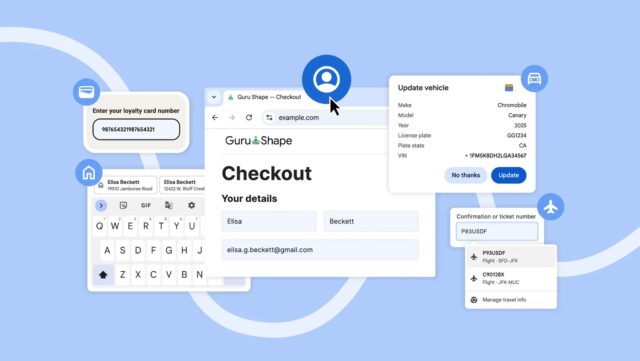
Chrome now integrates with Google Wallet so you don’t need to remember details like loyalty card numbers, travel details, and vehicle information.
Now, when shopping in Chrome on desktop or Android, you can use autofill for existing loyalty card information, making sure you earn your rewards without having to dig out your physical card.
And if you're booking flights for a holiday reunion or renting a car for a road trip, Chrome now can fill in your trip and vehicle details, making travel-related tasks simple.
Say you're renting a car at the airport and need to provide your incoming flight details. Chrome recognizes the form then pulls in the necessary flight information — like the confirmation number and dates — from your booking saved in Google Wallet. What used to be a frantic search for booking details is now an automatic, single-tap interaction.
The automatic filling in of forms with personal details such and name and address is very much to be expected, but Google says: “When you’re shopping or ordering a service, your saved Home and Work addresses are shared securely from your Google Account, ready to fill instantly. This smooth handoff removes all the hassle from your first interaction with any new website. It’s quick and accurate, and is rolling out on desktop, Android and iOS”.
While much is made of new features and options, there are some that have simply been improved. A good example is the enhancements that have been made to international address format support, making things easier for people around the world.
For mobile users, Google has heard feedback that autofill suggestions that appear above the keyboard were often too small and cramped to easily see. More than hearing feedback, the company has done something about it:
We’re solving this by introducing a two-line display for all autofill suggestions in Chrome on Android. This expanded view gives you more information about each suggestion — whether it’s a password, an address or a payment method — allowing you to instantly understand the content and choose the correct option faster and easier, ensuring accuracy every time.
Full details are available in Google’s blog post here.



