
Microsoft trawls Google complaint forums to make Office 365 look better
Microsoft is going on the offensive trying to demonstrate that Office 365 is better than Google Apps. A series of tweets sent out via the Why Microsoft Twitter account link to articles on the Why Microsoft website in which Office is compared to Google's offering in various scenarios. This latest campaign appears to be not just an exercise in advertising Office 365, but in actively putting down Google Apps.
A series of infographics draw comparisons between using the two tools in different professions. Things kicked off with a look at the life of a sales rep but there are other scenarios including the daily activities of a teacher and Microsoft is also keen to point out how different a company it is to IBM.

NirSoft’s new NetworkConnectLog tracks everything that connects to your network
The ever-productive Nir Sofer has announced another NirSoft freebie, NetworkConnectLog, which monitors your network and logs each device as it connects and disconnects.
The end results can be informative if you’re curious about network usage, or perhaps are just wondering whether anyone else is illicitly accessing your wireless network. Check the NetworkConnectLog table occasionally and you’ll see a list of everything that’s connected to or disconnected from your network, including its computer name, workgroup, MAC address, IP address, network adapter manufacturer and connect/ disconnect time.

Quick Review: Macrorit Disk Partition Expert Home 2013
Dividing a hard drive into multiple partitions brings many potential benefits. Using "System", "Programs" and "Data" partitions may help to keep your files organized, as well as improving performance, and you’ll be able to install and use multiple operating systems.
Windows provides an applet to handle partitioning tasks (right-click Computer, select Manage > Disk Management), but it’s distinctly short on features. And that’s why you might turn to the lengthily-named Macrorit Disk Partition Expert Home 2013, which promises "advanced hard drive partitioning" and is free for personal use.
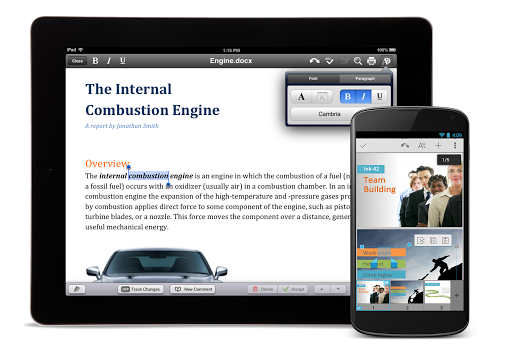
Google releases a refreshed Quickoffice for Android and iOS -- for free
When I bought the first-generation iPad in 2010, I intended to use it for taking notes in college classes. Unfortunately, the iPad didn't come with an office suite and Microsoft's was not available. And so, I was forced to try a bunch of alternatives. Ultimately, I found one that stood out among the rest -- Quickoffice. I found it to be complete and a pleasure to use.
While my iPad is long gone, Quickoffice has followed me to Android with great results. However, Google bought my beloved Quickoffice in June 2012 and I became very nervous. My concern was that the software development would cease under Google's leadership. I am happy to say that my concerns were for naught -- Google announces today that QuickOffice has been updated and is now free.

LICEcap records desktop activity in animated GIFs
When you need to show someone exactly what’s happening on your desktop -- to create a tutorial, say, or get help with some technical problem -- then it’s usually time to install a screen recorder. This will capture anything what you like and save it in a video, which you can then edit, maybe add a soundtrack, or otherwise fine tune to produce the best possible results.
What if you just want something simple, though? A lightweight, easy-to-use program to record a few seconds of activity, which you can then use anywhere, without having to worry about video support? Then you might prefer the free, cross-platform (Windows and OS X) LICEcap.
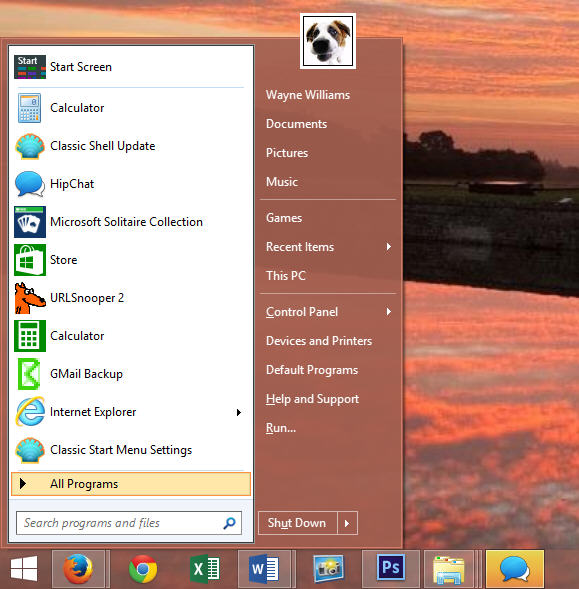
Get the Start menu back in Windows 8.1 RTM with Classic Shell
I’ve already declared my love for Windows 8.1, and got used to the fact that the Start menu, as we’ve always known it, is no more. I find the Apps screen pretty much fine to work with (certainly better than the Start screen), but there are still times when I miss the ease and speed of launching programs from a Start menu on the desktop.
If you can’t get on with the Start screen in Windows 8, and the Apps screen in 8.1 doesn’t really appeal, there are plenty of alternative Start buttons and menus available to download, either for free or a nominal amount. One of the most popular free choices is the freshly updated Classic Shell.

iolo System Mechanic 12 promises deeper repair tools, better system stability
Los Angeles software developer iolo Technologies has released System Mechanic 12.0 and System Mechanic Professional 12.0, major updates to its flagship PC stability and optimization tool.
Also available in cut-down freeware form, version 12.0 boasts major new stability tools, improved cleaning and expanded malware engine, plus full certification with the forthcoming Windows 8.1.

Piracy isn't theft… but its effects are wide and far-reaching
Philip Pullman -- UK author of His Dark Materials and Golden Compass fame -- is upset. In a column for the Index On Censorship he bemoans the invention of the Internet as a vessel that makes the lives of thieves easier, saying that piracy is theft "as surely as reaching into someone’s pocket and taking their wallet is theft".
Often, the argument against piracy is a slightly odd one. For many people it is a simple black and white affair -- it's not yours, and if you take it without paying for it you are stealing. But for others, online piracy -- be it movies, music or software -- is not tantamount to theft. It is the ethereal, non-physical nature of these types of goods that seems to bring about confusion.

Restore lost files from your Windows shadow copies with Z-VSSCopy
In principle, the Windows Volume Shadow Copy service (VSS) was a great idea: a fully automatic system which would transparently back up your files at regular intervals, maintain multiple file versions as required, and allow you to restore them with the minimum of hassle.
VSS wasn’t exactly easy to configure, though. Restoration options used to be hidden away in the File > Properties > Previous Versions dialog, and in Windows 8 even that’s disappeared. So if you want to take control of your shadow copies, then you’ll need some third-party assistance from the free-for-personal-use Z-VSSCopy.

Pale Moon update promises significant performance improvements
Moonchild Productions has released a major new version of its Firefox browser variant for Windows. As the version number implies, Pale Moon 24.0 and Pale Moon x64 24.0 are based on the same Mozilla code base as the latest stable build of Firefox, and come with the promise of significant performance improvements on top of a host of other changes and tweaks.
The performance improvements come from major changes and updates to Pale Moon’s rendering, scripting and parsing back-end, and should be visible in day-to-day use as well as via benchmarks.
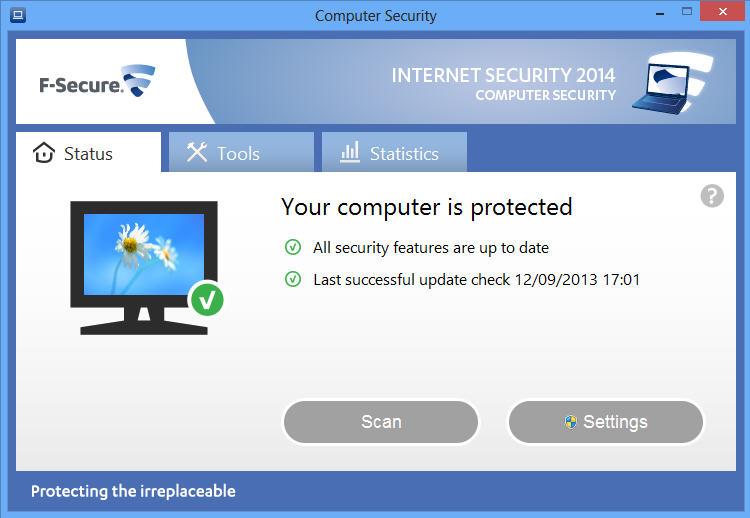
F-Secure’s 2014 lineup adds new banking, Facebook tools
F-Secure has today launched its revamped range of security products, including F-Secure Anti-Virus 2014 and F-Secure Internet Security 2014.
Top of the new Internet Security features list is probably the extended Banking Protection feature. This automatically kicks in at online banking and payment sites, and, the company says, "elevates security settings" so that "consumers can be sure that their banking transactions are safe and private".

ClipboardFusion Free automatically strips formatting from clipboard text
You’ve found some text you need on a web page, and so you copy it to the clipboard, paste it into a document. But now there’s a problem. Not only have you got the text, but it’s also come with links, colors, and a host of other formatting you really didn’t want at all.
If this only happens occasionally then there are a few tedious workarounds you could try (copy the text into Notepad, select and copy the converted plain text to the clipboard). But ClipboardFusion will strip formatting entirely automatically -- and it comes with some other interesting clipboard options, too.
SendMessage can control applications from scripts, shortcuts and more
Most Windows programs are controlled by "messages", signals which keep it up-to-date with what’s happening (you’ve moved the mouse) or tell it what to do: close down, perhaps.
If you’re thinking "so what?", then you may have a point. The typical PC user doesn’t have to know anything about this at all. If you’d like to automate common tasks via scripts or shortcuts, though, it may be worth looking at how this system can work for you.
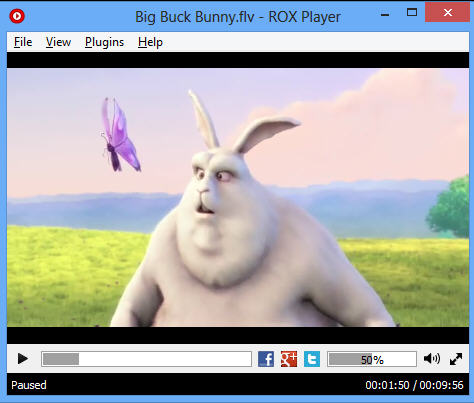
Stream torrents, IPTV, HTTP streams and more with ROX Player
ROX Player is a compact, lightweight and entirely free media player, which supports all the main audio and video formats, without having to clutter your system with codecs, filters or anything else.
Yes, we know -- that’s not the most compelling of program descriptions. ROX Player does stand out rather more in its web support, though, with the ability to stream files via HTTP, IPTV, and even BitTorrent.

DeepSound lets you hide confidential documents inside audio CD tracks
When you need to send confidential documents to someone else steganography can be an effective technique. Use SteganPEG to embed your files inside JPEGs, say, then just email them as normal, and casual observers will see only normal pictures. They’ll never realize your hidden data is inside.
And at first glance, DeepSound seems to carry out much the same function, but with audio files. Point the program at a WAV or FLAC file, hide a few personal documents inside, and you’re done: the audio files will still play just as before, and only someone who knows the secret will be able to extract your hidden content.