
OutWiker is a versatile personal wiki


OutWiker is a free personal wiki for organizing text notes into a tree structure. The program uses wiki-type notation and its own commands to set up lists, tables, headings and assorted formatting options, insert images and more.
There’s also support for including graphs, diagrams, equations and more. Pages can also have as many attached files as you need.
Cut PNG and JPG file sizes with Black Bird Image Optimizer

Black Bird Image Optimizer ($39.95) is a commercial tool which claims to "reduce the size of your photos several times without quality loss!"
Lossless compression which reduces JPGs and PNGs to a fraction of their usual size? This sounded unlikely to us, and it didn’t take long to find out why.
gInk is a quick and easy screen annotation app

GInk is an open-source Windows application which allows drawing and annotating your screen, then saving the results. The program is a handy way to highlight elements of a screenshot for presentations or demonstrations, or maybe to attach a quick note to a particular area of the screen.
Getting started is easy. There’s no installation required, you can run the program, tap the system tray icon and draw on the screen immediately.
Tad is a smarter CSV and data viewer

Tad is a free cross-platform tool for viewing and analyzing CSV files and tabular data. Open a CSV file and it’s displayed in a simple table. Clicking column headers quickly sorts the data by that field, and you can drag and drop headers to reorder them. That’s useful, but it’s also very familiar.
Fortunately, there’s more.
Blocked from running security software? AVCertClean can help

Malware will often try to block security software from running, and one of the ways it does this is by adding their code signing certificate to Windows’ Untrusted list.
If you try to run a program with an untrusted certificate, Windows displays a message like "this program has been blocked for your protection", or "an administrator has blocked you from running this program." (These messages can also appear for other reasons.)
Organize all your messaging and email services with Rambox

Rambox is a smart tool which enables accessing all your messaging and email services from a single cross-platform Electron-based app.
We really do mean all. The program opens with icons for 90+ supported services: Flock, Gmail, Hangouts, Hootsuite, Hushmail, iCloud Mail, ICQ, LinkedIn Messaging, Outlook, Outlook 365, Pushbullet, Skype, Slack, SquirrelMail, Steam Chat, TweetDeck, WhatsApp, Yahoo! Mail, Yahoo! Messenger, Zimbra and more -- and you can add as many others as you need.
Extend Android device battery life with AMOLED mnml Wallpapers

It’s been known for a long time that using dark wallpaper on devices with AMOLED screens can save energy and extend battery life. Exactly how much you’ll save depends on the wallpaper, your device and how it’s used, but typical figures are 5 to 15 percent.
AMOLED mnml Wallpapers is a straightforward ad-free Android app which provides a host of minimalist wallpapers to explore.
Xonotic is a free and fast arena shooter

Xonotic is a fast-paced arena-style first-person shooter for Windows, Linux and Mac. Powered by a modified version of the Quake engine, the program’s quality graphics and lengthy feature list already outperform some commercial products.
The game is convenient to play as there’s no setup required, and just a single download to cover all platforms. Grab a copy, unzip it and go.
Chrome Delight brings gorgeous time-lapse video to your New Tab page

There’s now a whole library of Chrome extensions which aim to enhance your "new tab" page, typically by importing new wallpaper from sources like Flickr and Shutterstock.
Delight goes a step further, replacing the usual static images with gorgeous time-lapse videos.
Safely clean your Windows Installer folder with PatchCleaner

PatchCleaner is a free tool which can detect and safely remove junk files from the \Windows\Installer folder, potentially freeing up gigabytes of hard drive space.
The folder contains Windows Installer-based setup programs and patch files, and uses these whenever you want to modify or update the software. They should be removed when you uninstall a program, but guess what? This doesn’t always happen.
kkrieger: a first-person shooter in under 100KB
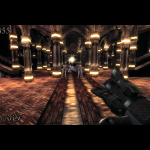
Tired of resource-hungry Electron apps hogging vast amounts of system resources for even the simplest task? For a neat reminder that it doesn’t have to be that way, take a look at kkrieger -- a complete first-person shooter in under 100KB.
The program was developed for a programming competition back in 2004, and it looks and feels much like the shooters of the day. You must run around a maze of corridors to a moody soundtrack, picking up guns, ammo, health packs and more, while shooting assorted monsters before they get too close.
Convert digital images to color ASCII art with Image2ASCII

Image2ASCII is an open-source Windows application which converts digital pictures to stylized ASCII art. The program is tiny, and arrives as a stand-alone executable. There’s no installation required, simply download and run it.
Image2ASCII’s interface follows its own rules. It has a couple of boxes for the loaded and converted images, and a bunch of icons, without captions or tooltips, which you have to figure out for yourself.
Find suspect processes, files and settings with ESET SysInspector

ESET SysInspector (32-bit) is a powerful tool for examining the low-level details of a PC, and perhaps spotting malicious files, poorly configured settings and other issues that might be causing you problems.
The program has been around for a long time, but we’ve not looked at it for several years, and as ESET issued a rare update recently we decided to see what it could do on a test Windows 10 laptop.
Automatically change Android device settings with AUTOSET

AUTOSET is an interesting $2 app which enables altering your Android device settings when you run an app, when an event happens, on a particular schedule, and more. This opens up all kinds of possibilities. Choose a navigation app in AUTOSET’s list, for instance, and you could increase the screen brightness and media volume.
You could use Wi-Fi more selectively by configuring your device to turn it on when you run YouTube and similar apps, and turn it off when they close.
Dipiscan is a professional, customizable network scanner

Dipiscan is a professional network scanner, fast, capable, and with a huge number of configuration options. The package is easy enough for anyone to use. Launch it, click Analyze to scan your current network (no need to enter an IP address range, it figures out sensible defaults for itself), and the process is completed within seconds.
A table displays details on every detected network device: reply time, NetBIOS name, DNS name, domain and user, MAC address, adapter manufacturer, and maybe the operating system, device description, available shares and more.
© 1998-2025 BetaNews, Inc. All Rights Reserved. About Us - Privacy Policy - Cookie Policy - Sitemap.