
AVG Family Safety alternative browser launches on Windows Phone, updates on iOS
Security software company AVG has taken an active role in providing security apps for the popular mobile platforms like iOS and Android, and has garnered approximately 114 million active users across them all.
Today, AVG has released its free alternative Web browser AVG Family Safety for Windows Phone, following yesterday's update to the software for iOS.

The spotlight shines on these 27 software downloads
As we move through June, there are more and more software titles being released. The past week has been pretty busy, particularly on the web browser front, but there have also been a number of other programs worthy of note.
If you still use physical CDs and DVDs, ISO Workshop 3.0 is worth taking a look at as it enables you to work with virtual drives to save having to keep switching discs. Diskeeper 12 Home is a great tool for anyone looking to ensure that their hard drive is completely defragged, and Diskeeper 12 Pro includes support for drives exceeding 1TB. Another interesting tool for maintaining your system is GhostBuster 1.0.1.0, a free utility that remove references in the registry to hardware you no longer use. There’s also a portable version available – GhostBuster Portable 1.0.1.0.

Which Firefox is right for you -- 13, 14, 15 or 16?
Following on from the release of Firefox 13 FINAL, Mozilla has updated its developmental branches to versions 14 (Beta), 15 (Aurora) and 16 (Nightly/UX) respectively. After the relatively exciting new features in version 13, what’s coming next? How does integrated social networking tools, panel-based download manager and improvements in OS X Lion users sound for starters?
Get a head’s up on what’s coming and discover which build is best for your personal needs with our updated guide to what the future holds in store for Firefox.

Firefox 13 arrives with major new features -- get it NOW!
Ahead of its official release, Mozilla has uploaded Firefox 13 FINAL to its servers, the latest version of its open-source, cross-platform web browser. Version 13 will be officially unveiled on June 5, when it should also become available as an update to existing Firefox users.
Version 13 is a landmark release, containing a number of major new features: redesigned home and new tab pages, support for “tabs on demand” loading of pages on restoring the previous browsing session to speed up startup, and a new Reset Firefox feature for attempting to fix major problems with a single click.

Techies, June will be the most amazing month EVER
Save your greenbacks now. During these thirty days you'll hear about lots of innovative and imitative products coming for the holidays. There's no coal in Santa's stocking this year, just too much tech to fit your gift list.
Not since the late 1990s, when seemingly every day some vendor announced a new PC that was ever-so-better than the one you bought the week before, is there so much new tech coming so close together. The cloud connected-device era ushers in a storm of tech. Save up now so you don't break the bank account or exceed credit card limits later.

Microsoft turns on 'Do Not Track' in Internet Explorer 10 by default
In a move that is sure to rankle web advertisers, Microsoft late Thursday disclosed that Internet Explorer will have "Do Not Track" functionality on by default. This will prevent browser data crucial to behavioral and targeted advertising from being sent to third parties and could seriously disrupt the advertising industry in general.
Microsoft is vowing to move ahead despite the complaints of the industry. "While some people will say that this change is too much and others that it is not enough, we think it is progress and that consumers will favor products designed with their privacy in mind over products that are designed primarily to gather their data", IE vice president Dean Hachamovitch says.

Confused yet? NetApps ranks Internet Explorer No. 1 (Microsoft agrees), but StatCounter puts Chrome tops (Google agrees)
The battle of the browsers reached new territory in May, as IE and Chrome directly engaged for the first time. Firefox is collateral damage -- destined to fall to No. 3, whether by Net Applications' or StatCounter's reckoning. Mozilla's open-source champion that took back the web from Microsoft, falls before Chrome's advances. The browser wars are back with a vengeance and the heretofore top two are in retreat. Well, depending on whose counting you believe.
While the top browser, as measured by usage share, may be disputed, Firefox's decline is not. StatCounter put Chrome ahead of Firefox last summer. NetApps has the Mozilla browser and Chrome in a May photo finish -- 19.71 percent and 19.58 percent share, respectively. Given the downward and upward trajectories of both, Google's browser is all but certain to claim second place during June. Firefox's decline is all but inevitable -- that despite Mozilla adopting similar fast-track development that sets both browsers' apart from slow-updating Internet Explorer and Safari.
Most of you use Google Chrome
On June 1, Net Applications and StatCounter will release browser usage share for May. But why wait? Ten days ago I asked which is your preferred primary browser. You answered, and Chrome takes the crown, followed by Firefox and Internet Explorer. The days of IE dominance are over. No wonder the European Union is crawling down Google's throat over search.
The poll results are fairly consistent with those from one conducted last year, even though the sample size is smaller, 1,160 as I write. I asked: "Which is your preferred primary web browser, meaning when you can choose it? (For personal computer, not phone or other device.)" The idea is to gauge browser usage based on what people would choose, pushing aside what they might be compelled to use at work. A stunning 46.72 percent of respondents choose Chrome, 25 percent Firefox and 20.4 percent Internet Explorer.

Take one of these 27 downloads out for a spin
May is coming to a close, and as June beckons there are still countless software releases to keep track of. If you’ve had trouble keeping up with everything, this handy roundup is here to bring you up to speed.
This past week saw the release of WikidPad 2.1_01, a wiki-style text editor that can be used to capture thoughts and ideas -- stored locally or exported as an HTML file to upload to the web. If you need to store reminders of things you need to do and appointments you need to attend, PNotes 9.0.107 is a great sticky note tool that may be able to help you out. There’s also PNotes Portable 9 for anyone who likes the idea of running the same program from a USB drive. If pictures are more important to you than words, Juicebox 1.0.2 can be used to create a stunning gallery to show off your digital photos -- all in HTML5 glory.
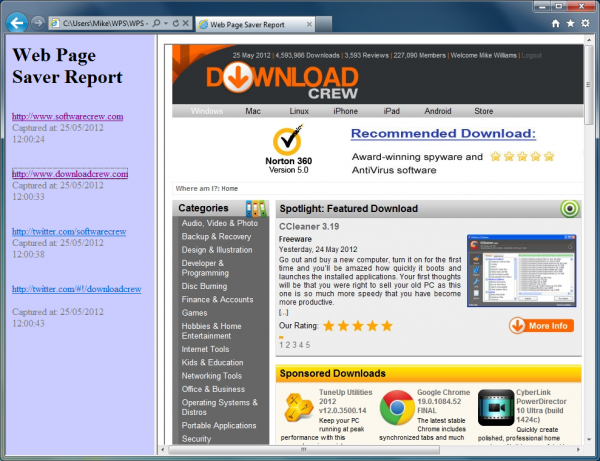
Web Page Saver lives up to its name
A couple of weeks ago we wrote about wpic, a console tool that could easily save a complete webpage as an image. But while this works well, it seemed a little basic, and is probably best used within scripts if you needed to automate the saving process. If you were also interested in the core idea, but wished wpic had more features, though, Web Page Saver might appeal: it can also save webpages for you, but takes the idea to the next level.
The program’s simple GUI allows you to enter up to five URLs, for instance, which can then all be saved in the same operation. (You need to enter the protocol, though -- http://my.domain.com, not just my.domain.com -- for this to work properly.) And it can also import URLs from text or CSV files, which may be handy if you often need to capture the same groups of sites.
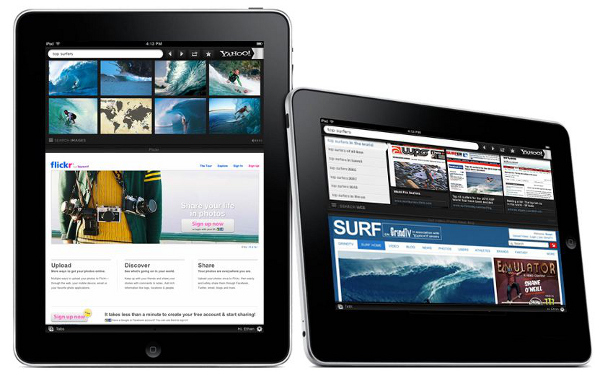
Yahoo launches the first Pinterest-integrated mobile Web browser, Yahoo Axis
After a consistent stream of bad news from Yahoo's executive offices, the fading giant search company has finally launched a big new development that takes on its core business challenge: staying relevant. The company on Thursday launched its own Web browser called Yahoo Axis.
Axis is centered around searching, bookmarking, and content syncing across multiple devices. While Yahoo says Axis is both a desktop and mobile browser, it is really just a mobile browser for the iPad and iPhone, and a plug-in for Safari/Chrome/IE/Firefox which amounts to a little more than a "next-gen Yahoo Toolbar."

Tell me, in what alternative universe does Chrome usage surpass Internet Explorer?
Surely it can't be this one, but that's what StatCounter's weekly report would have you believe. Can it be true? Has IE really fallen so low and Chrome come so far? That's my question for you, as we revive our browser usage poll.
For the week May 14-20, IE global usage share is 31.94 percent compared to 32.76 percent for Chrome. This change in leadership comes after a May 1 methodology adjustment that should penalize Chrome. Google's browser pre-renders pages to speed up search, but not all are viewed. StatCounter now adjusts for them. I must say that StatCounter's data dramatically differs from Net Applications', which on May 1 put Chrome third to Firefox and IE usage about three times more.

Security dominates mid-May's 27 software downloads
Halfway through May and the software release schedule shows no sign of abating, and beta releases stand out over the past week. Some of the biggest releases come from security experts Norton, which updated 2013 public betas. Norton AntiVirus 2013 v20.0.0.106 beta, Norton Internet Security 2013 v20.0.0.106 beta and Norton 360 2013 v20.0.0.106 beta provide an early look at what to expect from the upcoming security line, and all of these tools are free during the beta testing period.
But Norton is far from the only name in the security world, and ESET Smart Security 6 Beta (32-bit) includes not only antivirus protection but a firewall and interesting anti-theft features for laptop users; there’s also a 64-bit version of the program available -- ESET Smart Security 6 Beta (64-bit).

Secure your connections with HTTPS Everywhere
When browsing the Internet you may well have noticed that some of sites you visit are secure, while others are not. While HTTPS is most often used for secure shopping and banking web sites, there is no reason that connections to other pages should not be encrypted to help improve privacy and security. If this is something that has concerned you, HTTPS Everywhere could be just what you have been looking for.
This free browser extension can be used to ensure that a secure connection is used whenever available. There are a huge number of websites that offer support for encrypted HTTPS connections, and yet will default to sending visitors to the regular, unencrypted HTTP version of the sites. HTTPS Everywhere uses a series of specially written rules to redirect your browser, provided you are using Chrome or Firefox, to the secure version.
Chrome 19 arrives with tab syncing -- get it now!
Google just pumped out another stable release of its web browser as Chrome 19 sees the light of day. It seems as though new browser releases are becoming an almost daily occurrence these days, so what can you expect from Google’s latest offering? Well the big new feature to be found in this release is tab syncing -- and this is as self-explanatory and awesome as it sounds.
In many regards Chrome is playing catch-up with Firefox here, as Mozilla’s web browser has featured the ability synchronize tabs for some time now. Chrome 19 takes very much the same approach so that whenever you are signed into your Google account any tabs you have open are automatically synced to the cloud. When you switch computers you can then access any tabs you had open on another machine by accessing the Other devices menu of the new tab page.