

How to activate all of Windows 11's secret God Modes
Windows 7 introduced a useful hidden feature called God Mode, which provides access to all admin tools and control options in one place. Since Microsoft hasn't fully removed the Control Panel from Windows 11, God Mode remains functional in the company's newest operating system -- and you can use it in Windows 10 too.
To enable God Mode, you simply need to create a folder and rename it using a specific command. In addition to the standard God Mode, there are several alternative modes you can activate. Here’s what you need to do.
Get Windows working the way YOU want with Super God Mode
You are probably familiar with God Mode in Windows. This feature displays all of the admin tools and control options on a single screen, but it’s tucked away, so you need to create a folder and give it a special name to activate it.
There are actually multiple God Modes, and we’ve covered them all, along with how to activate each one, here. However, if you're looking for something even more powerful, you should definitely try Super God Mode.

How to activate all of Windows 11's secret God Modes
Windows 7 introduced a useful hidden God Mode that displays all of the admin tools and control options on a single screen. Because Microsoft has yet to phase out Control Panel entirely, this feature works just fine in Windows 11.
It’s very easy to action God Mode -- you just need to create a folder and give it a special name -- and there are actually quite a few alternative God Modes available. Here’s what you need to do.
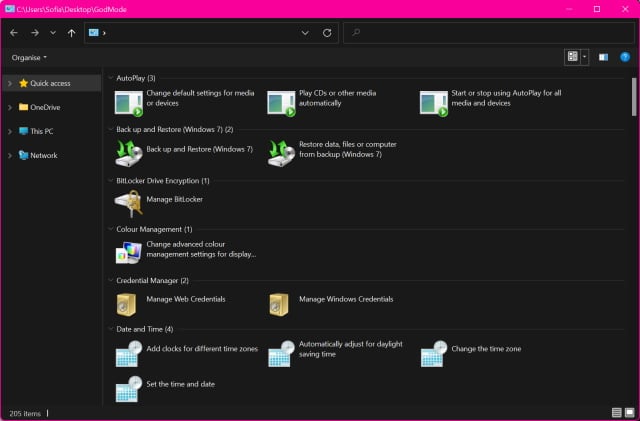
Windows 11 has a handy God Mode for power users
Windows 11 is gradually making its way to more and more computers, giving an ever-growing userbase the chance to try out the latest features. But while Microsoft has used Windows 11 to introduce lots of changes and new options, it has also continued trend of moving away from some of the familiarity of Windows of old.
This includes a continuing move away from the Control Panel to the Settings app. This change is not to everyone's liking, but there is some good news. There is a special God Mode option that gives access to a huge number of Control Panel options in one place, giving power users the control they crave. Here's how to activate it.



