Microsoft reveals the most dangerous, pointless and misunderstood group policies for Windows 11
There are a huge number of ways to customize, optimize and tweak Windows, some of which involve using third party utilities, while others rely on tools that are built into the operating system -- like Group Policy Editor.
System administrators have used group policies to implement a wide range of settings for a long time now, but there are some that should be avoided. Microsoft has shared information about some of the legacy group policies that should not be used; some because they have no effect at all, some because they have unwanted or unexpected side effects. Take a look through the list and see if you need to make any changes to the policies you have put in place.
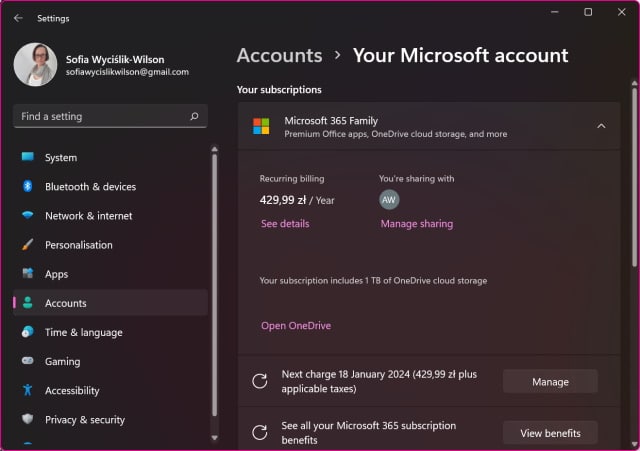
Windows 11 Settings can finally be used to manage your Microsoft account
If you have ever had to change a setting in your Microsoft 365 account, you'll possibly have been irritated by the fact that you have to do so in your browser rather than in Windows. But this is changing.
Last week, Microsoft released Windows 11 Build 22000.466 (KB5008353) to Windows Insiders signed up for the Beta and Release Preview channels. What many people -- including us! -- failed to notice in the changelog, or in the build itself, was an important change to the Settings app that means it is now possible to view and change options relating to your Microsoft account.
Microsoft is bringing another mouse utility to PowerToys to make it even more useful
Some of the newest additions to the handy collection of tools known as PowerToys have been mouse-related. Sticking with the theme, Microsoft has just revealed that there are plans for more utilities to enhance the capabilities of mice around the globe.
We have already seen the very useful Find My Mouse and Mouse Highlighter tools in recent versions of PowerToys, and later this month there is going to be yet another member of the family -- Inclusive Mouse.
Microsoft releases Windows 11 Build 22538 with Voice Access updates and lots of fixes
It’s Wednesday and that can only mean one thing for Windows Insiders in the Dev Channel -- a new Windows 11 build from Microsoft!
Build 22538 fixes a number of problems, including one that caused explorer.exe to crash for some Insiders when they pressed the hardware volume buttons. The build also includes some updates to the Voice Access feature introduced in Build 22518.

Run Windows apps on Linux with Wine 7.0
It used to be, people would scoff at the idea of switching to a Linux-based operating system due to a lack of software. While that is still true for some folks -- especially business users -- it is less of a concern these days. Why? Well, so many things are done through the web browser nowadays, lessening dependence on Windows software. For many consumers, just having the Google Chrome browser on, say, Ubuntu, is more than enough to accomplish their wants and needs. Not to mention, there are many quality Linux apps like GIMP and DaVinci Resolve.
But OK, lets say you really want to use a Linux-based operating system, but there's some Windows-only software that you absolutely cannot live without. Thankfully, you may still be able to ditch Windows and upgrade to something like Fedora or Linux Mint. How? Thanks to the excellent Wine! This compatibility layer (don't you dare call it an emulator), can sometimes enable you to run Windows software on Linux. Today, version 7.0 is released.
Microsoft releases emergency KB5010795 update for Windows 11, and nine more out-of-band updates, to fix Patch Tuesday problems
The first Patch Tuesday of 2022 was little different to those in preceding months in as much as the updates released by Microsoft caused various problems for lots of Windows users -- quelle surprise!
As a result, the company has been forced to release a series of out-of-band updates for numerous versions of Windows. The updates (KB5010789, KB5010790, KB5010792, KB5010793, KB5010794, KB5010795, KB5010796, KB5010797, KB5010798 and KB5010799) fix problems with virtual machines, VPN connections, Windows Server Domain Controllers and more.
Third-party widgets are coming to Windows 11 (probably)
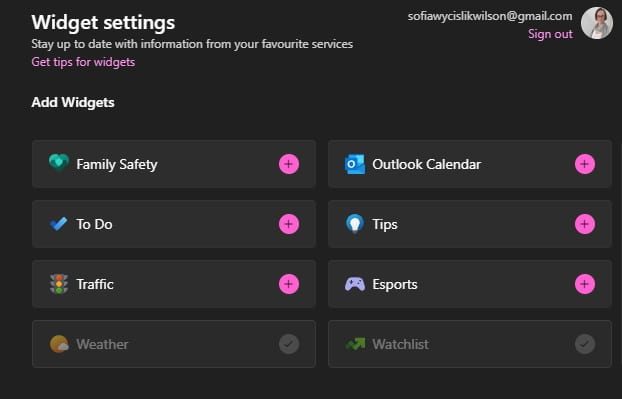
The Widgets component of Windows 11 was something that seemed like a great idea on paper, but has thus far failed to generate too much excitement. This is at least in part down to the fact that only official Microsoft widgets exist -- but this is going to change.
It is looking very much like Windows 11 is going to be gaining support for third-party widgets, opening up the possibility of a wider range of genuinely useful tools coming to users. There are also hints that a widget store, called the Widget Board, is on the way.

Best Windows apps this week
Four-hundred-seventy-three in a series. Welcome to this week's overview of the best apps, games and extensions released for Windows 10 and 11 on the Microsoft Store and elsewhere in the past seven days.
Microsoft released a new Windows 11 build this week. It includes a redesigned flyout and other improvements.
Microsoft releases Windows 11 Build 22533 with redesigned flyout
With the holidays a distant memory, Microsoft is back to its regular Wednesday release schedule with a new Windows 11 build for Insiders on the Dev Channel.
Build 22533 updates the flyout design for the hardware indicators for brightness, volume, camera privacy, camera on/off and airplane mode, so it now follows Windows 11’s design principles.
Microsoft urges Windows users to patch critical HTTP vulnerability
Microsoft has fixed a critical vulnerability which affects several versions of its operating system including Windows 11 and Windows Server 2022.
The security bug is an HTTP vulnerability which is tracked as CVE-2022-21907 and Microsoft warns it is wormable. The company has issued a fix for the flaw and says that users should prioritize installing it to secure their systems.
Microsoft releases KB5009566 update to fix long-standing Windows 11 issue
Microsoft has released the first cumulative patch of 2022 for Windows 11 in the form of the KB5009566 update.
The patch is a mandatory cumulative update that addresses security problems thanks to the inclusion of January 2022 Patch Tuesday fixes. These address no fewer than six zero-day vulnerabilities, and a total of 97 security issues in all. The KB5009566 update also address a long-standing issue with Windows 11 and takes the operating system up to build 22000.434.

Microsoft Edge for Windows 11 is getting Dynamic Refresh Rate to boost performance and reduce power consumption
While still a long way from being the most popular browser on the market, Microsoft Edge continues to be where some of the most interesting developments are to be found. A great example of this can be seen in the latest Canary build of the browser.
In Edge 99, Microsoft has added a new setting that can be configured to use higher refresh rates only when scrolling. This not only means that scrolling looks nicer, but also that the lower refresh rates used the rest of the time will help to reduce power consumption, thereby improving battery life on laptops.
Best Windows apps this week
Four-hundred-seventy-two in a series. Welcome to this week's overview of the best apps, games and extensions released for Windows 10 and 11 on the Microsoft Store and elsewhere in the past seven days.
The first big Windows 11 update may come earlier than expected. Microsoft released the first Windows 11 build of the year to the public this week.
Microsoft releases Windows 11 Build 22526 with improved file search
Having taken a break for the holidays, the Windows development team is back in business with the first new Windows 11 Dev Channel build of 2022.
Build 22526 comes with a decent number of fixes, as well as some welcome changes and improvements.
Microsoft makes updated Notepad and Media Player available to more Windows 11 users
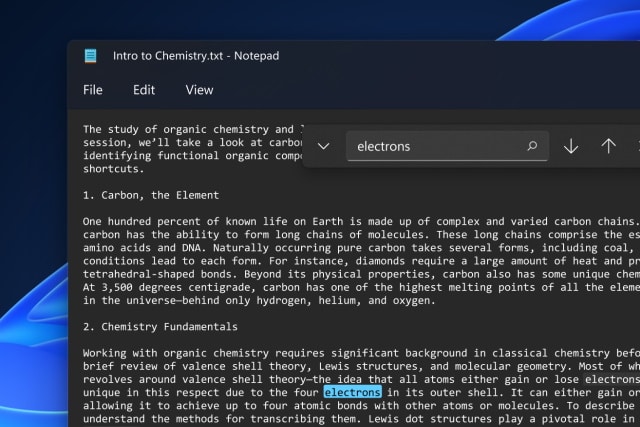
It has been suggested that Windows 11 shipped as an unfinished product. Microsoft would almost certainly disagree, but it's an idea that is backed up by the fact that bundled apps are being updated -- and not just with minor tweaks, but with major overhauls.
We've already seen a preview version of the redesigned Notepad, and now Microsoft is making this staple app available to more people, complete with a new dark mode option and more. And it doesn't end there. An updated version of Windows Media Player, which replaces Groove Music, is also available to a wider range of users.