
WhatsApp for iOS gains an enhanced Clear Chat feature

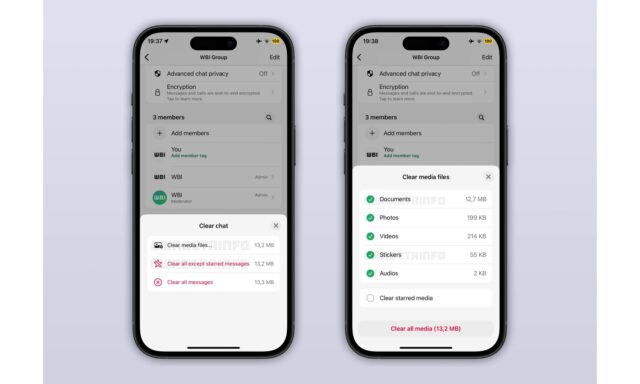
Currently in beta testing, iPhone users are being given access to an enhanced and updated version of WhatsApp’s chat cleanup tool.
The feature – which allows for the deletion of messages and media in different ways – is not completely new, but it now offers greater control over what is deleted. The cleanup tool now provides a better balance between freeing up space and retaining the files that were shared in a chat.
Now when you choose to delete a chat in the iOS version of WhatsApp, the app displays a new confirmation screen from which it is possible to select various components which should be retained. Included in this list are photos and videos, and there is also the choice of saving or deleting messages which have been starred.
The confirmation screen is part of a two-step process which gives users more control over how messages are deleted. The first screen – as can be seen in the screenshot above, shared by WABetaInfo) – shows shortcuts for deleting all messages, or all messages apart from those which have been starred. The “Clear media files” option allows for further customization via a second screen.
The second screen allows the deletion of documents, photos, videos, stickers and audio files from chats. Next to each of the options on the two confirmation screens, there are files sized shown, so it is possible to see just how much space will be freed up by deleting things. A running total is also displayed to save you from having to manually calculate things.
WABetaInfo explains:
Instead of a simple confirmation alert, the action now opens a bottom sheet that clearly explains what content will be removed. Messages, starred messages, and stored media are shown as separate categories so users understand exactly what is affected. The process is structured to prevent accidental deletions by encouraging users to review their choices before continuing.
Starred messages receive special attention, as WhatsApp asks whether they should be deleted or kept during the clearing process. This makes it easier to clean long conversations without losing saved information. Users can also choose to delete specific media types like images, videos, documents, audio, stickers, or voice messages and see an estimate of the storage space that will be freed. The new clearing tool is available from both the chat info screen and the chats list, offering the same detailed options from either entry point.
The new options are gradually rolling out to iOS user who have installed the WhatsApp beta for iOS 25.37.10.72 update, and it is not yet clear when this might be made more widely available.



