
Create professional video slideshows with PhotoFilmStrip
Converting your favorite photos into a video slideshow can be a great way to share them with others, and there are plenty of free tools to handle the task (Pic View EXESlide, say). But most deliver only very basic results, simply cutting from one static image to another: not exactly interesting.
PhotoFilmStrip takes this idea a little further by making smart use of the Ken Burns effect, where your slideshow smoothly pans and zooms across each image. It produces a much more engrossing and professional video, and is surprisingly easy to set up.

New Paint.NET 4.0 alpha adds Bezier curve, tweaks status bar
Two months after the initial alpha release, dotPDN LLC has released a brand new build of Paint.NET 4.0 Alpha, its free image-editing tool for Windows. Build 5105 of this pre-release software includes a number of tweaks, improvements as well as the usual flurry of bug fixes associated with pre-release software.
Only one new feature is added to build 5105: a Bezier curve can now be applied using Paint.NET’s Shapes tool. Users should also find both line and curved shapes now work when the rounded line cap styles is applied.

Learn to love the command line (maybe) with cmder
Many PC users need to access the Windows command prompt occasionally, but its awkward interface means this is rarely a happy experience. Line editing works differently, you can’t use the clipboard as normal, even the window won’t resize properly: it’s no great surprise that most people avoid the console just as much as they can.
You don’t have to put up with the standard Command Prompt, though. There are plenty of applications which can make your console life very much easier, and cmder is the perfect way to start trying them out.

Brighten up your PC with the best Bing homepages of 2013
Bing is a decent search engine, and the daily images that adorn its homepage are always worth a look. Late last week the Bing team announced the ten most popular homepage images for 2013, which includes an aerial view of Gardens by the Bay and the Super Trees in Singapore City, a night shot of Mount Shasta in California, a mangrove seen from underwater in the Seychelles, and Lulworth Cove along the Jurassic Coast, in England. As well as showing off the pictures, the Bing team provides a link so you can download them for use as desktop wallpaper.
If you’d prefer to have the images cycling in a screensaver, the Bing team has now made that possible too, in the form of a new 13MB "Wallpaper & Screensaver" Pack.

Sysinternals Disk2vhd 2 supports WinRE volumes, VHDX
Windows Sysinternals has unveiled Disk2vhd 2.0, a tool for converting physical Windows systems to virtual formats.
The major plus in this release is support for VHDX, a significant update to the VHD format which offers much-improved performance, increased reliability, and more. Just leave the "Use Vhdx" box checked and the program will create a VHDX file for you.

The UK’s most-used TV guide app goes global
Television used to be simple. When you only had a few channels delivered via an aerial or a cable, deciding what to watch and where to watch it was easy. But with multi-channel digital services, the ability to watch on mobile devices, catch up with programs you’ve missed and more, it’s now a whole lot more complicated.
Little wonder then that apps which help you work out what to watch are proving popular. YO.TV, the UK's most used TV guide with five million customers, now plans to expand to 50 countries in 14 languages. Available on Google Play and the App Store, YO.TV lets users see listings for all their favorite channels across broadcast providers. Its Now and Next options streamline the scanning process, giving a cross section view of the full channel listings for any given time block. Personalized features let users set themselves reminders on their personal calendars so they don’t miss a favorite show or share their tastes in TV via social media.

CCleaner adds individual cookie cleaning, Nero 14 support
The holiday season is upon us, and utilities developer Piriform has delivered a Christmas gift to all CCleaner users with an update to version 4.09.
The latest release now offers finer tuned cleaning, with an option to delete individual cookies from the Cookies interface.

LookDisk searches your drives for files, duplicates, text, more
Your PC’s hard drive is packed with files. Windows doesn’t provide all the search power you need, and you don’t have the time to research a host of specialist search tools, either.
The answer? LookDisk. It’s versatile, searching your drives for files, text, duplicate files and more. A host of configuration options ensures the program works just as you require. It’s also free, and portable, so ready to use almost anywhere.

STDU Viewer opens PDF, MOBI, TIFF, CBR/CBZ, EPub, PDB files and more
If you’re working on someone else’s PC and need to view a PDF file, then it probably won’t be an issue. Just about everyone has a copy of Adobe Reader (or something similar) around, allowing you to open and browse the document as usual.
If you’re faced with a DjVu file, though -- or a TIFF, MOBI, EPub document or PSD image -- then you might need to do a little extra work. And that’s where STDU Viewer comes in.

Get a REAL Start button and menu in Windows 8.1
So Windows 8.1 is finally here and although it is a massive improvement over its predecessor (I recently had to install Windows 8 on a laptop and couldn’t believe how bad it is in comparison), Microsoft’s new Start button really isn’t what a lot of people were hoping for.
If you want to enjoy the benefits of the new operating system without being bothered by the Modern UI there are lots of alternative third-party options available. And when I say lots, I mean it. Some cost money, others are free. I’ll list my favorite three and then suggest some others to try if those don’t appeal.

Avast 2014 update improves detection, performance and compatibility
Avast Software has announced the update of Avast 2014 (including Free Antivirus 2014, Internet Security 2014 and Premier 2014) to build 9.0.2011. Don’t be fooled by the minor version number, though -- this is a major update with some significant new features.
The installer now uses Avast's self-defense driver from the moment it launches, for instance, making it much more difficult for active malware to shut it down.
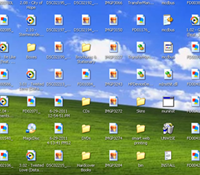
Keep desktop icons out of sight with AutoHideDesktopIcons
Is your desktop a cluttered mess of shortcuts, files and folders? If you can never quite find the time to clear it up, then you might appreciate AutoHideDesktopIcons, a free tool which hides any desktop icons until you need them.
The program is portable, no installation required; just run it, click "To-Tray", and wait. Within five seconds your desktop icons will vanish. When you need them, left click the desktop and they’ll return. Easy.

Notepad too limited? Give Poet a try
If you’ve finally given up on Notepad and its extreme lack of features, then Googling for "Notepad replacement" will point you towards plenty of alternatives. But these can be very complex, packed with developer-oriented features, not so welcome if you’re mostly only interested in simple plain text editing.
Poet is a little different. While it can be used as a simple programmer’s editor (there’s customizable syntax highlighting, for instance), it doesn’t pile on the unnecessary extras. You can’t sort or split lines, there’s no column editing, no XML manager, no built-in telnet client. And although the program has some useful bonus tools of its own, they generally stay out of your way, only appearing when you need them.

Fluffyapp makes file sharing in CloudApp easier than ever
After an extended three years in beta, developer Richard Wang has released FluffyApp 2.0, a major new release of his freeware client for Windows users wishing to share files using the CloudApp file-sharing service.
Version 2.0 introduces a new flyout, Internet Explorer trigger plugin and adds various tweaks and improvements, such as using Windows’ own shortcut key mechanism for greater reliability.

Quickly take, upload and share screengrabs with ICUP
There’s not exactly a shortage of PC screen capture tools around, but Starpunch’s Chris Gingerich has just added another with ICUP (Image Capture and Upload Program). Is it worth your time? We took a look.
Setup is unusually flexible. Run ICUP.exe and it’ll offer to install itself locally; refuse and it’ll run as a portable version, with the option to install it fully later. Either way, there’s no adware or other marketing trickery here.