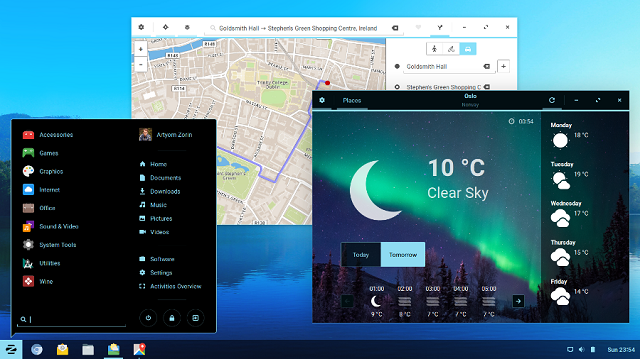
Zorin OS 12 Ubuntu-based Linux distribution now available -- a Windows 10 alternative
Windows 10 is a really great desktop operating system, but it is not for everyone. For those that care deeply about security and privacy, an open source Linux-based operating system is a wise alternative. The problem? Learning a new user interface can be hard for some. If you have always used a Windows OS in the past, moving to a desktop environment like GNOME or Unity can be confusing and scary.
Luckily, for those that have difficulty with change, there are some Linux-based operating systems that are designed for Windows-switchers. One fairly popular such offering, Zorin OS, has now reached version 12. It is designed to be familiar to former users of Microsoft's OS. While the company does charge for an "Ultimate" version, the "Core" edition of Zorin OS 12 is entirely free.

How to enable Windows 10's Block at First Sight protection in Windows Defender
Windows Defender in Windows 10 may not be the best security solution, but it will keep your system safe from threats if you don’t have a third-party anti-malware program installed. Microsoft made several improvements to it in the Anniversary Update, and as a result it's now much more useful.
Newly introduced features, available from Build 1607, include Limited Periodic Scanning, which can intermittently scan your system and notify you of any threats (even if you are using another anti-malware program and have Windows Defender turned off), and Block at First Sight protection.
Windows 10 Creators Update Preview Build 14971 for PC arrives on the Fast ring, includes Paint 3D, removes Command Prompt
Continuing its weekly update schedule, Microsoft has rolled out another new Insider Preview build to the Fast ring. Build 14971 is only for PC this time around. Windows 10 Mobile users on the Slow ring can however, now upgrade to Build 14965.
There won’t be a new Insider Preview build for either platform next week, due to Thanksgiving, so you’ll have to make do with this one, which offers some interesting additions, and also says goodbye to the Command Prompt.

Microsoft has huge Black Friday savings on Surface devices, Windows 10 PCs and Xbox One S
Black Friday is just around the corner, and Microsoft is already talking about what special offers it's going to have on the big day. Whether you're looking for a new desktop PC, an Xbox One S, or a Surface, you could save yourself hundreds of dollars.
In fact, if you are in the market for a Surface device, there's never been a better time to consider making the leap -- you could save up to $430. Microsoft is also offering the Xbox One S at its lowest price ever, and there are savings to be made on games and much more.
Microsoft says Windows 10 Anniversary Update is the most secure version of Windows ever
In a white paper and blog post, Microsoft makes the claim that changes introduced in Windows 10 Anniversary Update make it the most secure version of Windows ever. The company is particularly proud of its ability to fight ransomware, but also points to security features such as Credential Guard and Windows Hello.
Microsoft says that Windows Defender -- recently complained about by Eugene Kapsersky -- is to thank for this. Cloud-based protection and faster updates mean protection is more effective than ever.
Furious Kaspersky is 'disappointed and dismayed' with Microsoft
Claims of anti-competitive behavior are incredibly common in the world of tech; Google finds itself on the defensive on just about a weekly basis. Microsoft is certainly no stranger to accusations of anti-competitiveness, most notably for bundling Internet Explorer in older versions of Windows. But now it's Microsoft's approach to security that's in the firing line.
Eugene Kaspersky (yes, that one: the Russian security expert and CEO of Kaspersky Lab) has fired a vitriolic tirade at Microsoft in which he complains about how Windows Defender works in Windows 10. Windows 10 has been lambasted for many reasons since it launched, and things are not really improving as we near the launch of Windows 10 Creators Update. Kaspersky is so furious about the way in which Defender operates that he has written a lengthy and bitter blog post entitled: "That's It. I've Had Enough!"
Microsoft patches Windows flaw reported by Google
Microsoft has kept its promise and delivered a vulnerability patch for its Windows operating system, for a flaw, revealed by Google, which allowed attackers to gain full control of a targeted system.
Releasing the details in a security bulletin, Microsoft says the flaw in the Windows kernel "could allow elevation of privilege if an attack logs onto an affected system and runs a specially crafted application that could exploit the vulnerabilities".
Windows 10 Insider Preview Build 14965 for PC and Mobile arrives on the Fast ring
We’ve already started to see the beginnings of the next big version of Windows 10 appearing in new builds for Windows Insiders. Termed the Creators Update it has a heavy focus on 3D, but there’s more to it than just that.
The previous new Insider Build, released last week, didn’t have much in terms of new features on show, but the latest offering, Build 14965, is thankfully much more exciting.
How to block Windows 10 popups for Microsoft Edge and Bing Rewards
Just the other day users started to notice that Microsoft was using Windows 10 to push ads for its Edge browser. Already riled by ads for Windows 10 itself and the appearance of app ads in the Start menu, people were soon asking how to stop the unwanted popups.
One suggestion that started doing the round was that simply unpinning Microsoft Edge from the taskbar does the job -- but it doesn’t seem to work for everyone. Here are a few more things you can do to prevent the appearance of Microsoft's ads.

Here we go again! Microsoft throws more ads into Windows 10
With Windows 10, Microsoft faced criticism for its heavy promotion of the new operating system. Windows 7 and 8 users became more than a little annoyed by the presence of persistent nagging upgrade prompts, and others have been irritated by the addition of 'promoted apps' to the Start menu.
Now Microsoft is at it again. Apparently unhappy with the number of people using its Edge browser, the company is now trying to encourage people to switch from rivals by using popup ads to push Edge and Bing Rewards. Will the company never learn?

Best Windows apps this week
Two-hundred-and-five in a series. Welcome to this week's overview of the best apps, games and extensions released for Windows 10 on Windows Store in the past seven days.
Microsoft released a new Windows Insider build this week. You can check out what is new here.
Unified Update Platform (UUP) means much smaller updates in Windows 10 Creators Update
For anyone who is a Windows Insider, the release of a new insider build is something of a double-edged sword. There is -- of course -- the excitement of trying out the latest and greatest build of Windows, but there is also the prospect of a huge download; one that must be completed on every computer you use.
Microsoft has a plan to reduce the size of update downloads. The Unified Update Platform (UUP) sees the introduction of differential download packages meaning that users need only download the bits that have changed since the last release rather than having to download the whole build in its entirety. It's a feature that will be an important part of Windows 10 Creators Update next year, but -- of course -- Insiders get to try it out sooner.
Windows 10 Insider Preview Build 14959 -- Creators Update -- for Mobile and PC arrives on the Fast ring
It’s taken a few days longer than normal for a new build to arrive for Windows Insiders, but Build 14959 for both PC and Mobile finally makes its way onto the Fast ring.
This is the first new build since Microsoft announced the next big step in Windows 10’s evolution -- Creators Update. This is due to be released early next year, but Windows Insiders will get an early taste of all its new features and improvements.
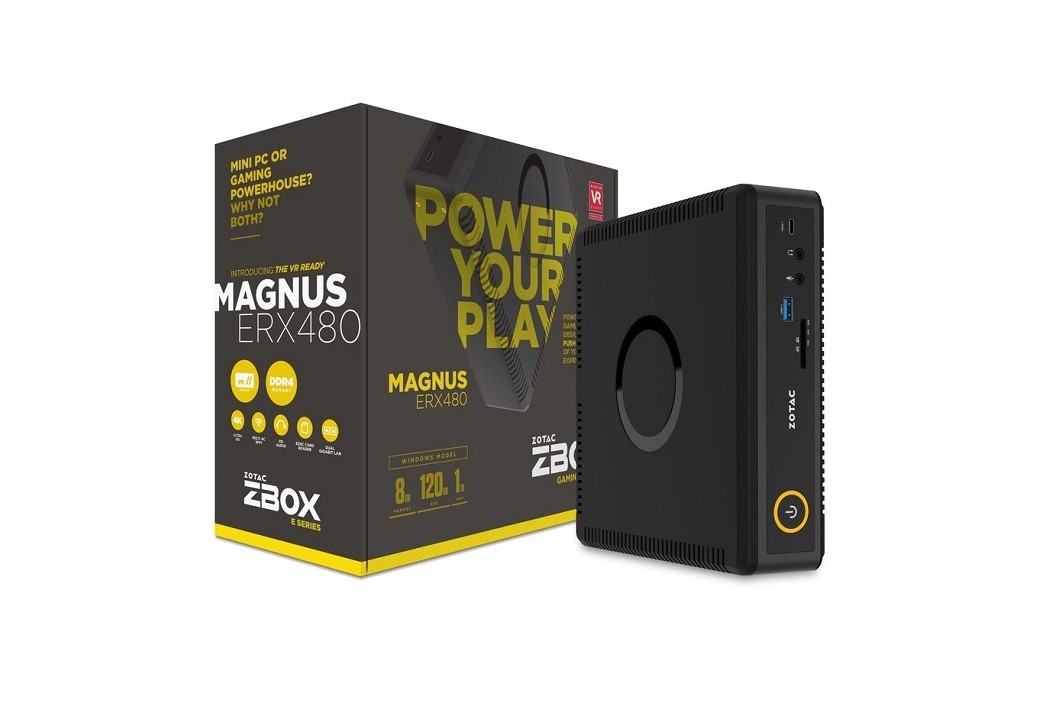
ZOTAC unveils VR-ready 'MAGNUS ERX480' mini gaming PC with AMD Radeon RX 480
It used to be that if you wanted a powerful gaming PC, you would need a monstrous tower with many loud fans. Nowadays, you can build a Mini-ITX system that offers impressive specifications in a tiny package.
What if you want something even smaller? Zotac has a new VR-Ready mini PC that is shockingly tiny. Inside the diminutive 'MAGNUS ERX480' barebones box is an Intel Skylake Core i5-6400T and an AMD Radeon RX480 (4GB GDDR5 256-bit). It supports DDR4 RAM (1866 or 2133) up to to 32GB and an M.2 connector for storage. For convenience, it can also be had with both RAM and storage installed from the factory. You can choose to have Windows 10 pre-installed too.

How to rename Cortana in Windows 10 (you can call her 'Siri' if you like!)
One of Windows 10’s biggest new features is the inclusion of Microsoft’s personal assistant, Cortana. She can do all sorts of things for you, from searching the web, to setting reminders, and even looking up songs as they play.
You can summon Cortana at any time simply by saying "Hey, Cortana", but if you’d rather call her something different -- "Siri", perhaps, or "Darling", or "Ava" -- it’s possible to give her a name change. This is how.