
Protecting against man in the browser attacks
The web-enabled generation has become increasingly reliant on technology for everyday activities. Cloud services, social networks, web extensions, plug-ins and online games, are all growing in popularity and as such, are replacing desktop applications. This heightened use of mobile web-browsers has opened the back door to cybercriminals, who now have new channels to implement browser-based attacks, spread malware and maximize infection campaigns.
Traditional "man in the browser attacks" (MITB) have been given a new lease of life as a result of the latest types of malware, distribution models and special features. Cybercriminals are becoming ever more sophisticated, injecting JavaScript code into web pages to steal user credentials or hijack data, such as those used for online banking.

Vivaldi ends the year with a series of tab-related improvements
Hot on the heels of Opera’s final release of the year comes Vivaldi 1.6, a new version of the world’s most flexible web browser from Opera co-founder Jon S von Tetzhner.
Version 1.6 -- available for Mac, Windows and Linux -- debuts three new features, all revolving around the browser’s flexible tab management system. The highlight of these is the new tab notification feature.

DevDocs is an offline developer’s documentation browser for Chrome
You're working in your browser, testing some new web development project, but there's a problem. And you've no idea why. So you open some documentation in a separate browser tab, more in your development environment, maybe a separate PDF or two until you find whatever you need.
Alternatively, you could just install DevDocs, a free Chrome app which gives you speedy access to documentation for 190 technologies from one interface.

Free tool helps consumers check online security ahead of Black Friday
On this year's Black Friday and Cyber Monday, more Americans will be shopping online than ever before, but a new study reveals that the majority are concerned about the potential to have their personal and financial information hacked.
The survey from cybersecurity company UpGuard shows that almost 95 percent of consumers are concerned about the security of their information online, and more than half would break with their favorite brands if they knew their information was at risk.

Vivaldi embraces IoT with support for Philips Hue lights, adds multiple tab selection
Vivaldi Technologies -- led by Opera co-founder Jon S von Tetzchner -- has released Vivaldi 1.5, the latest version of its customizable web browser for Windows, Mac and Linux.
The big talking point in version 1.5 is Vivaldi’s integration into the Philips Hue IoT ecosystem, but the new release also adds a number of more universal features, such as support for tab drag and drop, which makes tab stacking much simpler than before.

Mozilla Firefox 50 trims start-up times, widens download protection
Mozilla has released Firefox 50.0 for Windows, Mac and Linux, with Firefox for Android 50.0 due imminently. For the second release in a row it’s launched a week late, but this time the reason behind the pause is different.
The extra week gave Firefox 50 time to unveil its headline new feature: significant start-up improvements, achieved through an overhaul of the application’s add-on SDK module system. Elsewhere download protection covers a wider range of executable files, plus Firefox 50 introduces a smattering of useful usability improvements.

Google fails to patch Chrome browser bug -- Microsoft Windows users at risk of scams
Many people use Google Chrome, and rightfully so. The cross-platform web browser works brilliantly, and is super-fast. Plus, the search-giant's browser is very secure too, right? Not so fast...
Today, Sophos drops a bombshell by revealing that scammers are actively targeting Chrome users by leveraging a bug. These bad guys pose as Microsoft tech support and display an in-browser message that says the user's computer is infected with "Virus Trojan.worm! 055BCCAC9FEC". To make matters worse, Google has apparently known about the exploit for more than two years and simply failed to patch it.

Google's new Safe Browsing site is home to malicious site reporting, transparency reports, and policies
Google today launches a revamped version of its Safe Browsing site, bringing a number of tools and services under one roof. The tag line for the site is "Making the world's information safely accessible," and Google makes much of fact that it now keeps more than two billion devices safe online -- desktop and Android, as well as devices running Google tools such as Chrome and Gmail.
One of the main purposes of the site is to make it easier for people to report malicious sites they encounter, so other internet users can be warned and protected. But the updated site is also home to additional information from Google, such as its Transparency Reports and company policies.

Google: HTTPS usage is rising among Chrome users
Google is actively pushing websites to embrace HTTPS, going as far as to warn Chrome users when they visit a page that can transmit sensitive data over the unsecured HTTP protocol. The search giant hopes that this will speed up HTTPS adoption, and to help us keep track of how things evolve it has updated its Transparency Report to reveal how HTTPS usage is increasing among Chrome users.
Google says that the majority of pages that Chrome users access on desktops are now loaded via HTTPS, and two thirds of their time is spent on pages loading the secure communications protocol. The platform with the highest rate is Chrome OS, which is approaching the 75 percent mark.

Mozilla pulls Battery Status API from Firefox over privacy concerns
It was supposed to be a feature that allowed more efficient versions of websites to be delivered to people running out of battery power.
But the Battery Status API built into Firefox was also found to be problematic from a privacy point of view after it was discovered that visitors' battery levels could be used to track them online. In response to this the API is being pulled from Firefox.
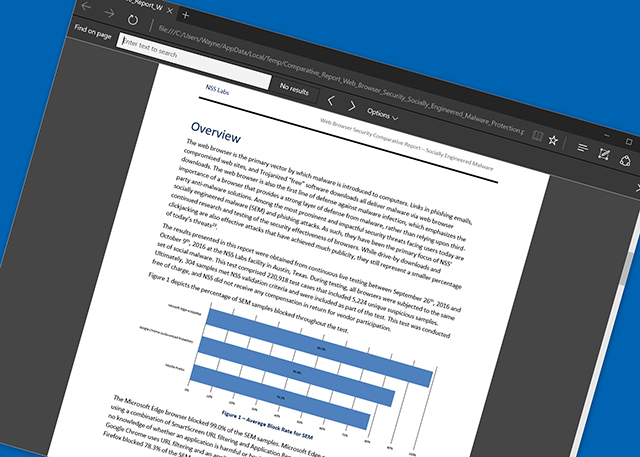
Microsoft Edge is way more secure than Chrome and Firefox
While Microsoft Edge might be a little lacking in features, compared to more established browsers like Chrome and Firefox, one area where it is better than its rivals is security.
That’s according to NSS Labs which today announced the results of its latest Web Browser Security comparative test. The test pitted Chrome, Firefox and -- for the first time -- Edge against each other to see how effective the browsers are at protecting against threats.
Thanks to Microsoft, Chrome is now 15 percent faster on Windows
In a bid to make its browser faster than ever, Google has started using Microsoft’s Profile Guided Optimization (PGO). Introduced in Chrome 53, this technology can help optimize high-use functions in the browser.
The nightly Chrome builds track how often functions are used, and these functions are then optimized by PGO, sometimes increasing their binary size. In addition, PGO optimizes the memory location of the browser code, keeping rarely and frequently used functions away from each other.

Screen recorders for Chrome: ViewedIt vs Openvid
Recording what’s happening on your desktop can help you create presentations, share ideas, troubleshoot problems, or just impress others with your gaming skills.
Getting started is surprisingly easy. There’s no need for complex native clients, just installing a free Chrome extension like ViewedIt or OpenVid Screen Recorder could give you everything you need.

Opera 41 slashes start times, improves newsreader feature
Opera Software has released Opera 41 for Windows, Mac and Linux, making reduced start times its major priority. The headline new feature is accompanied by a number of other performance improvements.
Opera 41 also includes a majorly revamped personalized newsreader, containing a wide list of tweaks and enhancements to give users some extra features to play with on top of the under-the-hood updates.
How to disable new tab article suggestions in Chrome 54 for Android
If you've updated Chrome on your Android smartphone to version 54, you may have noticed an annoyance. When you open a new tab, Google has now decided to spam users with "article suggestions". These -- you will be pleased to hear -- can be banished.
There's more than one reason that you might want to get rid of these suggestions, not least of which is that the feature involves Google keeping an eye on the sites you visit to come up with the suggestions. But the feature also replaces the far more useful bookmarks, and this is going to be enough to tip many users over the edge. Here's how to disable article suggestions.