
'Start' is a do-everything new tab page for Chrome
If you’re bored with Chrome’s standard "new tab" page, there are hundreds of free extensions to make it better. Whether you’re after gorgeous photos, better searching, more productivity tools, there’s something, somewhere that can help.
If you don’t have time to look, that doesn’t have to be a problem either -- just install something like Start -- A Better New Tab, which crams in just about every feature you could possibly want.

Schedule web pages to open automatically with Open Me Later! for Chrome
If you’re looking to revisit a website later then the obvious solution is to bookmark it. That’s easy, but won’t help much if you forget about the link, or where you saved it.
Open Me Later! is a free Chrome extension which enables scheduling a page to open automatically, as the date and time you specify.
Google Chrome could soon include an ad blocker
It's news that -- on the face of it -- makes very little sense; the Wall Street Journal reports that Google is going to include an ad-blocking feature in its Chrome web browser. For a company that makes so much money from advertising this seems like something of a strange move, but in the light of recent ad controversy, it could be sensible business.
Just last month a large number of big companies started to pull advertising from Google and YouTube after finding that their ads were appearing on sites hosting extremist material. This, coupled with the fact that there is a general backlash against advertising from consumers (hence Adblock Plus pushing its Acceptable Ads program), could explain why Google is keen to be seen to be doing something that will give uses a better ad experience with greater control.

Firefox 53 unveils new themes, adds reading time estimate to Reader Mode
Mozilla has released Firefox 53.0 for Windows, Mac and Linux, with Firefox for Android 53.0 due imminently.
Firefox 53 unveils a number of design tweaks, starting with two new -- and built-in -- compact themes, which users can access via about:addons > Appearance. There’s also enhanced graphics stability for Windows users while Mac users can enjoy smaller update files going forward.
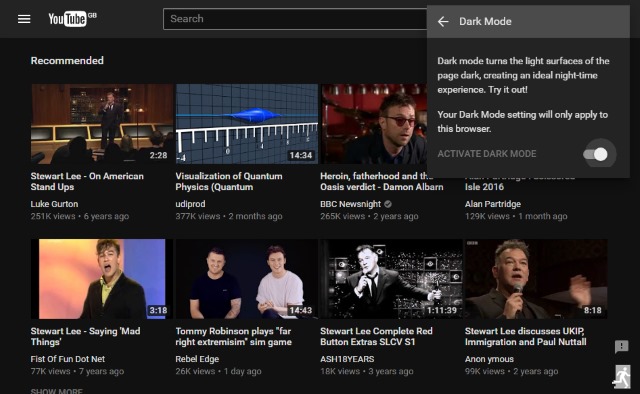
How to enable Dark Mode on YouTube
If you're someone who enjoys watching YouTube at night -- perhaps on your phone in bed -- you'll be all too aware that the site's light color palette can be rather harsh on the eyes. With a little tinkering, you can unlock a hidden Dark Mode which will save your delicate peepers and make nocturnal viewing all the more enjoyable.
At the moment the hack only works in Chrome, but it's likely that Google will bring it to everyone when word spreads. Here's what you need to do.

CrankWheel: easy screen sharing for Chrome
CrankWheel is an easy-to-use Chrome extension which enables speedy sharing of your Chrome tabs or entire screen, without installing any other software.
The service requires a little setup before you start. You must provide your email address, choose a password, a unique name for your "meetings", and so on.
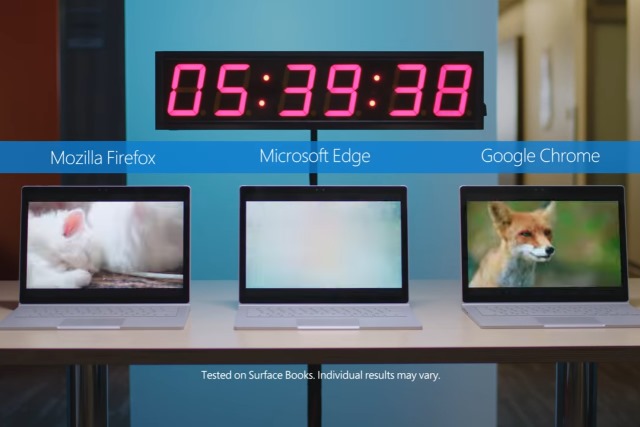
Microsoft shows off Edge's battery usage improvements in Windows 10 Creators Update
The war over which web browser offers the best battery life to laptop users has been waging for some time. Chrome, Firefox and Microsoft Edge have all been battling it out, and with the release of Windows 10 Creators Update, Microsoft thinks it's time to show off the improvements that have been made to its browser.
In Microsoft's own tests -- involving streaming video on a Surface Book -- Edge lasted for over three hours longer than Chrome, and nearly five hours longer than Firefox. These are figures that will almost certainly be disputed in further tests by Mozilla and Google, but for now, Microsoft is giving Edge its moment in the spotlight at the top of the performance pile: 77 percent longer battery life than Mozilla Firefox, and 35 percent longer than Google Chrome.

Google Chrome gets scroll anchoring
Google Chrome is a great web browser for many reasons. Like Firefox, it is a cross-platform program based on (mostly) open source technologies, but compared to Mozilla's offering, its development moves at a much faster pace. Google is constantly pushing the envelope, creating a largely positive web browsing experience.
Today, Google introduces a new Chrome web browser feature that highlights the search giant's forward-thinking. Called "scroll anchoring," it literally "anchors" the web page, preventing the page from scrolling to the top in certain circumstances. In other words, if the user is reading text on a page, it will prevent the page from shifting and interrupting the consumption. The brilliance of this feature is its overall impact -- this annoyance has probably been experienced by most, if not all, web surfers.

Hide your ID online with Random User-Agent for Google Chrome
Whenever you visit a website your browser hands over a user agent, a text string which tells the site about your browser, operating system, plugins and more.
This scheme was designed to help sites customize themselves to different devices, but user agents can be misused to help fingerprint your computer and track you online.

Vivaldi unveils revolutionary new History feature
Challenger web browser Vivaldi 1.8 has been released for Windows, Mac and Linux. The browser, which has made great strides in its relatively short lifespan, unveils another game-changing feature with this new release.
The headline new feature is a revamped History view -- accessed via the Speed Dial or by pressing [Ctrl] + [H]. The feature gives users a more visual overview of their browsing behaviour, making it easier to find -- and return to -- previously visited pages and sites.

Privacy warning: US ISPs could sell and share your browsing history without consent
In a major blow for privacy advocates and individual rights, the US Senate has voted to permit ISPs to sell or share customers' data -- including their browsing histories -- without consent.
The vote overturns a Federal Communications Commission rule that banned such activity. While there are still legislative hoops to jump through before the result of the vote is ratified, ISPs will be rubbing their hands in glee at what the Senate has done.

Firefox for Linux is now Netflix compatible
Relying on a Linux distribution as your full time operating system can be great -- until it isn't. While there are many quality packages and applications that are compatible with the open source kernel, every once in awhile you will run into something that simply isn't available. When this happens, it can be very frustrating.
For a while, Netflix was not available for traditional Linux-based operating systems, meaning users were unable to enjoy the popular streaming service without booting into Windows. This was due to the company's reliance on Microsoft Silverlight. Since then, Netflix adopted HTML5, and it made Google Chrome and Chromium for Linux capable of playing the videos. Unfortunately, Firefox -- the open source browser choice for many Linux users -- was not compatible. Today this changes, however, as Mozilla's offering is now compatible with Netflix!

Google Chrome's background tabs now use less power
Chrome isn't the most energy efficient browser around, but Google has been working hard to make things better. The latest improvement focuses on background tabs, which are now said to use less power.
The lower power consumption in background tabs is actually one of the main changes that are part of Chrome 57, which Google released earlier in March. The latest version of the popular browser also gained WebAssembly support and dropped the ability to disable plugins, to name a few.
Updated Skype extension for Chrome brings one-click Skype integration to calendars, emails and Twitter
Microsoft is pushing out an update to its Skype extension for Chrome, bringing a host of new features to a range of online services. The update means that you can add Skype call links to emails, calendar events, and social media postings with a single click.
With support for Gmail, Google Inbox, Outlook.com, Google Calendar and Twitter, Microsoft is clearly trying to cover a lot of bases. Twitter is arguably something of a strange choice, but by embracing rival Google services, Microsoft is clearly keen to make Skype more accessible for as many people as possible.
Firefox 52 lets you send tabs to other synced devices, ups the security ante
Mozilla has released Firefox 52.0 for Windows, Mac and Linux, with Firefox for Android 52.0 due imminently.
Firefox 52 now supports syncing tabs to specific devices, makes various improvements to the Downloads button and introduces a raft of security, developer and other enhancements. It’s also the final release for Windows XP and Vista users.