
Freeplane: a versatile brainstorming tool
Whether you need to understand a problem, complete a task, or just generally get organized, mind mapping can probably help. Not least because it’s so easy.
Start with the central issue; note down any related ideas, and begin to arrange and order them. You’ll quickly come up with a structure which helps you better understand the issue.

Hardwipe drops 32-bit support, improves Recycler cleaning tool
Big Angry Dog Ltd has released HardWipe 4.0.1 and HardWipe Portable 4.0.1, a major new version of its ad-supported data wiping tool for Windows. Version 4.0.1 is notable for becoming a 64-bit only build, dropping support for legacy OSes including Windows XP in the process.
The update also sees HardWipe transition from the Qt4 to Qt5 application and UI framework as a result of becoming a native 64-bit application.

Run super-fast file searches with Hddb
If you need to run rapid searches for file names on NTFS drives then there’s no substitute for VoidTools’ Everything. The program’s smart use of the NTFS Master File Table (MFT) means you’ll see matching files almost as fast as you can type.
There are competing tools around, though. And the latest, Hddb (Hard Disk Database) is particularly interesting, as it claims to address and fix some Everything problems. Is it worth your time? We took a look.

Peazip introduces File Manager improvements, updates archiving tools
PeaZip srl has released PeaZip 5.3, the latest version of its open-source, cross-platform archiving tool for Windows and Linux users. The archiver supports over 178 file extensions, and is also available for Windows users in 64-bit form as well as portable builds (both 32-bit and 64-bit).
Version 5.3 launches with numerous new features and improvements to the File Manager graphical user interface as well as a wide range of improvements to its archiving and extraction tools.

PlainEdit.NET -- A Notepad replacement for technical users
PlainEdit.NET is a free portable Notepad replacement with some interesting and unusual extras.
The core feature set is familiar enough. A tabbed interface allows you to open multiple documents, and there’s support for opening ANSI, UTF-8, Unicode and Unicode big-endian files, with Windows, Mac and Unix line breaks.

Inspect your PC’s drivers with InstalledDriversList
NirSoft’s Nir Sofer has announced the release of InstallerDriversList, the latest addition to his lineup of system information tools.
As you’ll probably guess from its name, the program is a compact portable tool which displays a report on all the device drivers installed on your PC.
Set up to 128 desktop alarms with Eusing Clock
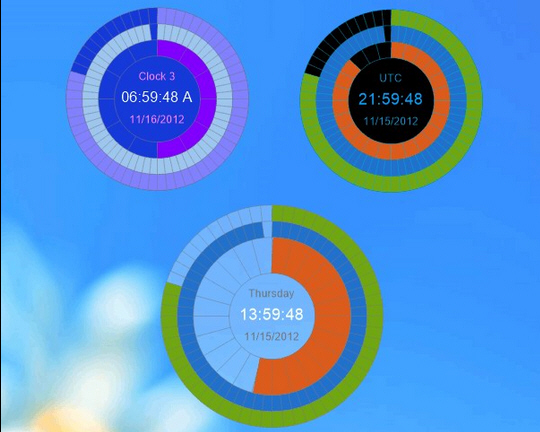
Eusing Clock is a free clock gadget for your Windows desktop. Yes, we know, there are several million of these already, but this one does have a few twists which help it stand out from the crowd.
The program doesn’t just reproduce the same old digital design, for instance. Instead it has three colored meters which fill up to represent seconds, minutes and hours, making it a more eye-catching addition to your desktop.
Optimize your PDF files for mobile reading with k2pdfopt
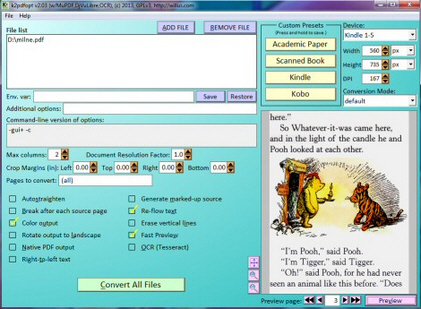
The value of a PDF document is, in part, that it can be read on just about any device, on any platform. Wherever you are, you can open it and see the same information, presented in the same way.
This isn’t always as good as it sounds, of course. Especially if a document has been formatted for landscape viewing on a high resolution desktop, and you’re trying to browse it on a smartphone (there’s sure to be plenty of surplus scrolling involved).

EASEUS Partition Master 10 adds OS migration, WinPE 3.0 boot disk
EASEUS has released Partition Master 10 Free and Partition Master 10 Professional, the latest editions of its excellent disk management tool.
The new build now includes a wizard to migrate your system disk to a new drive (SDD and HDD), and make it bootable.

Automatically discover and diagram your network with Netpict
Netpict is a simple free program for creating basic network diagrams using popular Cisco icons.
If you’ve ever used any other diagram tool, Netpict will seem very familiar. A panel on the left has various icons ("Cloud", "Firewall", "Server", "Router", "PC", "Laptop", more); you drag and drop the ones you need onto the page, right-click and drag to create connections between two elements, before finally exporting the map as an image.

CopyQ: a seriously powerful clipboard manager
The Windows clipboard is useful, but limited, not least because it can hold only one item at a time. Copy in something else and the first has gone forever.
Clipboard managers can help, though, and at first CopyQ seems like a very typical example. It lives in the system tray; in a click or two you can be viewing a list of recent clipboard items (text or images); and any of these can then be selected or pasted into the current document.
Run more accurate benchmarks with NonCompressibleFiles
Benchmarking data storage or transfer speeds can seem straightforward, at least in theory. Assemble a group of test files on your PC; store, copy, upload or download them, and measure how long this all takes. Easy, right?
Well, not necessarily. Compression could be an issue. You might measure how long it takes to save a bunch of files to an SSD, for instance, but if the drive uses compression -- as many do -- then the speed you see will vary according to your test data.

Lurch lets you enter math in a document -- and check it, too
Lurch is an open source math word processor which allows you to create documents, insert a full mathematical argument, and validate it, too.
This isn’t just a matter of checking that "2+2=4", either. The program also supports and "understands" algebra, calculus and proofs.

Convert .REG Registry data into BAT, VBS or AU3 scripts with Reg Converter
REG files can be a very convenient way to import Registry data. Double-click them, Regedit launches, reads their contents and adds them to your Registry, all in just a few seconds.
There can still be problems, though. Your system may have blocked REG files for security reasons. You might want to import the data as part of an unattended installation, or maybe you just need more control of the import process.

The most popular stories on BetaNews this past week: March 30 -- April 5
It's difficult to deny Microsoft at least some of the limelight this week as the Build developer conference generated some interesting news. Bringing Windows version numbers in line with each other, Windows Phone 8.1 was finally revealed, complete with a notification center and Siri-like Cortana. The highly anticipated Windows 8.1 Update (which you may have heard something about) was official unveiled and given a launch date of April 8. Wayne, for one, liked what he saw.
Microsoft came over all open source, making the Roslyn compiler as well as WinJS freely available. Brian was pleased with the tech giant's latest moves, proclaiming Microsoft is now back. Build also gave us a sneaky glimpse of an upcoming, but as yet unnamed, version of Windows that features the return of the Start menu -- all of this chopping and changing is getting confusing. Maybe next on the list of things to do with Windows will be getting rid of those apps and features that should have been killed some time ago.