
Microsoft bringing a new Find My Mouse tool and more mouse utilities to PowerToys
Fans of Microsoft's PowerToys have something to look forward to -- there is at least one new utility in the pipeline, very probably several.
Developers are currently working on a Find My Mouse tool which will appear in an upcoming Mouse Utilities section of PowerToys. The new tool will make it easy to locate your mouse cursor on the screen, but there is also the promise of more mouse-related tools in the future.
Microsoft releases PowerToys Experimental v0.48.1 with fixes and new features
It was entirely planned, but it does feel like a good while since there was an exciting PowerToys release with new things to play with. But now, with the release of PowerToys Experimental v0.48.1, this changes.
There are, of course, fixes and -- as this is an experimental release -- some known issues, but there is also the return of Video Conference Mute tool which has quickly turned into a fan-favorite.
Microsoft releases PowerToys v0.47.1, fixing bugs in FancyZones and more
With the current PowerToys release cycle, Microsoft had vowed to work on stability and optimization, and the company is making good on this promise.
It is only a couple of weeks since the release of v0.47.0 of the utility collection, but now there is another update to install. This time around, there are fixes for PowerToys Run, FancyZones and Shortcut Guide.
Microsoft releases PowerToys v0.47.0 -- download it now!
Microsoft has released an update to PowerToys, taking the utility collection up to version 0.47.0. Although the company has said that this release cycle would be focused on stability updates and optimizations, installer updates, general bug fixes, and accessibility improvements, there's still a welcome change for the Shortcut Guide tool.
Perhaps more interestingly, there is also news about the next experimental release -- PowerToys v0.48 -- which will appear just before the rollout of Windows 11 begins.
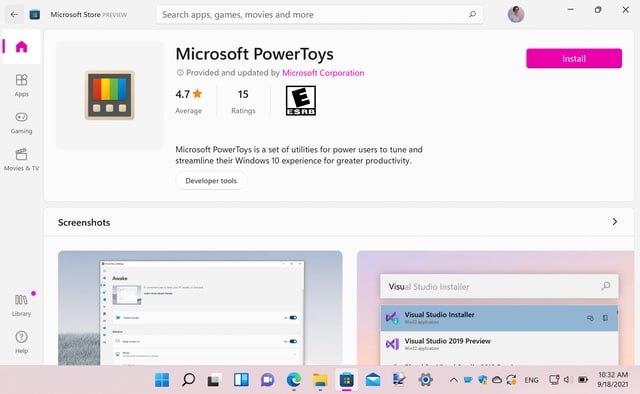
PowerToys is now available to download from the Microsoft Store for Windows 11
Microsoft recently started the process of giving PowerToys a Windows 11 makeover ahead of the launch of the operating system next month.
Now the company has released the latest version of the essential collection of utilities to the Windows 11 Microsoft Store. This means that PowerToys is now likely to gain a much bigger following as until now it has only been available to download from GitHub.
Microsoft releases new PowerToys build complete with Video Conference Mute tool
We've just written about Microsoft giving its PowerToys utilities a Windows 11 makeover. While a new coat of paint is all well and good, what people really want is new tools to play with -- and with the newly released PowerToys Experimental v0.46.0, this is precisely what Microsoft has delivered.
This latest release sees the addition of the much-touted Video Conference Mute tool which provides global audio and video controls for video calling apps that make use of cameras and microphones. The release also fixes a variety of issues with the collection of utilities.
Microsoft is giving more PowerToys a Windows 11 revamp
With Windows 11 comes a new look, a new visual language. It is central to the operating system and the way it feels, and software developers are preparing to embrace this new aesthetic in their products.
Not surprisingly, Microsoft has embarked on a mission to update the look of many of its products and services to match that of Windows 11, and one area in which this can be seen is in PowerToys. There have already been some changes introduced to the collection of utilities, and now the team behind the much-loved Windows enhancement suite has given a glimpse of further updates to comes.
Microsoft releases PowerToys v0.45.0 with Windows 11 styling
With the latest release of PowerToys, Microsoft has focused primarily on fixing bugs and improving stability, with the promise that updated utilities will be included in next week's experimental version.
But PowerToys v0.45.0 also sees a visual makeover which had been teased recently. The update gives the suite of utilities a modern look that is in keeping with Windows 11. The development team may be slightly biased, but describes this as a "truly spectacular update".
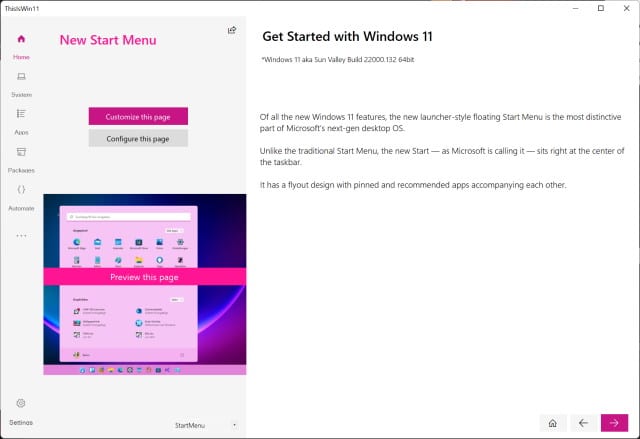
Tweaking tool ThisIsWin11 is 'the real PowerToys for Windows 11'
Windows 11 may not have had a proper release yet, but there are already tools and apps available for the latest version of the operating system. We've already seen Start11 for tweaking the Start menu, and now we have ThisIsWin11 for tweaking, customizing and debloating Windows 11.
This free app makes it easy to remove unwanted components from Windows 11 to help create a more streamlined system, as well as giving you great options for customization. You can increase your privacy and security by changing settings in ThisIsWin11 that are deeply hidden within Windows, and it quickly becomes clear why the developer calls this "the real PowerToys for Windows 11".
Microsoft releases PowerToys v0.43.0 with an absolute barrel load of fixes and changes (plus a bit of telemetry)
If it feels like a while since there was an update to PowerToys, that's because the last significant release was a little over a month ago. But now Microsoft has broken the dry spell by pushing out PowerToys v0.43.0.
Sadly, there are no new utilities to play with in this particular release, but it remains important. In terms of bug fixes, improvements and changes, this is one of the biggest updates to the suite of tools in quite some time. There is also the slightly controversial addition of telemetry to one of the utilties.
Microsoft pushes out yet another PowerToys update with important fixes and changes
As if the arrival of an entirely new utility was not enough, Microsoft developers have now released yet another build of PowerToys.
In addition to making important changes to the new Awake tool, PowerToys v0.41.4 is the third release from the PowerToys team in less than a week. It also addresses a number of other key problems and includes a handful of changes.
Microsoft releases PowerToys v0.41.3 with lots of improvements and a new utility
Microsoft has pushed out two new PowerToys builds in very quick succession, fixing lots of issues, making numerous improvements, and adding a brand new utility.
The bulk of the changes came in PowerToys v0.41.2, but this was followed mere hours later by PowerToys v0.41.3 because of a compatibility issue with BitDefender. The latest build is interesting not just because of the number of changes it includes, but also the arrival of the new tool called Awake.
Windows 11 is borrowing ideas from PowerToys
If you're a fan of utilities, you've very probably installed PowerToys for Windows 10. Long an essential software collection for older versions of the operating system, Microsoft gave the beloved tools a reboot for Windows 10 a couple of years ago, and it has gained an enthusiastic following.
And this is not surprising; the utility collection includes some incredible tools, and there's the promise of more great additions in the future. But it's not just us users who think PowerToys is great, the developers behind Windows 11 also appear to be fans. So much so that they decided to steal a few ideas from PowerToys and integrate them into Windows 11.

Microsoft is adding a new utility to PowerToys v0.39 -- Awake
If you think it feels like a long time since PowerToys received any significant updates, you're not wrong -- it has indeed been a while. But that's about to change as Microsoft is preparing to add a new utility to the collection.
Briefly known as Espresso (in a nod to the 'caffeinate' command in macOS), the new tool is called Awake. Coming to PowerToys v0.39, this is a keep-awake utility that can be used to stop Windows from going to sleep.
Microsoft releases new PowerToys update with important fixes and changes
It feels like it has been a while since the last PowerToys update, but today that changes. Microsoft has released PowerToys v0.37.2 bringing a couple of key changes to the suite of utilities for Windows 10.
Anyone hoping to see the appearance of the Video Conference Mute tool will remain disappointed. As this is only a minor version number increase, however, it is not really surprising that there are no major additions.



