
Chrome, Firefox, IE8 accelerate 12% or more in Windows 7 over Vista
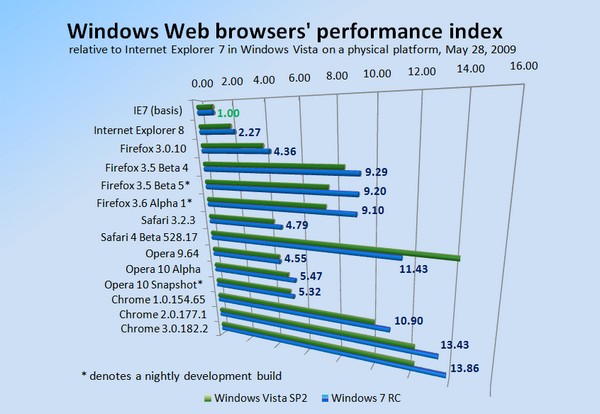
If you've been testing the final Windows 7 Release Candidate on your own physical platforms, and you wonder what's giving you that feeling that it's just a bit peppier, a tad zippier, it's not an illusion. Betanews tests all this week, concluding today, comparing all the major stable release and development Windows-based Web browsers, running on exactly the same physical computer with fresh Windows Vista SP2 and Windows 7 RC partitions, confirmed what our eyes and gut feelings were telling us: On average, most browsers ran 11.9% faster in Windows 7 than on the same machine running Vista SP2, with most speed gains falling right around that mark.
Internet Explorer 8, for example, runs 15% faster in Windows 7 than in Vista SP2, in multiple tests whose results were within one another by a hundredth of a point. Using our performance index as a guide, if you consider the relatively slow Internet Explorer 7 in Vista SP2 as a 1.00, then in a fresh test of IE8 on the same platform, the newer browser in Vista SP2 scored a 2.03 -- performing generally better than double its predecessor. But in Windows 7, the score for IE8 rises to a 2.27.

Five Vista perception problems Windows 7 must overcome
Poor Windows 7. Months before its official launch, it's already fighting to live down the reputation of its older siblings. It's bad enough it has to fight perceptions of insecurity (I'm looking at you, XP) and bloated incompatibility (Vista, anyone?). But like the poor kid entering a high school after his older brothers have spent years being serially suspended for misbehaviour and general hooliganism, Windows 7 has an uphill battle ahead of it. Whether the perceptions are earned or not is irrelevant. Undoing them is a monumental process either way, and it all rests on the shoulders of a kid whose only mistake seems to lie in carrying the family name.
But undo these perceptions it must. Windows 7 promises to be Microsoft's most crucial launch ever because the company's very future has never been in as much question as it is now. Its two cash cow franchises, Windows and Office, are mooing a little less deeply these days thanks to a seismic shift away from the traditional PC model. While Vista's problems are more perception than anything else, there's no escaping the cruel reality that the age of Windows-everywhere-by-default is over. As conventional desktop and laptop PCs give way to all sorts of new form factors running all sorts of new operating systems and connecting to the outside world in all sorts of unconventional ways, Microsoft can't afford another lukewarm Windows launch.
Top 10 Windows 7 Features #3: XP Mode
In some ways, Steve Ballmer is proving to be a more capable Microsoft CEO than Bill Gates, especially recently. Whereas Gates' strategies have typically been associated with playing unfair, rewriting the rules, and being blatantly defiant about it in the process, Ballmer's strategy of taking away the argument -- eliminating the appearance of advantage and then still winning -- has been more effective, and more difficult to combat in both the marketplace and the courtroom.
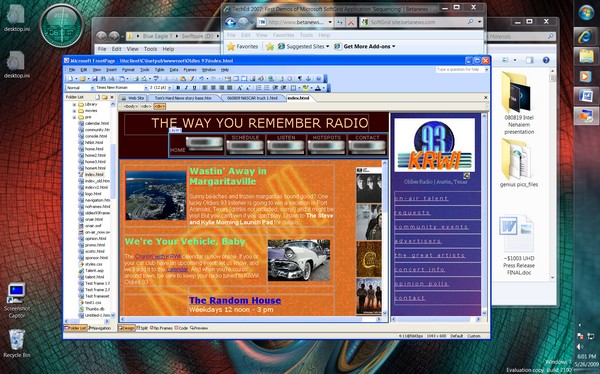
Nowhere does the "Playing Too Fair" strategy make a bigger display of itself in Microsoft's favor than in its latest permutation of virtualization technology -- a move that many individuals (myself included) directly suggested the company should do, and the company then did. Since 2004, Microsoft has offered a no-cost way for users to run Windows XP in a kind of hosted envelope, one which users were delighted to discover worked fairly well in Windows Vista. But it didn't offer any real advantages -- to use a program that relied on XP, you had to work within that envelope, using networking tools to associate two machines running on the same CPU.

Top 10 Windows 7 Features #4: A worthwhile Windows Explorer
Over the last few decades of Windows' existence, Microsoft has wrestled with the problem of how much control it should give users over the arrangement and organization of files on their computers. In a perfect world, users shouldn't have to care about their \Windows\System32 or \Windows\SysWOW64 directories, so a good file manager shouldn't make the mistake of exposing users to information they don't know how to deal with. On the other hand, knowledgeable users will need to have access to system directories in such a way that they don't have to jump through hoops to find them.
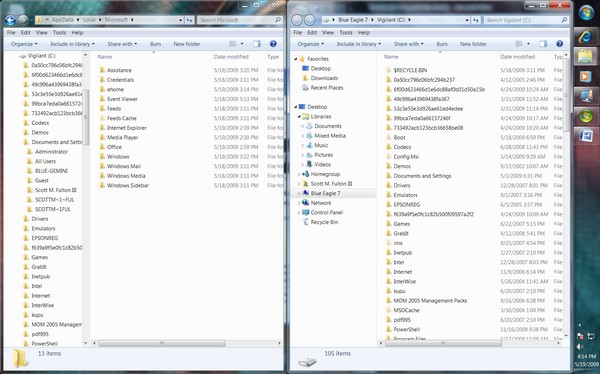
It is a balancing act, but not an impossible one. Over the years, third-party file management utilities such as Total Commander and xPlorer2 have been among the most popular software downloaded through Betanews Fileforum. Granted, these are typically installed and used by folks who know such bits of trivia as the fact that the \Application Data\Local Settings\Microsoft\Office folder in Windows XP maps to the \AppData\Local\Microsoft\Office folder in Windows Vista. But the reason they're popular with folks such as myself is because we need more direct and comprehensive access to the systems we manage. What's more, we commonly need access to two directories at once, and it makes more visual sense to have them both open.

Upgrading from XP to Windows 7: Does Microsoft's method work?
Three months ago, Betanews experimented with a process for converting a Windows XP-based system to Windows 7 even though a direct upgrade process was not officially supported by Microsoft. Our process involved borrowing a Windows Vista installation disc, and going through the upgrade motions twice except for the part where you register and activate Vista. This way, you would only have to register Windows 7. Although our tests involved an earlier build of Win7 than the current public release candidate, we discovered the process, while slow and laborious, was at least workable.
To make certain of this, we installed Office 2007 in our XP-based test system first, then ran Word, Excel, and PowerPoint perfectly well in Windows 7 after the installation was complete. We did have to re-activate Office, but that only took a moment.

Top 10 Windows 7 Features #5: Multitouch
For close to two decades now, the design of applications has changed surprisingly very little. At their core, apps wait for users to generate input, and they respond -- a server/client model of processing on a very local scale. So in a very real way, what applications do has been a function of how they respond -- the whole graphical environment thingie you've read about has really been a sophisticated way to break down signals the user gives into tokens the application can readily process.
The big roadblock that has suspended the evolution of applications from where they are now, to systems that can respond to such things as voice and language -- sophisticated processes that analyze input before responding to it -- is the token-oriented nature of their current fundamental design. At the core of most typical Windows applications, you'll find a kind of switchboard that's constantly looking for the kinds of simple input signals that it already recognizes -- clicking on this button, pulling down this menu command, clicking on the Exit box -- and forwarding the token for that signal to the appropriate routine or method. Grafting natural-language input onto these typical Windows apps would require a very sophisticated parser whose products would be nothing more than substitutes for the mouse, and probably not very sufficient substitutes at that.
Windows 7 gives Firefox 3, IE8 speed boosts, while Firefox 3.5 slows down
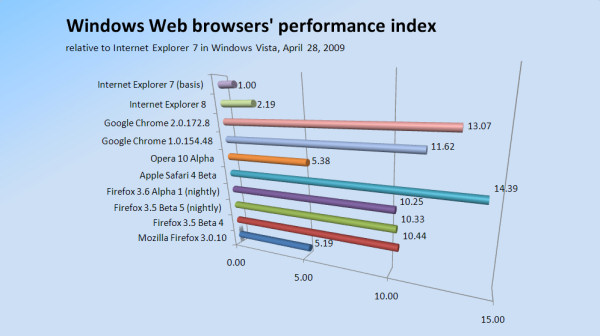
In preliminary Betanews tests Tuesday comparing the relative speeds of major Web browsers in Windows Vista- and Windows 7-based virtual machines, not only did the general performance of Microsoft Internet Explorer 8 improve by about 23%, but the latest production build of Firefox 3.0.10 appears to improve its performance by 17.5%. This despite running in a Windows 7-based virtual machine that we estimate to be 12.1% slower overall than a Vista-based VM hosted by the same environment.
These are the initial findings of Betanews' experiments in how the architecture of Windows 7 may or may not influence the performance of major Web browsers. We wanted to see whether Win7 made browsers faster or slower, and doing that meant hosting browsers in virtual environments whose relative speeds with respect to one another could be normalized.

Russinovich rescues the TechEd 2009 keynote with Windows 7 AppLocker demo
In the absence of many dramatically new product announcements (notices about the Office 2010 technical preview and Windows Mobile 6.5 were already expected), it was Senior Vice President Bill Veghte's job for the first time to rally the troops during this morning's TechEd 2009 keynote address in Los Angeles. But perhaps not everyone has Bill Gates' knack for holding an audience captive with sweeping gerunds and participles, or Ray Ozzie's outstanding ability to conjure a metaphor as though it were a hologram hovering in space, and describe it for countless minutes without relating it to the physical universe.
What may have kept attendees affixed to their seats for the time being was the promise of Mark Russinovich, Microsoft's Technical Fellow who always dives right into a real-world demonstration in the first few minutes, and is always affable enough to be forgiven for the inevitable technical glitch. Though Russinovich's stage time today was shorter than usual, one of his highlights was a demonstration of a feature Windows 7 RC downloaders had already received but may not have known they had: a way using group policy to block specified software from running on client systems even after it's been upgraded or revised.
Windows 7, Windows Server 2008 R2 to ship before the holidays
Microsoft's Windows Business Senior Vice President Bill Veghte delivered what may very well have been one of the more disappointing keynote addresses to TechEd 2009 in Los Angeles this morning, judging not only in terms of features but in pure speech quality. But one hour and fifteen minutes into the address, he answered the key question he called one of two "elephants in the room:"
"When are we going to ship? This is a question that I get a lot," Veghte said. "We're going for holiday and we're tracking very, very well for it."

Second wave of Windows 7 updates tomorrow, but they won't be for real
The big difference in using Verizon Wireless over its competitors, its current wave of TV ads suggest, is that every user is backed up by "the network." With Windows 7, Microsoft is working to create a similarly distinguishing value proposition. It'll be given its biggest test to date tomorrow, as "the network" from Microsoft pushes out a series of 10 placebo system updates, to see how well it can handle the heavy Patch Tuesdays yet to come.
As the Windows Update Product Team blogged on Friday, the boatload for the Win7 RC's first Patch Tuesday will contain ten update patches. Nine of them will run automatically and should run flawlessly. One won't, but that's part of the plan.
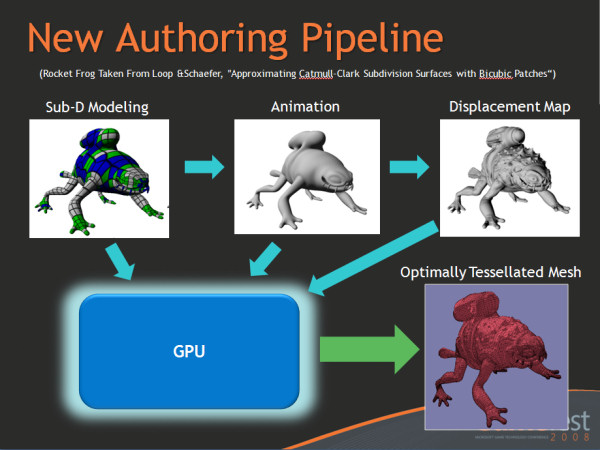
Top 10 Windows 7 Features #6: DirectX 11
Early in the history of Windows Vista's promotional campaign, before the first public betas, Microsoft's plan was to create a desktop environment unlike any other, replete with such features as 3D rendered icons and buttons, and windows that zoomed into and off the workspace as though they occupied the space in front of the user's face. That was a pretty tall order, and we expected Microsoft to scale back from that goal somewhat. But for several months, journalists were given heads-up notices that there would be several tiers of Windows performance -- at one point, as many as five -- and that the highest tier, described as a kind of desktop nirvana, would be facilitated by the 3D rendering technology being called DirectX 10.
DirectX is a series of graphics libraries that enable Windows programs to "write" graphics data directly to screen elements, rather than to ordinary windows. While the operating system's principal graphics library since version 3.0 has been the Graphics Device Interface (GDI), its handles on memory are tied to window identities and locations. But it's DirectX that makes it possible for a 3D rendered game to be played in the Windows OS without having to be "in" a window like, say, Excel 2003.
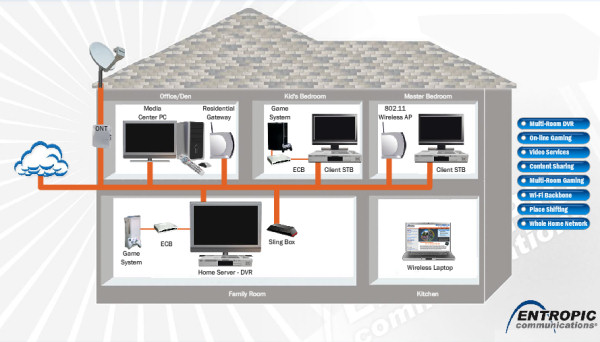
Top 10 Windows 7 Features #7: 'Play To' streaming media, courtesy of DLNA
Perhaps you've noticed this already: Getting media to play in a Windows-based network is a lot like siphoning water from a pond using a hose running uphill. If you can get enough suction, enough momentum going, you can get a decent stream, but there are way too many factors working against you. Foremost among these is the fact that you're at the top of the hill sucking through a hose, rather than at the bottom pushing with a pump.
So home media networking is, at least for most users today, precisely nothing like broadcasting whatsoever. That fact doesn't sit well with very small networked devices like PMPs, digital photo frames, and the new and burgeoning field of portable Wi-Fi radios like Roku's SoundBridge. Devices like these don't want or even need to be "Windows devices;" and what's more, they don't want to be the ones negotiating their way through the network, begging for media to be streamed uphill in their general direction. They want to be plugged in, shown the loot, and told, "Go." Back in 2004, a group of networked device manufacturers -- the Digital Living Network Alliance (DLNA, and yes, it's another network association) -- coalesced with the idea of promoting a single standard for being told "Go." But up until today, there hasn't been a singular, driving force uniting the standards together, something to look up to and follow the way Web developers followed Internet Explorer.

First Windows 7 RC patch turns off 'hang time' correction in IE8
Perhaps Google Chrome's most innovative architectural feature is the way it relegates Web page tabs to individual processes, so that a crash takes down just the tab and not the whole browser. In addressing the need for a similar feature without overhauling their entire browser infrastructure, the engineers of Microsoft Internet Explorer 8 added a simple timeout mechanism that gives users a way to close a tab that appears unresponsive.
As it turns out, there's quite a few legitimate reasons why a Web page might appear unresponsive although it's really doing its job. One of them concerns debugging with Visual Studio, as this user of StackOverflow.com discovered.
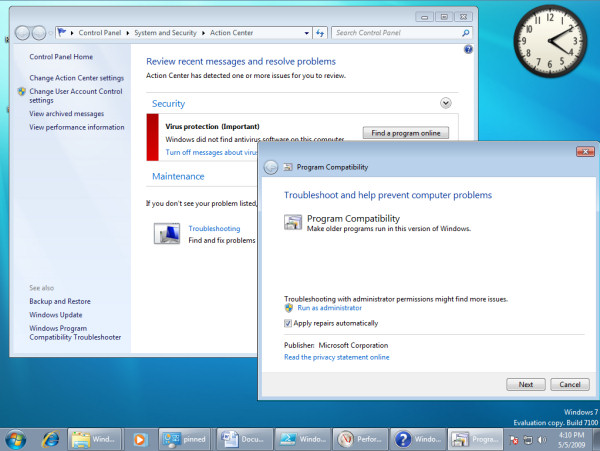
Top 10 Windows 7 Features #8: Automated third-party troubleshooting
Among the stronger and more flourishing cottage industries that have sprouted forth as a result of Microsoft Windows has been documenting all of its problems. One of the most successful of these efforts has been Annoyances.org, which sprouted forth from "Windows Annoyances" -- much of what Internet publishers have learned today about search engine optimization comes from revelations directly gleaned from the trailblazing work of Annoyances.org. Imagine, if you will, if the instructions that Annoyances.org painstakingly gives its readers for how to eradicate those little changes that Microsoft makes without your permission, were encoded not in English but instead in a language that Windows could actually execute on the user's behalf.
Windows 7 is actually making such an environment -- a system where, if you trust someone else other than Microsoft to make corrections to your system, you can accept that someone into your circle of trust and put him to work in Troubleshooting. Can't make that Wi-Fi connection? How do you test for the presence of other interfering signals? Streaming media suddenly get slow, or running in fits and starts? Maybe there's an excess of browser-related processes clogging up memory and resources. Did something you just install cause Flash not to work in your browser? Maybe you don't have time to check the 36 or so places in the Registry where that something altered your file associations.



