

Is Microsoft to blame for DuckDuckGo 'censoring' Russian search results?
We recently reported that privacy-focused search engine DuckDuckGo had taken the decision to downrate sites that publish Russian propaganda and disinformation. At the time, CEO Gabriel Weinberg said that the move came because the company was "sickened by Russia’s invasion of Ukraine and the gigantic humanitarian crisis it continues to create"... but this may not be the whole story
The announcement by DuckDuckGo caused upset on the left and right of the political spectrum, but it seems that the ire and claims of censorship might have been misplaced. It is actually Microsoft that is to blame. Or maybe the EU.
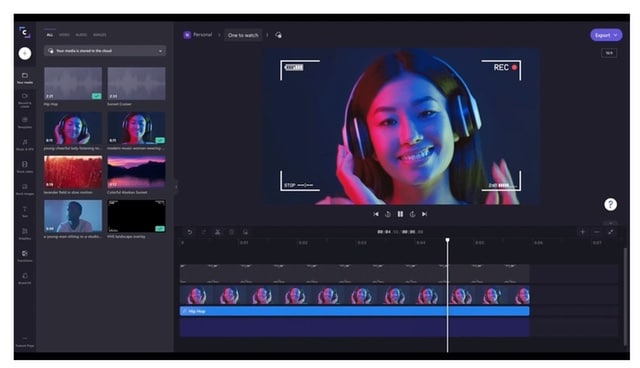
Microsoft is adding the appallingly named Clipchamp video editor to Windows 11
It is about six months since Microsoft acquired the video editor Clipchamp, and many people hoped that this could signal the return of the much-missed Windows Movie Maker. And this is -- almost -- what is happening.
In the latest preview build of Windows 11, Microsoft has integrated the video editor into the operating system, taking the unfortunate decision to retain the terrible name. Appalling moniker aside, the arrival of Clipchamp is something to be welcomed as it's a great, user-friendly editor that will keep beginners (and beyond) more than happy.
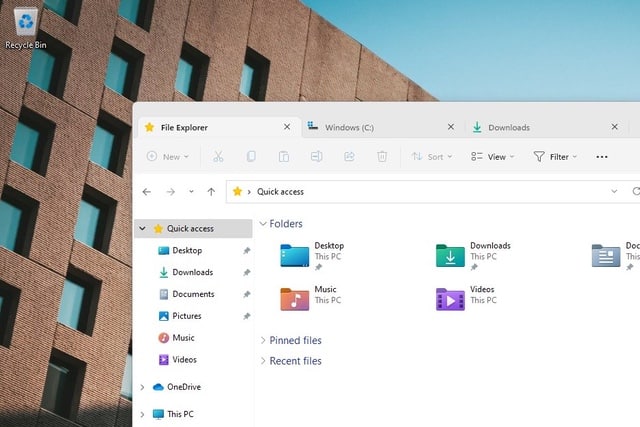
Microsoft is finally bringing tabs to Explorer in Windows 11
There are lots of ways that people think Microsoft could improve Windows, and one request that has cropped up for years is that Explorer be given a tabbed interface. So popular has the idea been, that over the years there have been numerous third-party tools that bring tabs to Explorer.
But now Windows 11 users can look forward to something more official. Microsoft has, at long, long last, decided that it is time to give Explorer users the tabs they have been requesting for so long. Signs that the feature is on the way have been spotted hidden in Windows 11. More importantly, while not officially launched yet, you can enable the feature now.
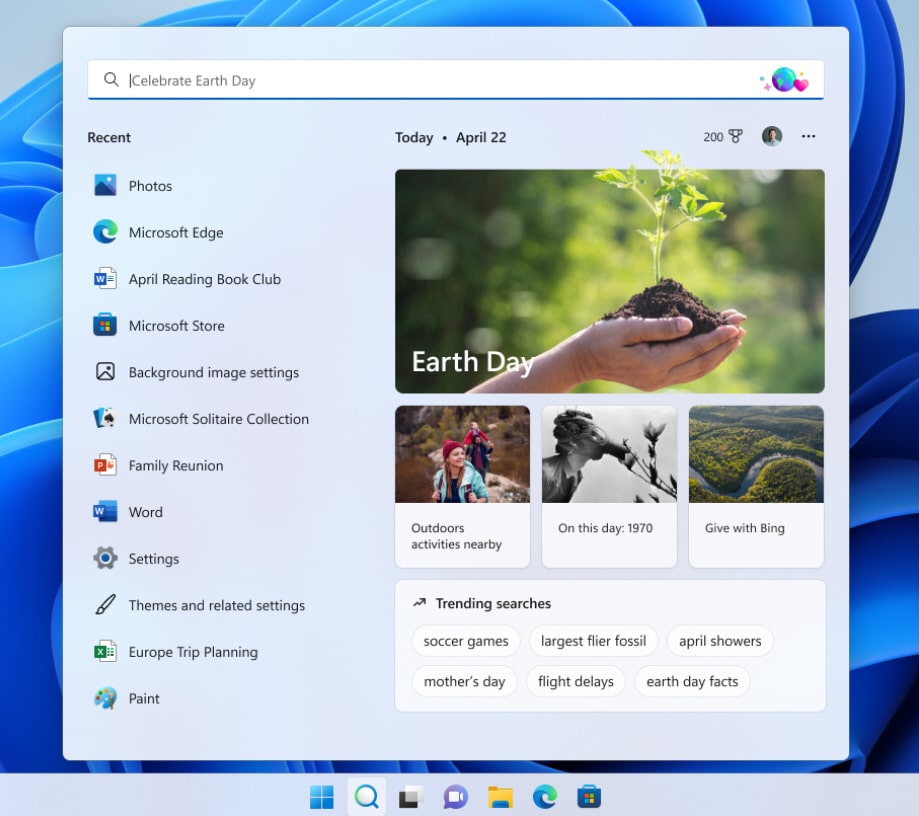
New 'Search highlights' feature coming to Windows 11 next week
Microsoft rolled out a new Windows 11 build to Insiders in the Dev Channel today and took the opportunity to announce a new search feature arriving early next week.
The upcoming 'Search highlights' feature will show "interesting moments in time" each day in the Windows 11 search window, including major holidays and anniversaries.
Microsoft releases Windows 11 Build 22572 with new inbox apps
Windows Insiders in the Dev Channel know that Wednesday is typically the day when Microsoft rolls out new Windows 11 builds. Today sees the arrival of Build 22572, and this one comes with two new inbox apps and a good number of improvements and fixes.
From this build, Microsoft Family -- the software giant's parental control toolkit -- is now available as a inbox app (that is, an app included with the OS), as is Clipchamp, the company’s new video creation tool.
Microsoft releases KB5011493 update for Windows 11 to fix data wiping bug and more
Last month, Microsoft confirmed an issue affecting Windows 10 and Windows 11 that means data was left behind after a system wipe. With the Patch Tuesday updates for March, the company has addressed this problem and more.
The fix comes in the KB5011493 update which also includes a number of other fixes as well as new features and options. The new features -- including multiple monitor support for taskbar clocks, weather widget updates and more -- were seen last month, and this time around it is a mandatory update thanks to the inclusion of security patches.
Microsoft releases PowerToys v0.56.2 with bug fixes and new settings
There have been a lot of updates for PowerToys released so far this year, and the pace shows no sign of slowing. It is only a week or so since the last release, but already there is another update to install.
While PowerToys v0.56.2 does not yet include any of the new utilities we have seen glimpses of, it is an important bug-fixing release. But more than just addressing problems with the likes of FancyZones this latest release also introduces new settings for other PowerToys utilities.
Microsoft releases KB5012432 update for Windows 11 -- but not for everyone
We are, slowly but surely, moving towards the release of Windows 11 Version 22H2, also known as Sun Valley 2, and this is very evident to Windows Insiders. We very recently saw the release of Windows 11 Preview Build 22567 to Insiders and then there was the KB5012427 update for testing the servicing pipeline.
Now Microsoft has released a second Cumulative Update Build of Windows 11 for Windows Insiders signed up for the Dev Channel. The KB5012432 update takes Windows 11 up to build 22567.200, but this time Microsoft is not making it available to everyone -- not even all Insiders.
Microsoft is working on some amazing new PowerToys for Windows 11
While there have been dozens of PowerToys releases since Microsoft revived the much-loved utilities collection for the Windows 11 era, the software is still in preview.
Usually, it is the new sub-1.x versions that Microsoft pushes out which give cause for excitement, but there is also much to be learned about the future direction of the software from data on GitHub. Recent Pull Requests in the repository shows that Microsoft is working on not only new add-ons for existing PowerToys, but also completely new utilities. So, what can we expect to see? Is TweakUI for Windows 11 on the horizon?
The latest update from Microsoft shows that Windows 11 Version 22H2 is feature complete
It would appear that the current build of Windows 11 available to Insiders on the Dev Channel is the feature complete version of the upcoming Sun Valley 2 update -- also known as Windows 11 Version 22H2.
Last week, Microsoft released Windows 11 Preview Build 22567 to Insiders, and this was followed shortly after by the KB5012427 update. Billed as an update to "test our servicing pipeline", Microsoft did not add any new features, but it did confirm that the update will be called Version 22H2 -- and this also serves as an indication of the release date.
Microsoft is using the KB5012427 update to test the servicing pipeline for Windows 11
It is only a few days since Microsoft released a new build of Windows 11 in the form of Preview Build 22567, and already the company has pushed out a cumulative update for it.
With the release of the KB5012427 update, Microsoft takes the current build of the operating system available to Insiders signed up for the Dev channel to Windows 11 build 22567.100. So, what can you expect from this update?
Microsoft suspends sales of new products and services in Russia
It’s hard to imagine that Vladimir Putin expected quite the response his invasion of Ukraine generated. In addition to hard hitting sanctions, Russia has seen its media censored across the world, sporting events pulled, and hacktivist collective Anonymous has been knocking many state-sponsored sites offline, and much more.
Tech firms have also shown their anger towards Russia in a number of ways, and now Microsoft -- which previously revealed what it was doing to help the people of Ukraine -- has taken the decision to suspend all new sales over there.
Microsoft teams up with Apple, Google and Mozilla to improve the web with Interop 2022
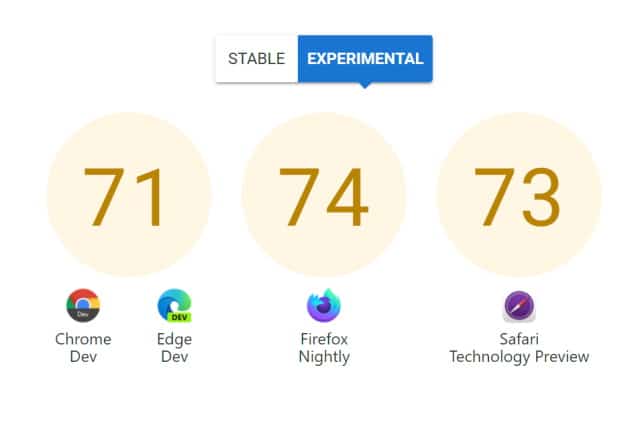
Four of the biggest browser developers have joined forces to participate in the Interop 2022 initiative. Apple, Google, Microsoft and Mozilla are working together to improve interoperability between web platforms, make lives easier for developers, and enhance the experience of internet users.
Interop 2022 is a series of tests, a set of benchmarks that are at heart a way to measure whether individual browsers meet various web standards, working with web developers to discover problems and find solutions. The ultimate aim is to eliminate inconsistencies between browsers, and it gives a reason for companies who are usually competitors to work together on a shared vision.
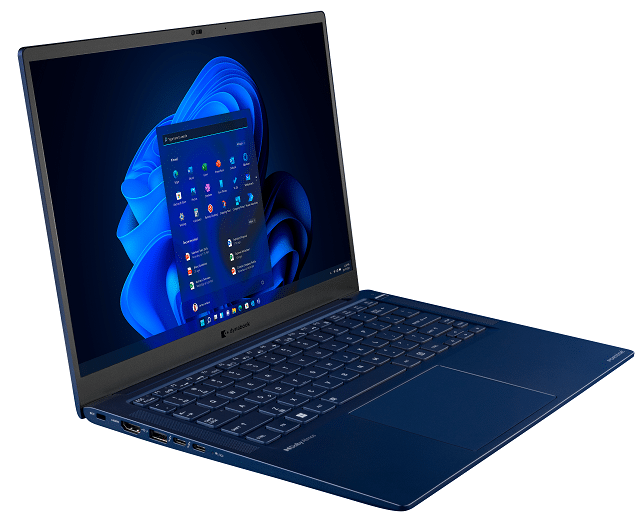
Dynabook Portégé X40L-K is a svelte and powerful 14-inch Windows 11 laptop
Windows laptops aren't particularly fascinating these days -- it can be hard to get excited about them. With that said, Dynabook has a new notebook that should truly get your motor running. Called "Portégé X40L-K," this 14-inch laptop has a dark-blue magnesium chassis, and it is merely 15.9mm thin while weighing just 2.3 pounds.
The Dynabook Portégé X40L-K comes with Windows 11, but Windows 10 remains an option too. It is powered by either a 12th Gen Intel Core or Core vPro processor, and can be configured with up to 32GB of LPDDR5 RAM and up to a 1TB PCIe NVMe SSD for storage. The 14-inch 1920x1200 display should pair quad nicely with the Dolby Atmos-compatible quad-speaker system for enjoying media.
Microsoft's free App Assure program gives software compatibility assistance to Windows 11 upgraders
Microsoft has reminded business and enterprise users about its App Assure program and how it can help with the process of upgrading to Windows 11.
The program has been running for a while, and was expanded to cover Windows 11 back in October to coincide with the release of the latest version of the operating system. Available at no cost, App Assure gives users a chance to work with Microsoft engineers to ensure app compatibility, and to gain assistance in addressing issues.



