
Microsoft wants you to vote for what the next PowerToys utilities should be
The development of PowerToys for Windows 10 has been impressive, with Microsoft continuing to add new utilities all the time. Now the company is looking for feedback from users to help decide just what it should focus on next.
Specifically, the development team says that while it currently has ideas for three new PowerToys, it only has time to work on two of them next year. Rather than making the decision itself, power users are being asked to vote, choosing between a Gif/Video screen recorder, the ability to adjust font rendering, and a tool called "Mouse without borders".
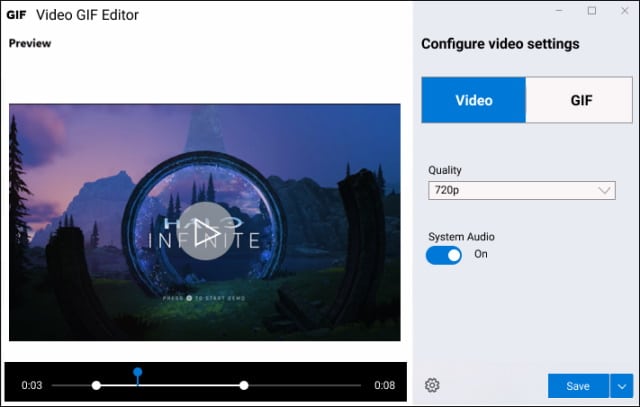
Windows 10 is getting a screen recorder PowerToys utility called Video GIF Capture
Here on BetaNews, some of our most constantly popular posts relate to Windows 10's 'secret' screen recorder that is part of the Game Bar tool. Seemingly aware that people are keen to be able to create video of on-screen activity, Microsoft is now working on a dedicated screening recording app.
Currently known as Video GIF Capture, the tool is being created by the PowerToys developers and it promises to give people the ability to record what is happening on their screen and save it as an animated GIF or video file.
Microsoft releases PowerToys v0.23.0 with promise of new Video Conference utility
It's been around a month since Microsoft last updated PowerToys for Windows 10, so it's nice to be able to report that a new version has finally been pushed out.
PowerToys v0.23.0 is a release that focuses on "stability, localization and quality of life improvements", and there are numerous fixes to the various the utilities that make up the suite. Unfortunately, there are no new tools in this version, but Microsoft has given an update about the upcoming Video Conference utility.
Microsoft releases two new PowerToys builds and adds new 'Video conference global mute' utility
It seems like it has been a little while since Microsoft made any significant changes to PowerToys for Windows 10, but now the company has pushed out a pair of new releases.
For people who want to stick with the more stable releases, there is PowerToys v0.21.1 which is largely about bug fixes and addressing stability issues. For anyone looking for new PowerToys utilities, however, there is the "experimental" version 0.22.0 which features a new 'Video conference global mute' tool.
Microsoft releases PowerToys v0.20.0 with new Color Picker utility and more
As recently promised, Microsoft has released PowerToys v0.20.0. This release sees the arrival of a new utility in the form of Color Picker for grabbing hex and RGB color values from anywhere on screen. There are other changes and fixes too.
There are now eight utilities available in PowerToys, and with this release Microsoft has made numerous improvements to those that were already in the collection. This includes adding SVG icon rendering to File Explorer, as well as improvements to Keyboard Manager.
PowerToys v0.20 is ready to impress with fixes and a new toy
Since the beloved PowerToys was resurrected for Windows 10, Microsoft has been busy pushing out new versions with fixes and new tools -- although it has been a little while since new utilities were added.
With PowerToys v0.20, however, this change. Not only are there the bug fixes and improvements you'd expect in a new version, there is also a new tool to play with: ColorPicker.
Microsoft issues another bug-fixing update for PowerToys for Windows 10
It's only a couple of weeks since Microsoft released PowerToys v0.19.0, and the company has now pushed out its second bug-fixing update to the collection of utilities.
Just last week, v0.19.1 addressed a range of issues with the Windows 10 tool collection, and now v0.19.2 has landed. Among the changes are fixes for PowerToys Run and FancyZone, and it also addresses an issue that caused high CPU usage.
Microsoft pushes out another update to PowerToys for Windows 10
Ah, PowerToys… how much we love thee! After reviving the much-loved utilities for Windows 10, Microsoft has wasted no time in releasing update after update, adding more and more tools and refining this incredible software.
It's only a week since the release of PowerToys v0.19.0, but the development team already has a new version for you to try out.
Microsoft releases PowerToys v0.19.0 with dozens of fixes, stability enhancements and improved installer experience
Microsoft has been making incredible progress with the return of the much-loved PowerToys utilities for Windows 10. Over a series of releases, the company has given tweakers and power users all manner of useful toys to play with.
Now PowerToys v0.19.0 is here, and Microsoft has gone on a bug-fixing rampage, fixing more than 100 issues. This release also sees improvements to the annoying installer.
How to stop PowerToys complaining about other applications running in administrator mode
The Windows 10 version of PowerToys has been available as a preview for a little while now, and Microsoft is gradually adding more and more handy utilities to it.
But something you may have noticed recently is the appearance of an error message when running certain apps or commands as administrator. Run an app with elevated privileges, and you may see a message that reads: "We've detected an application running with administrator privileges. This blocks some functionality in PowerToys". Here's what's going on and how to fix it.
Microsoft releases PowerToys v0.18.0 with new Run launcher and keyboard remapper
It's around a year since Microsoft decided to revive the popular PowerToys utilities for Windows 10, and in the intervening months there have been numerous updates and new tools to play with. With the newly release PowerToys v0.18.0 the company has added a handy keyboard remapping tool.
There's also something that will appeal to anyone who has been looking for a macOS-style Spotlight tool. The new Run launcher serves as a powerful upgrade to Windows + R and provides a flexible way to access apps, files and more.
Microsoft releases PowerToys v.0.17.0 bringing automatic updates and more to the Windows 10 tweaking tool
It is a month since Microsoft released an interesting update to PowerToys, adding new features and tools. This was followed by a less interesting but no-less important bug-fixing update which also added telemetry.
Now the company has released PowerToys v.0.17.0 which adds the much-needed automatic update option. This release also brings important updates to FancyZones and more.
Microsoft releases PowerToys v0.16.1 with numerous bug fixes and added telemetry
It's only a week since Microsoft released PowerToys v0.16.0 which included four new utilities. Now there's another update available which brings a number of bug fixes, but also something of a surprise.
This is a very minor increase in version numbering, so you'd be right not to expect anything too exciting. However, the addition of telemetry to one of the utilities is something users will want to be aware of.
Microsoft releases PowerToys v0.16.0, adding four new tools including Image Resizer and Window Walker
Since Microsoft first announced PowerToys for Windows 10, there was great excitement about the return of the collection of utilities. The company has been drip-feeding us new features over the last few months, and now PowerToys v0.16.0 has landed, bringing with it no fewer than four new tools.
The most interesting new arrivals are the Image Resizer Window Shell extension which provides easy access to image resizing options from the context menu, and Window Walker which is a text-based Alt-Tab alternative.
Microsoft has new utilities planned for the next version of PowerToys
It is mere days since the last pair of updates to PowerToys for Windows 10, but there was really very little to get excited about. PowerToys 0.15 and 0.15.1 weren't much more than bug-fix releases, but version 0.16 is something to look forward to.
While it's not known quite when this version will be released, Microsoft seems eager to make it available as soon as possible. This time around, there are new additions to excite you. A total of four new tools, including the return of the Image Resizer PowerToy.



