
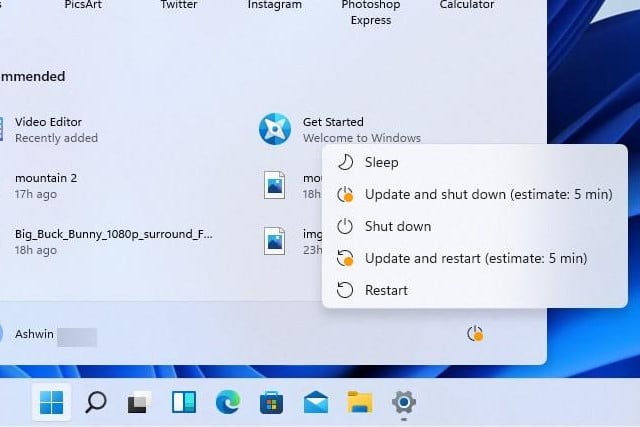
Windows 11 is making important changes to the way system updates work
When Microsoft announced Windows 11, the company made a few references to the process of updating the operating system. Windows Updates will work in much the same way as for Windows 10, but steps have been taken to not only reduce the size of downloads to helps speed things up, but also to ensure they will cause less disruption thanks to background installation.
But this does not mean that you'll never need to restart Windows 11 after downloading an update, but Microsoft has made an important change that will help you to decide whether to restart immediately or save the reboot for later.
Microsoft ramps up the automatic installation of Windows 10 21H1 update
Windows 11 is going to be unveiled tomorrow, but in the meantime, Microsoft has not forgotten about Windows 10. It's now a few months since the company released Windows 10 version 21H1, but it has been a staggered rollout.
Now Microsoft is stepping things up a gear and is starting to push the update to more devices. 21H1 is being rolled out to more users as an automatic update, after a period of machine learning training in which potential issues were identified.
Microsoft offers bug-blasting KB5003690 cumulative update to all supported Windows 10 versions
The attention surrounding Windows right now is very much focused on what Microsoft is going to have to say about Windows 11 later this week. But in the meantime, there are still millions of users running Windows 10 and contending with its various problems.
Now, having tested it with Windows Insiders on the Beta or Release Preview channels, Microsoft is giving the KB5003690 update a wider release. The cumulative update is now available for Windows 10 versions 20040, 20H2 and 21H1, fixing various issues including poor gaming performance, blurry text, and more.
Microsoft releases KB5003690 update to boost game performance and fix blurry text in Windows 10
Windows Insiders are among the first to get fixes for various issues with Windows 10 as Microsoft releases KB5003690 to address, among other things, problems with blurry text.
The KB5003690 update (Windows 10 build 19043.1081) is now available for anyone signed up for the Beta or Release Preview channels running Windows 10 21H1. Other fixes in this significant update include addressing poor game performance after installing KB5000842 or later.
Microsoft has stopped offering Windows 7 drivers via Windows Update
There have been many reasons to move away from the now-ancient Windows 7 for some time, and now there is another one. Microsoft will no longer offer driver updates via Windows Update for this version of the operating system.
The change comes a year and a half after support for Windows 7 came to an end, and also the expiry of the SHA-1 Trusted Root Certificate Authority for Windows 7 SP1, Windows Server 2008, Windows Server 2008 R2 last month. It is a slightly different story for anyone signed up for an Extended Security Update (ESU) program, however.
Future versions of PowerShell can be downloaded via Microsoft Update
Most people are familiar with the idea of using Windows Update to... well... keep Windows up-to-date. But there is also Microsoft Update which is used to keep other Microsoft software updated, and it can now be used to update PowerShell.
The announcement from Microsoft that PowerShell updates will be delivered through Microsoft Update will be welcome by anyone who dislikes the process of checking and updating the software via GitHub.
Microsoft releases KB5003698 update preview to fix blurry text and VPN issues in Windows 10
Ahead of next month's Patch Tuesday, Microsoft has released a preview of the KB5003698 update for Windows 10. The patch takes the operating system up to build 18363.1645, and although it is a non-security update it still addresses numerous issues that users have been experiencing.
Key among the improvements is a fix for the blurry text issue introduced by the KB5001391 update earlier this month. Other changes include addressing a problem with AppLocker, VPN issues, and fixing a problem that caused playback issues with FLAC files after editing metadata.
Microsoft releases out-of-band KB5004327 update for Windows 10 to fix 0x80073D26 and 0x8007139F errors
Microsoft has issued an off-schedule update for Windows 10 that addresses 0x80073D26 and 0x8007139F errors in versions 20H1, 20H2 and 21H1 of the operating system.
The KB5004327 update is aimed at systems that have experienced problems installing or opening Xbox Games Pass Games. Anyone affected by the issue is redirected to the Microsoft Store page for Gaming Services when the errors occur.

KB5003637 update is causing printer problems and breaking the taskbar in Windows 10
This month's Patch Tuesday updates are proving problematic once again. Yesterday we wrote about KB5003637 causing problems for apps accessing event logs, and now it appears that this very same update is causing problems with not only printing, but also the updated taskbar in Windows 10. Affected users complain of broken, vanishing and corrupt icons in the taskbar and notification area.
If all of this sounds a little familiar, it's because it is very much the same problem caused by KB5003214 last month. There's a key difference this time around, however. While KB5003214 was an optional update, KB5003637 is one that is automatically installed.
Microsoft releases preview version of KB5003212 update for Windows 10
Microsoft has released a new update for Windows 10 version 1909, around a week-and-a-half after this edition of the operating system reached end of service.
KB5003212 is a preview version of a cumulative update that's currently available as an optional install ahead of a wider release. Although a non-security patch, this is still a key update that includes a number of important fixes.
Microsoft no longer supports Windows 10 version 1809, but the lovely folk at 0patch do
It's only a week since Microsoft stopped supporting some older versions of Windows 10 -- specifically the Home and Pro editions of Windows 10 versions 1803, 1809 and 1909 -- but it won't be long before the effects are felt.
While Windows 10 version 1809 reaching "end of servicing" means there will be no more official patches and updates from Microsoft, the operating system will not be left completely unsupported. For anyone unwilling or unable to upgrade to a more recent build of Windows 10, micro-patch service 0patch has stepped up to the plate to lend a hand.
Recent KB5003173 update is causing 0x800f0922 errors in Windows 10
Earlier this week, Microsoft released the KB5003173 update for Windows 10. With no known issues, coupled with the fact it is a cumulative update rather than something brand new, we posited that it should be an update free from problems; it seems like we may have spoken too soon.
Growing numbers of people are experiencing failed installations with KB5003173 and are seeing an error 0x800f0922. While yet to be confirmed, it appears that the problem is related to the manual removal of the forcibly installed Chromium-based Microsoft Edge.
Microsoft withdraws AMD driver that causes INACCESSIBLE_BOOT_DEVICE error in Windows 10
Microsoft has pulled an AMD SCSI driver from Windows Update after it was found to cause boot problems for numerous people.
Reports came from many users who experienced boot problems, BSoDs, INACCESSIBLE_BOOT_DEVICE errors "bricked"systems after installing the troublesome driver. The driver -- Advanced Micro Devices, Inc. - SCSIAdapter - 9.3.0.221 -- has now been withdrawn, but anyone who has already updated will need to manually uninstall it.
Microsoft is ramping up efforts to forcibly remove Flash from Windows with KB4577586 update
The software blight and security nightmare that is Flash has all but died. In theory it is dead already, with support for Adobe Flash Player having drawn to an end last year and Microsoft having pushed out an update to carve it out of Windows.
But the company has realized that there are a lot of systems out there that still have the cancerous software installed, and starting next month it will ramp up its effort to kill it off once and for all. This means that more people will be receiving the KB4577586 update.
New Microsoft Graph APIs give greater control over Windows updates
Microsoft has released a public preview of new APIs for Microsoft Graph that give system administrators, developers and professionals fine-grain control over updates for Windows 10.
The new APIs are powered by the Windows Update for Business deployment service and allow for greater management of update deployment in various environments. Control over the installation of Windows 10 updates is something that administrators and regular users alike have long craved, but it is something that has been made all the more important this year following the release of a seemingly endless string of problematic updates.



