
Windows 10 October 2018 Update breaks Microsoft Edge and Windows Store apps for some users
Every time Microsoft rolls out a new Windows 10 feature update we hear of problems being encountered by early adopters, even though the update undergoes serious testing through the Windows Insider program.
The Windows 10 October 2018 Update only became officially available on Tuesday, and already it’s had to be blocked on certain Intel CPUs and, most damningly, it’s been found to be deleting user data (thankfully there’s a way to get the content back). Now it seems the new update is also causing problems with Microsoft Edge for some users.

How to recover personal data lost by upgrading to the Windows 10 October 2018 Update
If you’ve recently updated your copy of Windows 10 to the very latest version -- the October 2018 Update -- you might have found that it wiped your documents, photos and other personal files.
If you’ve got a backup stored safely away, then the loss of your content won’t be so devastating, but if you don’t, it’s not the end of the world -- you might be able to recover the files removed by the upgrade.

Best Windows 10 apps this week
Microsoft released the Windows 10 October 2018 Update on October 2 to the public. The update is not available for all systems yet -- it is blocked for certain Intel CPUs --and it has been reported that it causes data loss on some systems.
As always, if I've missed an app or game that has been released this week that you believe is particularly good, let me know in the comments below or notify me via email.
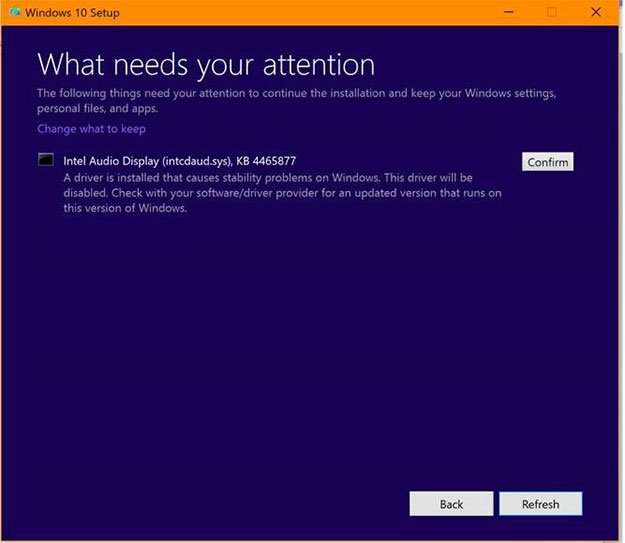
Microsoft blocking the Windows 10 October 2018 Update on some newer Intel CPUs
Windows 10 feature updates rarely roll out without some issues, but the Windows 10 October 2018 Update seems to be having more than its fair share. While some users are complaining the update has deleted their personal files, others are finding the upgrade has been blocked due to an incompatibility with systems running 6th generation (Skylake) or newer Intel processors.
The problem relates to Intel Display Audio device drivers and according to Microsoft, installing the latest feature update can result in "excessive power demand and reduced battery life."

Windows 10 October 2018 Update deleting documents, photos and other user files
Although Windows 10 feature updates undergo a lot of testing via the Windows Insider program, it’s only once a new update gets released that any major unresolved problems come to light.
The Windows 10 October 2018 Update is set to begin rolling out officially next week, but anyone can install it now via Windows Update, and of those who have, a growing number have reported that the upgrade has wiped their personal files.

The new Calculator app in the latest Windows 10 update is HUGE, but you can fix that
Five years ago, I wrote a story about how Windows 8.1's Calculator app summed up what was wrong with Microsoft's new OS. Windows 8.x was designed as a one-size-fits-all operating system, and apps were designed with little thought given to the different screen sizes they'd be viewed on.
The problem was, on a desktop PC with a large screen, the Windows Calculator was massive. Or, as I put it at the time, "bloody huge -- filling my screen with buttons the size of business cards." Fast forward to 2018, and Microsoft is at it again, this time in the Windows 10 October 2018 Update.
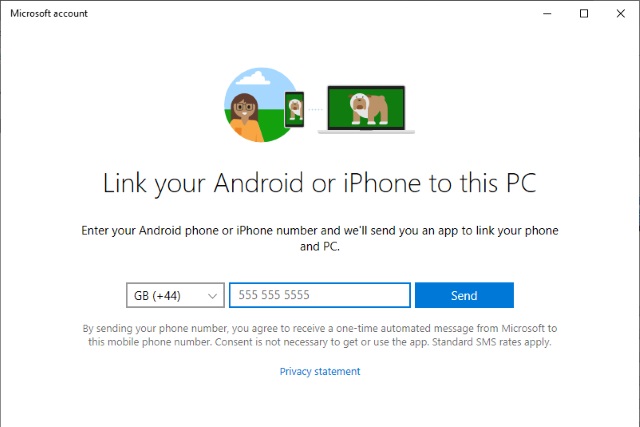
How to access your Android phone from Windows 10 with Microsoft's Your Phone app
Without a mobile operating system of its own, Microsoft is doing more for iOS and Android users than ever before. One example of this is the Your Phone app which makes it possible to view your Android phone's photos on your computer, as well as viewing and sending text messages from the comfort of Windows 10. Microsoft has also promised to enable an exciting-sounding app-mirroring feature.
As long as you have upgraded to the Windows 10 October 2018 Update, you'll have the Your Phone app installed on your computer already. Here we take a look at this handy tool and show you how to get started with it.
Microsoft releases Windows 10 19H1 Build 18252 to the Skip Ahead and Fast rings
Yesterday, Microsoft made the Windows 10 October 2018 Update available to anyone who wants it, meaning there’s currently only one development build on the go.
Because of that, new builds on the 19H1 branch are now being pushed out to insiders on both the Skip Ahead and Fast rings. If you’ve yet to opt out of the Insider program or switch to the Slow ring, and your PC downloads and installs Build 18252, released today, you will need to roll it back and take appropriate action.

Windows 10 October 2018 Update is available from today
Microsoft is hosting a special event in New York City where it is taking the wraps off the next generation of Surface devices.
It’s not just about hardware though, as the tech giant has announced the next big feature update for Windows 10, the October 2018 Update, is now available to download.

NetMarketShare shows Windows 10's share falling, Windows 7 rising
Usage share monitoring service StatCounter saw Windows 10 overtake Windows 7 back in February, and its latest figures put the new operating system on 50.07 percent, well ahead of Windows 7 on 37.2 percent.
Rival monitoring service NetMarketShare disagrees however. While Windows 10 gained significant share in August, at Windows 7’s expense, the latest figures, for September, show a reversal of fortune.
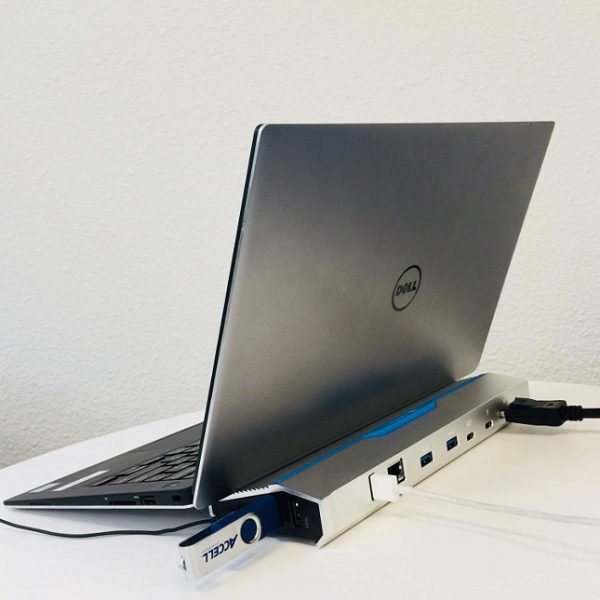
Accell launches Thunderbolt 3 Docking Station for Windows 10 and macOS
For a while, it was hard to find a decent Thunderbolt 3 docking station. Oh, there were plenty of USB-C docks, but believe me, other than sharing a connector type, they are nowhere near as good as TB3 variants. From my experience, USB-C models can be a bit problematic -- especially with macOS.
Nowadays, however, there are many Thunderbolt 3 docks on the market. Today, Accell -- a company known for selling quality products at affordable prices -- launches a TB3 dock that looks quite beautiful and futuristic. Rather than being a simple rectangle, it slopes downward on the front. This is not just for looks -- it is designed to prop up the laptop for better viewing and typing angles.
Best Windows 10 apps this week
The next feature update for Windows 10 is just around the corner. Windows 10 version 1809 may be released as early as October 2, 2018. Microsoft has not yet confirmed the date but most experts believe that the feature update will be released on that day.
As always, if I've missed an app or game that has been released this week that you believe is particularly good, let me know in the comments below or notify me via email.
Microsoft releases Windows 10 19H1 Build 18247 to Skip Ahead Insiders
The Windows 10 October 2018 Update is expected to arrive as early as next week, but for those people who are already looking forward to the following feature update, out next spring, Microsoft has a new build for you.
Build 18247, on the 19H1 branch, isn't the most exciting Skip Ahead build you'll ever encounter, as it doesn't contain any new features.

Windows 10 now has its own exclusive Linux distro -- WLinux
There are a number of Linux distros available for the Windows Subsystem for Linux (WSL), including Ubuntu, openSUSE Leap 42, Debian GNU/Linux, and Kali Linux.
However, these distros tend to lack development tools and contain unnecessary packages, such as systemd. WLinux is a new, open source Linux distribution based on Debian stable that has been specially optimized for WSL.

Best Windows 10 apps this week
Three-hundred-and-one in a series. Welcome to this week's overview of the best apps, games and extensions released for Windows 10 on the Windows Store in the past seven days.
Microsoft revealed the features that are deprecated or removed in Windows 10 version 1809, the October 2018 Update.