

How to force Cortana to use Google instead of Bing in Windows 10
Microsoft is pushing Bing heavily in Windows 10. Bing is the default search engine in Microsoft Edge, and while you can change this to Google (or any other choice), the process of doing so is far from intuitive -- you can’t simply pick "Google" from a list of options.
Cortana, Microsoft’s built-in personal assistant, is powered by Bing too, which means when you ask her a question she doesn’t immediately know the answer to, she’ll open up your default browser and display a list of results sourced from Microsoft’s search engine. There is a way to get her to use Google instead though, but you won’t find this in any Settings.
Windows 10 Build 10525 breaks Chrome; here's how to fix it
Chrome users who rush to install the latest build of Windows 10 have found that their favorite browser is broken. Build 10525 of Windows 10 prevents Chrome from working properly -- launch the browser and you'll be greeted by a series of notifications saying that plugins have crashed.
Additionally, when attempting to visit any website, all that is displayed is an error message that reads "Aw, Snap! Something went wrong while displaying this webpage. Closing the apps and tabs that you don't need may help by making more memory available". The compatibility issue has been reported to Google so a patch will be forthcoming soon, but in the meantime you can use this workaround.

Google Hangouts finally gets a webpage, so I switched from Chrome to Firefox
Google Hangouts is my choice for a communication service, so even though I prefer Firefox, I've been using Chrome lately since it worked better with it. Shockingly, the service did not have a dedicated web page. Yeah, Google touts the open web and web apps for its Chromebooks, but Hangouts was sort of missing from the equation.
Guess what? Today, this changes. Yeah, Google officially launches a Hangouts webpage and it is pretty damn good. It is so good, in fact, that I uninstalled the Chrome browser today and went back to Firefox full time -- I had no good reason to stay on Google's web browser.

Two decades in the making... was Microsoft Edge worth the wait?
Today marks the twentieth anniversary of the launch of Internet Explorer. First making an appearance in the Windows 95 era via the Microsoft Plus! Add-on pack which featured the excitingly-named Internet Jumpstart Kit and version 1.0 of the browser people love to hate and hate to love.
Two full decades later we have slowly but surely worked up to Internet Explorer 11 -- Chrome, for comparison has hit the 40s in less than half the time -- and now IE has been all but retired. With the launch of Windows 10, Microsoft Edge is the new kid on the block. Twenty years is a long gestation period. Was it worth the wait?

Firefox 40 unveils Windows 10-friendly design, tightens download protection
Mozilla has released Firefox 40 FINAL for desktop, with Firefox for Android 40.0 due to follow by the end of the week.
Version 40 provides added protection against potentially malicious downloads on both platforms, while desktop users enjoy a raft of new features, including a new Suggested Tiles feature and add-on management dialog.
Dump Google Chrome to extend your MacBook's battery life
One of the main benefits to owning a MacBook is the superb battery life. Apple's laptops can work for a great deal of time on battery power alone, thanks in no small part to the numerous improvements made to OS X in recent years. Take my 2013 13-inch MacBook Air for example: it gets well over six hours of battery life on Yosemite, despite being nearly two years old at this stage. I rarely have to worry about plugging it in.
In fact, it could last even longer. The trick is not to use Chrome, which, despite Google's recent efforts to lower its power consumption, continues to be the most power-hungry major browser on OS X, more so than Apple's Safari and Mozilla's Firefox.

Cent Browser is a feature-packed Chrome remake
Cent Browser is a free Chromium-based browser for Windows with a solid range of extras and enhancements.
A Firefox-like tab bar enables you to set the minimum width of a tab, then scroll the tab bar using the mouse wheel to find whatever you need.

Opera 31 unveils redesigned Discover service, tweaks sync options
Opera Software has unveiled Opera 31 FINAL, a new stable release of its desktop browser for Windows, Mac and Linux.
After the excitement of three major new features in version 30, Opera 31 is a bit of a damp squib. Only two relatively minor new features make their bow in this latest release: a redesigned Discover feature and improved sync capabilities.
Chrome has a hidden tab discard option that could solve your memory problems
For many people Google Chrome is their browser of choice. It may be popular, but most users would concede that Chrome has something of a memory problem -- it will gobble up resources like they are going out of fashion. To get around this issue, all manner of extensions have sprung up offering tab suspension -- but there's a hidden Tab Discarding option built in that does the same job.
As revealed by Google's François Beaufort, the Chrome development team is working on bringing the feature, which is already used by Chrome OS users, to the Windows, Linux and Mac versions of the browser. The Discarded Tabs feature works by unloading tabs from memory when resources are running low, and reloading them if and when they are next clicked. If you install the latest nightly builds, this is already available to you -- here’s how to use it.
Should we all be as pissed as Mozilla about Edge taking over in Windows 10?
Microsoft is no stranger to controversy when it comes to web browsers. Internet Explorer has been the butt of jokes for many years, and the company also found itself in trouble in Europe as part of an antitrust case. With the release of Windows 10, history could be about to repeat itself.
Mozilla CEO Chris Beard penned a letter to Microsoft the other day expressing his disappointment that people upgrading to Windows 10 have their default browser choice overridden and changed to Microsoft Edge. While some may feel that Mozilla is whining, it could be argued that the company is right to be pissed -- and Windows 10 users should be just as pissed at the liberties Microsoft is taking.

ScreenOut is an always-on-top Chrome video viewer
You’re browsing with Chrome, and have found a great video. Ideally you’d watch it all, uninterrupted, but there’s other work to do, and so you have to resize all your various windows to fit.
ScreenOut is a Chrome extension which gives you another option. Click an address bar button and the video opens in a floating, always-on-top pane. Then you can switch to some other application while still watching the clip.
Microsoft Edge introduces new security risks in Windows 10
The Internet Explorer replacement Microsoft Edge is one of the headline features of Windows 10. With security at the heart of Microsoft's latest operating system, and the general concern about online safety, it makes sense to put the web browser under the microscope to see how it fares against the competition.
This is exactly what security analysts at Trend Labs have done. While the team concedes that Microsoft Edge beats Firefox's security and roughly draws level with Chrome's, the new web browser also introduces new security problems and threat vectors.

Facebook dominates social website logins [Infographic]
Customer identity management firm Gigya has released its Q2 "landscape of customer identity" figures, showing how consumers are using third party identity providers such as Facebook and Google+ to log into other websites.
Facebook continued its dominance, now controlling two-thirds of all social logins, followed by Google+ (20 percent), Twitter (six percent) and Yahoo (four percent).
How to make Firefox or Chrome the default browser in Windows 10
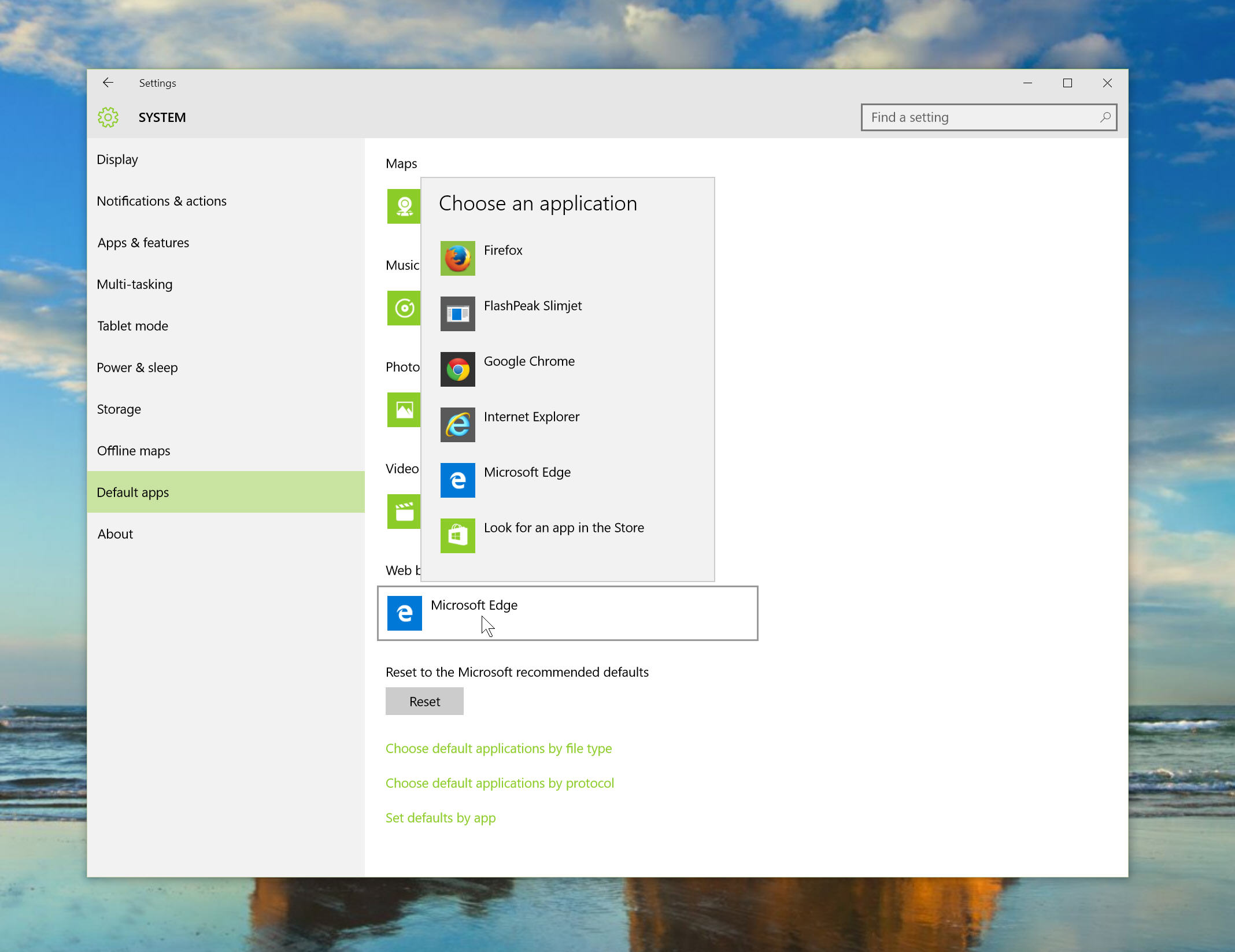
Obviously Microsoft’s Edge browser is the new default choice in Windows 10, and it’s definitely worth giving it a try. I’ve found it to be speedy and surprisingly good. Persevere long enough and you might grow to like it as I have.
That said, if you prefer to use Chrome or Firefox, with all the add-ons and customizations in place, I really couldn’t blame you. Edge isn’t (yet) as flexible, and if you already use Google or Mozilla’s browser for syncing content between devices, then it makes sense to use the same browser in Windows 10. Here’s how to setup a rival browser as the default option.

Dmail brings self-destructing emails to Gmail
Following the release of the Undo Send option last month, Gmail users can now also delete sent emails.
Through a new Chrome extension called Dmail, users will be able to use a self-destruct option, which deletes sent mails after a stipulated period of time.



