

Microsoft releases Skype for Desktop 8 Preview
We still use Skype. It’s still a decent tool to be able to converse with a wide range of colleagues spread across the world and, frankly, most people we need to communicate with are on Skype (or have access to a Skype account, at least).
Recent changes to the mobile version caused more than a few eyebrows to be raised. Luckily we don’t use the mobile edition, so when Microsoft announced changes to the desktop edition, this had us worried. Windows 10 users will receive the update automatically, as it’s built into your operating system, but Windows 8/7 and Mac OS X users can download a v8 preview right now.

Host a virtual meeting or webinar using CyberLink U
With an ever-rising number employees wanting to work from home or going freelance, how do you bring these team members together? There are plenty of messenger tools aimed at business owners, including those from heavyweights such as Facebook and Microsoft.
Problem is, adopt one of these tools and you might find that they change direction and are aimed towards flirting teenagers rather than business users.

EaseUS Partition Master 12.5 Free should be your choice of disk management tool
Buy a new computer and you’ll often find it ships with one big partition, which can be inconvenient. We usually allocate space on a drive to our music collection, documents and other important files. By partitioning one large hard drive in to separate drives, it makes it easy to manage, backup and migrate content.
You can perform basic partitioning tasks within Windows, such as creating, resizing or assigning a new drive label. However, we’d always recommend a complete partitioning toolkit and there’s few better than EaseUS Partition Master 12.5 Free.

Opera 47 (finally) adds bookmarks export, smoother video playback
Opera Software has unveiled Opera 47.0 for Windows, Mac and Linux. It’s a fast turnaround from Opera 46, taking less than the usual six-week development cycle to go from alpha to final release.
As a result, the new release is light on major features, but does boast a number of improvements, including smoother video and exportable bookmarks. It also updates the underlying Chromium engine to version 60.

Paragon Software releases Hard Disk Manager 16 Preview for free
We used to be a huge Paragon Software supporter, met the company a few times in London to discuss strategies, but in the past couple of years it has almost completely disappeared under the radar, despite having a fantastic range of products across its portfolio. Whilst Acronis and our friends at O&O Software have powered forward, Paragon appears to have taken a step back.
Whether this is because it is focusing on its core market, Germany, or it moved in to the corporate market, it’s unclear. Either way, we’d still recommend its products and and wrote about the updated Paragon Backup & Recovery 16 Free the other week.

New solution helps secure privileged accounts
Privileged accounts allow access to all aspects of a company's IT infrastructure, so if they fall into the wrong hands the consequences can be disastrous.
A new hardware appliance solution from identity management specialist One Identity aims to make it easy for businesses to deploy, operate and maintain their privileged password systems.

Firefox 55 unveils performance improvements and new features aplenty
Mozilla has unveiled one of the biggest updates to Firefox yet with its release of Firefox 55.0 for Windows, Mac and Linux. Firefox for Android 55.0 is also due imminently.
Firefox 55’s many highlights include instant restoration of browsing sessions with a large number of tabs, the ability to reposition the sidebar and a feature for grabbing screenshots of web pages direct from the browser itself.

Recover from ransomware with Paragon’s Backup & Recovery 16 Free
How often do you hear "it won’t happen to me", which is the primary reason many of us do not bother to backup our data. Sure, like us you can store some of your most important files in the cloud, but that has storage limitations and none of us wants to spend time trying to salvage our computer when we’re pressed for time.
The rise of ransomware means your computer is vulnerable, even if you have the latest security software. Once your files are encrypted, short of paying the ransom, there’s little else you can do.

1Password updates Windows edition with One-Time Password clipboard support
A password manager should be an essential tool. Unless you’re prepared to use the same password across many sites (which is a huge security hazard) or have a memory like Einstein, trying to remember all your passwords is nearly impossible.
One solution would be to write your passwords on paper, which you keep at home. We know people that do this and there’s nothing wrong with a hard copy, provided it's kept super-safe. Problem is, if you need to access a website when you holiday or on the road, you don’t have your passwords to hand.

LibreOffice 5.4 adds more new features, improves Office file format compatibility
The Document Foundation has unveiled LibreOffice 5.4 64-bit and LibreOffice 5.4 32-bit. Again, it’s on time, arriving six months after the release of LibreOffice 5.3.
LibreOffice 5.4 is "the last major release of the LibreOffice 5.x family", and like other point releases is a major one, adding features across all components and incrementally improving compatibility with Microsoft Office document formats.

How to enable portable mode in Paint.NET
In recent days, there has been a great deal of interest in the supposed loss of Paint, followed by the bizarre, inexplicable delight people felt when it transpired the app will live on in the Windows Store. The (subjectively) brilliant Paint.NET was originally built as a successor to Paint, and the developer recently said that it too will be coming to the Windows Store.
He also made reference to a portable mode that would be coming to Paint.NET, and this caused ripples of excitement through the app's userbase. Well, Paint.NET 4.0.17 is out, and portability is an option -- you just need to do a little work. So, here's how to enable portable mode in Paint.NET.
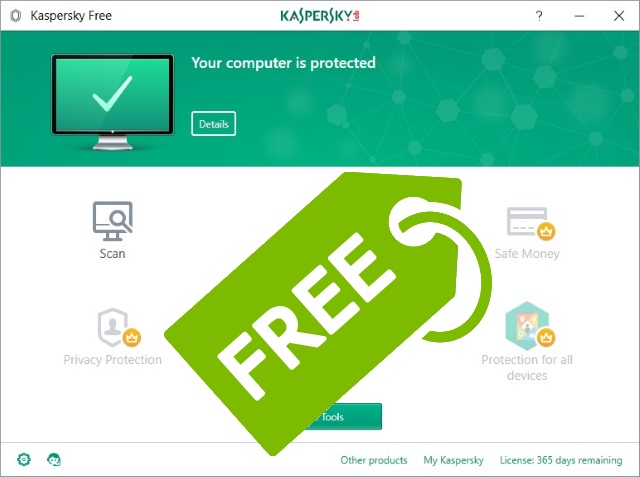
Kaspersky launches free antivirus tool -- Kaspersky Free!
Kaspersky has been in the news quite a lot recently, primarily because of US concerns over links to the Russian government. The security company also hit the headlines when it filed an antitrust case against Microsoft because Windows 10 disabled Kaspersky antivirus software.
But now there's a new reason to be in the news -- and this time it's a good one. The Russian company is launching Kaspersky Free, a free antivirus tool available globally. Company founder Eugene Kaspersky announced that the US, Canada and numerous Asia Pacific countries have access to the software immediately, and the global rollout will continue over the coming months (although it already seems to be downloadable in the UK).

It's the end of the line For Windows Paint as Microsoft finally kills off its simple art tool
Among the list of features set to be removed or deprecated in Windows 10 Fall Creators Update is Microsoft Paint, a fixture of Windows since the operating system’s first release back in 1985.
Microsoft doesn’t give any explanation as to why it’s being removed. Indeed, in the list of features being dropped it simply says "Microsoft Paint." Everything else in the list, including Outlook Express, has at least a one-line explanation. What a sad, inglorious ending.

Avast now owns CCleaner after acquiring Piriform
If you have been visiting BetaNews for a while, you surely have discovered some wonderful Windows freeware from the great FileForum. Over the years, I have downloaded countless pieces of quality software there, including Avast Antivirus and Piriform CCleaner -- two essential programs.
Today, those two programs are joined together in a financial matrimony. You see, Avast announces that it has acquired Piriform. Not only does the acquired company make CCleaner, but many other solid programs too. In fact, the rest of Piriform's library -- Recuva, Speccy, and Defraggler -- are staples of the Windows freeware community.

Malwarebytes AdwCleaner 7.0 heralds complete rewrite of adware removal tool
Malwarebytes has released AdwCleaner 7.0, a major new version of its portable Windows tool for removing adware, unwanted toolbars, PUPs and browser hijackers. It’s the first major update since Malwarebytes acquired AdwCleaner back in October 2016.
AdwCleaner 7.0 arrives as a completely rewritten piece of software, complete with brand new user interface, database system and the promise of more effective removal and faster scan times.



