


Best Windows apps this week


Five-hundred-and-seventy-nine in a series. Welcome to this week's overview of the best apps, games and extensions released for Windows 10 and 11 on the Microsoft Store and elsewhere in the past seven days.
Windows 12 might not be released this year. The latest rumors suggest that Microsoft will release the feature update Windows 11 version 24H2 instead. This update will be a larger update with a focus on AI.
HP CEO explains why the company is bricking third-party ink printers
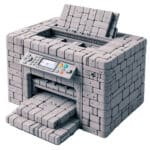
Printer owners have several options when it comes to supplying their printers with ink. The two main choices are to buy first-party or third-party printer ink. The former is official, the latter less expensive. Both options work well, provided that manufacturers do not manipulate printers to block support for third-party ink cartridges.
Printer manufacturers like HP have a vested interest that customers purchase first-party printer ink or, even better, subscribe to printing plans. HP CEO Enrique Lores confirmed to CNBC Television that HP loses money with each printer sold and that the company makes money with printer ink sales and subscriptions.
Best Windows apps this week
Five-hundred-and-seventy-eight in a series. Welcome to this week's overview of the best apps, games and extensions released for Windows 10 and 11 on the Microsoft Store and elsewhere in the past seven days.
Windows 10 is still the leading version of Windows when you compare usage. Microsoft published a video this week that it says helps users switch to Windows 11. It is doubtful that it is going to convince Windows 10 users to make the move, as it is relatively short and without meaningful arguments.
Best Windows apps this week
Five-hundred-and-seventy-seven in a series. Welcome to this week's overview of the best apps, games and extensions released for Windows 10 and 11 on the Microsoft Store and elsewhere in the past seven days.
Microsoft plans to remove the WordPad application from future versions of its Windows 11 operating system. While WordPad is going away, Microsoft is working on adding AI to the plain text editor Notepad.
Best Windows apps this week

Five-hundred-and-seventy-six in a series. Welcome to this week's overview of the best apps, games and extensions released for Windows 10 and 11 on the Microsoft Store and elsewhere in the past seven days.
Future Windows PC keyboards may have a dedicated Copilot key. First keyboards with a key will become available in late February. A tap on the key launches Copilot. It is unclear if additional shortcuts will be supported.
Best Windows apps this week
Five-hundred-and-seventy-five in a series. Welcome to this week's overview of the best apps, games and extensions released for Windows 10 and 11 on the Microsoft Store and elsewhere in the past seven days.
The next, and maybe final Moment update for Windows 11 could land in February. It may introduce the long-awaited options to remove Edge, Bing Search and other components in the European Economic Area.
Best Windows apps this week
Five-hundred-and-seventy-four in a series. Welcome to this week's overview of the best apps, games and extensions released for Windows 10 and 11 on the Microsoft Store and elsewhere in the past seven days.
Microsoft released a troubleshooting tool to fix a printing issue that identified non-HP printers as HP printers. The tool corrects the issue when run.
Best Windows apps this week

Five-hundred-and-seventy-three in a series. Welcome to this week's overview of the best apps, games and extensions released for Windows 10 and 11 on the Microsoft Store and elsewhere in the past seven days.
Windows Copilot is now also available for Windows 10. Microsoft released cumulative update KB5033372 this week that introduces the AI-powered tool on Windows 10 systems.
Best Windows apps this week
Five-hundred-and-seventy-two in a series. Welcome to this week's overview of the best apps, games and extensions released for Windows 10 and 11 on the Microsoft Store and elsewhere in the past seven days.
Windows 10's official support will run out in October 2025. Microsoft confirmed that customers will be able to extend support beyond that month for a price.
Best Windows apps this week
Five-hundred-and-seventy-one in a series. Welcome to this week's overview of the best apps, games and extensions released for Windows 10 and 11 on the Microsoft Store and elsewhere in the past seven days.
Microsoft is testing new features all the time. Windows 11 users may soon get more out of their device's battery thanks to the new Energy Saver tool that is currently in development. Another change moves the Copilot button from its center position on the taskbar to the very right of it.
Best Windows apps this week
Five-hundred-and-seventy in a series. Welcome to this week's overview of the best apps, games and extensions released for Windows 10 and 11 on the Microsoft Store and elsewhere in the past seven days.
After what felt like ages, Microsoft's Media Creation Toolkit for Windows 11 is finally offering version 23H2 to users. Microsoft began the rollout of the feature update three weeks ago, but only via Windows Update and as direct downloads.
Best Windows apps this week
Five-hundred-and-sixty-nine in a series. Welcome to this week's overview of the best apps, games and extensions released for Windows 10 and 11 on the Microsoft Store and elsewhere in the past seven days.
Microsoft confirmed that Windows Copilot is coming to Windows 10. The AI promises combines Bing Chat functionality with Windows-specific functions.
Best Windows apps this week
Five-hundred-and-sixty-eight in a series. Welcome to this week's overview of the best apps, games and extensions released for Windows 10 and 11 on the Microsoft Store and elsewhere in the past seven days.
Microsoft announced plans to retire the Tips app on Windows. Three Windows services will also be removed because of security concerns.
Best Windows apps this week
Five-hundred-and-sixty-seven in a series. Welcome to this week's overview of the best apps, games and extensions released for Windows 10 and 11 on the Microsoft Store and elsewhere in the past seven days.
The Windows 11 2023 Update is now available. You can install it via Windows Update or download ISO images, if you prefer those.
Best Windows apps this week
Five-hundred-and-sixty-six in a series. Welcome to this week's overview of the best apps, games and extensions released for Windows 10 and 11 on the Microsoft Store and elsewhere in the past seven days.
It is still unclear when Windows 11 version 23H2, the next Windows 11 feature update, will be released. Eagle-eyed users have now spotted Windows 11 23H2 ISOs on Microsoft servers.
Martin's Bio
Martin one day in October 2005 decided that he wanted to do something that he loved. He quit is day job, created the Ghacks Technology News blog and started to blog about operating systems, the Internet, web browsers, and everything else that geeks love and can't get enough of.
© 1998-2024 BetaNews, Inc. All Rights Reserved. Privacy Policy - Cookie Policy.